Forum Discussion

 New Contributor
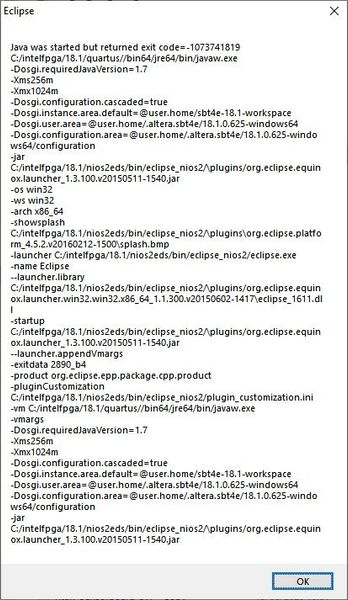
Nios II Software Build Tools for Eclipse (Quartus Prime 18.1) frequently crashing

 Contributor
Hello Mviss,
My apologize for this inconvenient tool crash. This is not common thing and few customer reported about this crash. there is no straightforward way to detect the root cause.
However, we do have some recommendations to our customers to try it out, and mostly one of those suggestions would help them:
- Change the workspace location.
- Create a new NIOS II aplciation.
- Clear the JAVA cache on your machine, simply go to control panel > Java > General > Temporary Internet files > Settings > Delete files.
- Un-install JAVA and re-install it.
- If all these things didnt work, then you might need a fresh installation of eclipse.
Also, is this crash come from any NIOS II application? or specific application?
Best regards,
Isaac Vazquez.
 TheRealNeil4 years ago
I want to add that I see this or similar error every time I debug with NIOS II Software Build tools for Eclipse.
I've generally found that the issues lies within attempting to disconnect from the target hardware. If a clean disconnect is not made (which happens often as the debugger can't make a clean break ~25% of the time) I have to perform the below steps.
When this happens I need to
- Close Eclipse
- Power off target hardware
- Unplug JTAG cable
- jtagserver.exe --stop
- jtagserver.exe --start
- Open task manager, close all instances of eclipse
- In task manager, close EXTRA instances of jtagserver.exe / nios2-gdb-server.exe (multiple will usually be spawned from failed debug attempts)
After this things will generally come back to a working state but not always.
Note that if I don't force close these applications from the task manager, my CPU and memory usage quickly go up to 100% each.
I have to go through these steps 10-15 times per day on a good day. At times I will spend 10-15 minutes attempting to get the debug environment back up and running.
If there is any information or follow up to this at all I would love to hear it. As it currently stands this is a very difficult tool to use, and especially unfortunate that it happens so often in debugging when things are already difficult.
 MViss46 years ago
Hi Isaac,
The issues has been persistent for years now on our department with more developers experiencing this issue.It appears with:- Quartus 10.1sp1/11.0sp1/12.1/17.1/ 18.1/19.3/19.4.
- Windows 7, Windows 10
- USB-Blaster Rev C., USB-Blaster II and Ethernet Blaster II.
- NIOS II/e or NIOS II/f
It is common knowledge on our department and what we think that it might be vague related to using too many 'printf' calls with the jtag_uart_0. It is very annoying and only occurs during debug phase with Eclipse.
I/we have worked on many PC's and different workspaces, different projects(thus different NIOS II applications but always the same crashing eclipse during debugging.
I got a bit tired/frustrated of this and thought why not ask on the forum.I don't think your suggestions help since I have just a fresh Win10 installation for 2 months and on my old Win7 machine the same problem occurs. Do the developers of the NIOS II SBT ever try to debug under windows with using 'printf' calls? I can't imagine that they never seen this problem.

