Forum Discussion

ZikunTan New Contributor
7 years agoNew ContributorHow to resolve the error 'modelsim (vsim) is not on the path'?
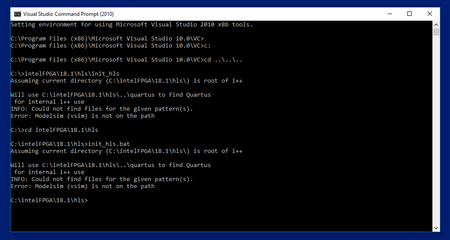
Hi! I am initializing Intel HLS compiler according to the instruction. I have downloaded Quartus, Visual Studio and Modelsim. What I typed 'C:\intelFPGA\18.1\hls\init_hls' in command prompt and pre...

Abe Frequent Contributor
7 years agoFrequent ContributorClick the Start button and type Control, in the list of search items , select Control Panel and then System and Security. Then select View amount of RAM and Processor Speed under System . Next click the Advanced System Settings option in the left pane.
In the window that opens, click the Environment Variables option and select the Path option to highlight it. Now, click the Edit... button.
In the window that opens up, make sure to enter the Quartus and ModelSim installation path as shown in the screenshot. Then click Ok to close the windows, and then finally open the Command Prompt and try again.


