Forum Discussion

 Honored Contributor
Debugging problem with USB-Blaster
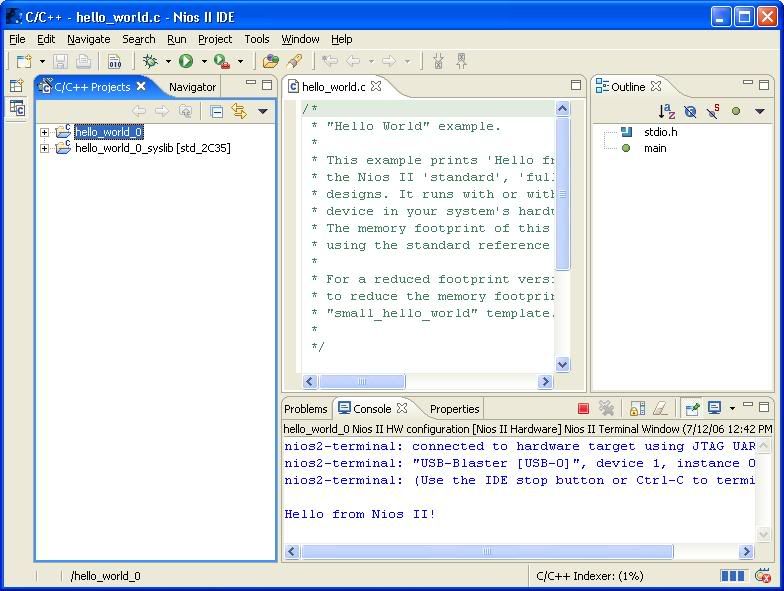
I am having a problem while trying to debug Nios applications using a USB-Blaster. On my own laptop everything works fine. I have bought a new laptop for another engineer that I recently recruited to join the team. On that laptop we can execute Nios applications by pressing the "Run" button in the Nios IDE. This builds the project, downloads it through the USB-Blaster, executes it and displays the result in the console window. Here is a screenshot of the Hello World sample running on the standard design example on a 2C35 dev board:
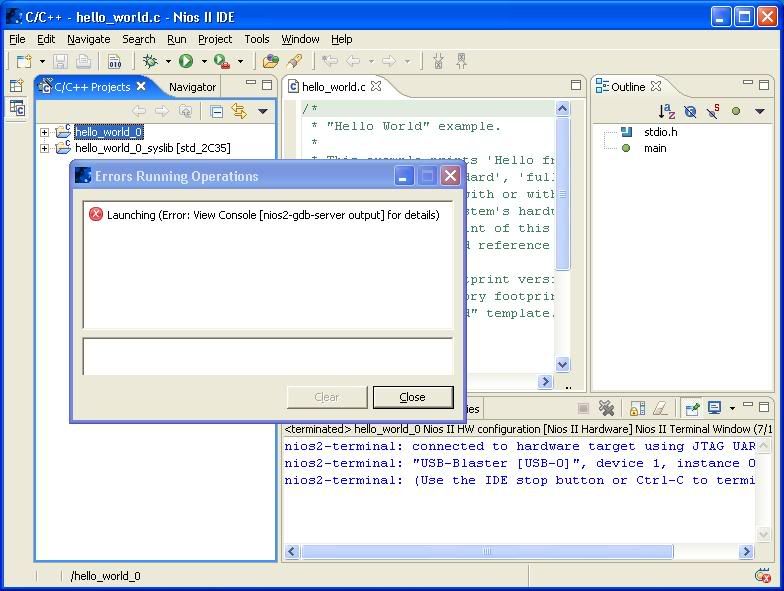
http://i84.photobucket.com/albums/k19/snaddenm/JTAG_run.jpg running application through jtag (http://i84.photobucket.com/albums/k19/snaddenm/jtag_run.jpg) If we press the "Debug" button instead then the IDE times out with a message that says "Launching (Error: View Console [nios2-gdb-server output] for details)", as show in this screenshot: http://i84.photobucket.com/albums/k19/snaddenm/JTAG_debug.jpg debugging through jtag (http://i84.photobucket.com/albums/k19/snaddenm/jtag_debug.jpg) If I try the same thing on my own laptop using the same board, USB-Blaster and design files then everything works perfectly. It also works perfectly on a third laptop borrowed from another engineer. The problem is the same using Quartus 5.1SP1 or 6.0SP1. Any idea what the problem could be? The USB-Blaster must be very nearly working as we can download the sof to the FPGA and download and execute Nios code, we just can't use the debugger. The new laptop is significantly faster than the other two systems, could that be the problem? Is there a setting somewhere in the IDE to slow down the JTAG clock for debugging? If we can't solve this problem then I'll need to fire the new engineer that I just hired so please help if you can (For the good of the Nios community).... only joking! Mike8 Replies
 Altera_Forum
This is a much less important problem than the USB-Blaster, but does anyone know why the IMG tags in my last post failed to make the screenshots appear in-line with my text?
Mike- Altera_Forum
the usb blaster is realy a problem with our target designs with cycloneII too
the only working solutions that fixed our problem with all usb blasters we have was to remove the yellow foil cable and replace it with a normal but short ribbon cable just long enough to fit into a pcb socket. i have modified 4 usdb blaster can could get all of them working. with the original yellow cable none of them was able to comunicate correctly. hope alter reads this. try it out and make a ribbon cable of about 5 to 6 cm lenth Regards Michael Schmitt - Altera_Forum
Thanks for that suggestion Michael. We have two USB Blasters (Both Rev http://forum.niosforum.com/work2/style_emoticons/<#EMO_DIR#>/cool.gif so I can afford to take a small risk with one of them. I'll try this and let you know the result.
Mike - Altera_Forum
We also had tremendous problems with USB-Blaster and our CycloneII/StratixII
designs. Signal integrity from the USB-Blaster( Rev.B, tried a couple of 'em) was p*ss poor. We ultimately added a 74HC14 as buffer for the signals coming from the Blaster and now it works flawlessly with a total of about 30cm JTAG cabling. Getting rid of the ALTERA flex-print like cable might also do the trick. However all the Blasters worked with the ALTERA 2C35 Demoboard. Cheers, Roger - Altera_Forum
Our USB-Blasters are all Rev-B too ...
Regards. Michael Schmitt - Altera_Forum
I received a loan of a ByteBlaster from my friendly local Altera FEA today. The ByteBlaster gives the same symptoms as the USB Blaster: it works well on the older, slower laptop; but on the new laptop it can't debug applications, although it can download and run them.
This observation might imply that the problem is not in the USB Blaster but is something to do with the Quartus or Nios set-up on the new laptop. I am gathering the parts together to try the suggestion of shortening the USB Blaster cable. The ByteBlaster has a really long ribbon cable. Mike - Altera_Forum
I tried a USB Blaster with a short ribbon cable but sadly it didn't fix the problem http://forum.niosforum.com/work2/style_emoticons/<#EMO_DIR#>/sad.gif
The next thing I tried was to use the Insight debugger rather than the Nios IDE. I started two Nios shell windows. In one of them I typed "nios2-gdb-server –-tcpport=2343 &" and in the other I typed "nios2-elf-insight hello_world_0". When Insight opened I opened its terminal window and then typed "target remote :2343". At this point Insight crashed and vanished from my screen. The shell window where I started the gdb server said that it had accepted a connection but on the next line it said "Connection from GDB closed". Could there be a problem with the GDB server or tools on this system? Mike - Altera_Forum
I have solved this problem. The solution is weird but I think you should know what it is for future reference. The new laptop is a Dell D620, it comes installed with some software called "Embassy Trust Suite". This is security software which drives the smart card interface on the laptop. I removed that software after reading this web page:
www.daemon-tools.cc/dtcc/showthread.php?t=11764 (http://www.daemon-tools.cc/dtcc/showthread.php?t=11764) and then the Nios debugger started working! Mike