Forum Discussion

 New Contributor
Customize DSPBuilder-generated custom component in Qsys/Platform designer
 5 years ago
Dear all,
I found a workaround for my problem on my own, thanks to your tips.
The workaround procedure I developed for configuring DSP Builder-generated custom components to ensure their data signal ports are compatible with connecting to data signal ports on HDL Coder-generated custom components in Platform Designer/Qsys is as follows:
1. Generate _hw.tcl representing contents of DSPBuilder IP core using MATLAB play button.
2. Edit _hw.tcl using any text editor, set EDITABLE property to "true" near top of file
3. Import _hw.tcl into Platform Designer by adding folder containing _hw.tcl and .vhd files to IP catalog search path via Platform Designer top toolbar Tools >> Options.
4. Select DSP Builder IP core (aka custom component), select Edit...
5. Go to Signals & Interfaces tab...- Add one new conduit for each data signal.
- Drag one data signal to each conduit.
- Set clocks and resets for each conduit.
- rename each conduit from [conduit_end1, conduit_end2, ...] to [In1, In2, ... Out1, Out2...] (corresponding to data signal name).
- For each signal, recast "signal type" from [data_In1, data_In2...] all to just "pin".
- Delete original "exp" conduit.
6. Finish, save + overwrite edits, now "port edits" appear at the end of _hw.tcl file.
7. Copy "port edits" at end of _hw.tcl file.
8. Regenerate _hw.tcl file for DSPBuilder IP core using MATLAB play button.
9. Edit _hw.tcl using text editor, add "port edits" to end of _hw.tcl file, replacing "exp" conduit interface declaration.
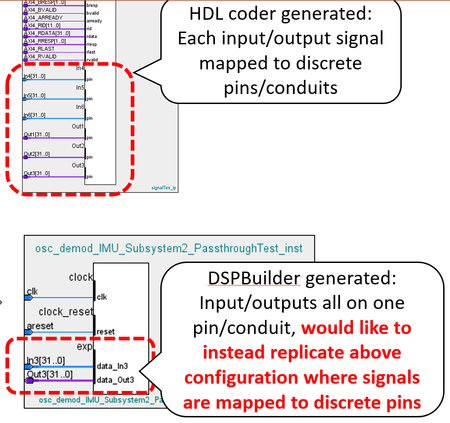
10. Refresh Platform Designer using F5, add IP core to project. Now data signal conduits are properly configured for connecting to data signal conduits on MATLAB HDL Coder generated blocks, shown below.Thank you to @sstrell for pointing out the easy/repeatable/bug-free way to edit conduit/data signal assignments from the Qsys component editor.
I borrowed this method to generate the _hw.tcl code necessary to define my custom port configuration.
Unfortunately in doing so, the rest of the _hw.tcl file was "wiped clean", but it is easy to regenerate in MATLAB.
I took the port configuration code generated from the component editor, and added it to my re-generated _hw.tcl file, and after refreshing Qsys, the ports on my DSPBA custom component are configured correctly.
Although slightly roundabout, this consistent UI-based procedure seems to work every time. Also, the port configuration _hw.tcl code generated from the component editor is re-usable as long as the DSPBA in/out data signals remain unchanged.

 Super Contributor
Hi Gheorghe,
By default, all Intel FPGA IP is locked where Intel not want user to modify the hw.tcl files.
The reason is those exp buses are design as a conduit. simply modify the hw.tcl to other type of signal will not work.
There are two ways you can work on this.
1) to make it to AVST, or any other interface. You will need to recreate a custom component to wrap around it. and the interface you need to redesign as well as the it's original are just conduit.
it's easy to implement... Just put your data on the data bits, assert 'valid' when the data from the A/D is there, and wait until 'ready' is asserted. When it is, de-assert 'valid' and prepare the next data word.
You can refer to the spec for it here: https://www.intel.com/content/dam/www/programmable/us/en/pdfs/literature/manual/mnl_avalon_spec.pdf page 40
Also, you need to Add Component Instances in your hw.tcl files in order to call out the demo_nco_subsystem IP.
you can refer to https://www.intel.cn/content/www/cn/zh/programmable/documentation/zcn1513987282935.html?
Look for session 2.9. Add Component Instances to a Static or Generated Component
You can look for the demo_nco_subsystem hw.tcl files, by right click in it in the IP catalog -> details -> location
2) second way would be much simpler, just design create custom component for convertor from BUS to avalon ST. You are going to do it same way in number 1 anyway.
You can refer to https://www.youtube.com/watch?v=v6rhbVABlo8
For visibility of the signal, you can just click on Tools -> hierachy.
Thanks,
Best regards,
Kenny
- Ghe0rghe5 years ago
Dear @KennyTan_Altera,
Thank you for the suggestions.
1. My goal is to output my DSP Builder data signals on "vanilla" conduits that do not conform to Avalon ST format (i.e. do not have valid/channel signals), to simplify high-level development for my team.
I believe mapping data signals to "vanilla" conduits is possible because we used MATLAB HDL coder to generate and import a custom component in Platform Designer with its data signals mapped to non-AvalonST conduits, and we verified that they work with a passthrough/self-connect test, as shown in the first screenshot below. These "vanilla" non-AvalonST conduits are shown in detail in the second screenshot below.
2. After reviewing the DSPBuilder-generated _hw.tcl file, I was able to find the line of code that was preventing me from editing the DSPBuilder-generated custom component in Platform Designer, shown below.
After setting this "EDITABLE" module property to "true" in the DSPBuilder-generated _hw.tcl file, I imported this DSPBuilder-generated IP core as a custom component in Platform Designer by adding the the DSPBuilder-output folder containing the generated _hw.tcl file and its .vhd source files to the Platform Designer search path, as shown below.
I tried editing this DSPBuilder-generated custom component, and was able to edit the conduit signals by dragging and dropping them into new conduit interface connection points, as Intel Forum user @sstrell suggested earlier in this thread, shown in the below screenshots.
Before editing:
After editing:
With these edits, I can add the custom component into my Platform Designer project, and connect it to my HDL coder-generated custom component with no errors or warnings, as shown below.
However this project fails to compile, because it seems like the .vhd synthesis files for the DSPBuilder-generated custom component are not being imported correctly.
Just after importing the DSPBuilder-generated custom component by including its output files folder containing _hw.tcl and .vhd files, and before making any port edits, there are no synthesis files displayed in the component editor, shown below, even though they are referenced in the _hw.tcl file, also shown below.
After applying my port edits and overwriting this DSPBuilder-generated custom component, it seems like the .vhd synthesis file references originally shown in the _hw.tcl are wiped clean, where the below screenshot shows the new _hw.tcl file for the DSPBuilder-generated custom component after applying and saving my port edits.
How can I ensure that the .vhd synthesis files originally referenced in the DSPBuilder-generated _hw.tcl file are still automatically referenced after importing into Platform Designer?
Do you see anything wrong with the way that I am importing this DSPBuilder-generated _hw.tcl file as a custom component in Platform Designer?
If these files will not get added automatically, how can I manually add them?
It seems like I would also have to add .vhd file references for "dspba_library_package.vhd" and "dspba_library.vhd", is this true?
I would prefer to find a solution where things are done "automatically" as much as possible, to simplify things and ensure seamless high level development for the rest of my team, to whom I will hand-off this workflow.
Best,
- Gheorghe Schreiber


