Forum Discussion
Hi
I created the example design from Agilex DDR4 EMIF IP GUI and see the Maximum pending read transaction parameter is set to 64 as attaching. I am not sure where this changes comes from.
- SCLAY4 years ago
New Contributor
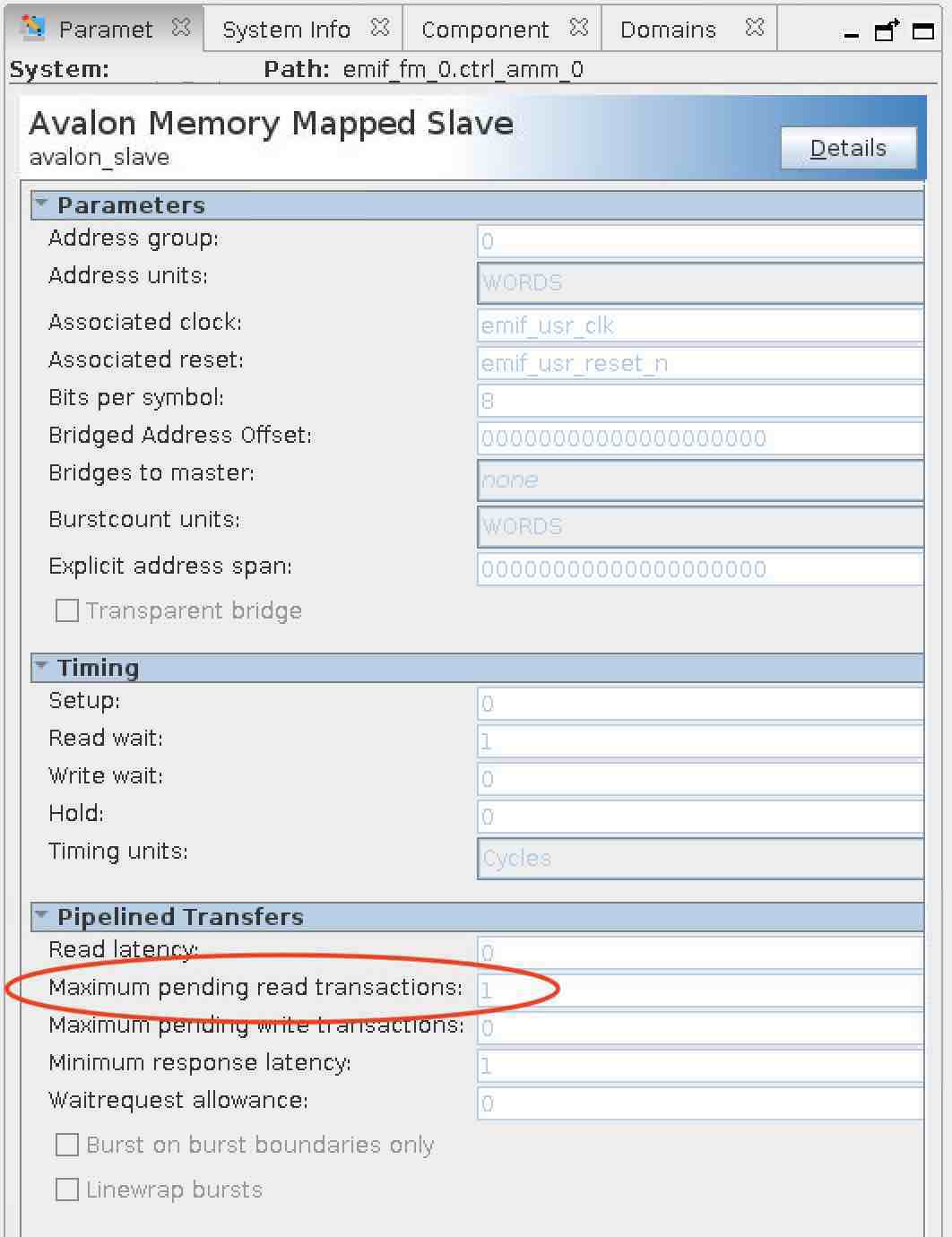
Yes, that looks great. Same screenshot of my example design is attached - it is set to "1". What tool version are you running?
Info: Version 20.4.0 Build 72 12/14/2020 SC Pro Edition
Thanks!
- SCLAY4 years ago
New Contributor
Update - I created an empty project, added the EMIF, and wrote the EMIF example design without doing any configuration. The parameter is set to "64". The parameter may be changing due to either configuration or context. I'll need to do more investigation.
- SCLAY4 years ago
New Contributor
I've found what looks like may be the problem - edit the EMIF parameters, choose the "Diagnostics" tab, and under "Performance", set the "Efficiency Monitor Mode" to anything other than "Disabled" (e.g., "Interface to Efficiency Monitor Toolkit"). Click the "Finish" button. The "Maximum pending read transactions" becomes set to "1". This is the configuration that produced the results in the original post.
This would appear to greatly reduce the utility of the efficiency monitor, due the performance implications listed in the original post (unless the design only issues a single read at a time!). Please confirm.
Thanks!