Forum Discussion

 New Contributor
USB Blaster I is working but USB blaster II NOT working? (important)
Hello,
I have problem that do not configure sof file with usb blaster II. I dont understand why is not working. Because I can use USB blaster I so it is working. what difference from USB Blaster I and USB Blaster II ??
Can u help me sir ?
Thank u very much...
Hi,
MAX10M08SAU169 can be programmed using USB Blaster II without changing the frequency. Could you please check the details,
1. First close the programmer & update the drivers for USB Blaster II using "1.5. Installing the Intel FPGA Download Cable II Driver on Windows 7/8 Systems" below user guide,
https://www.intel.com/content/dam/www/programmable/us/en/pdfs/literature/ug/ug_usb_blstr_ii_cable.pdf
2. Check 10 pin header connection : 1.4. Installing the Intel FPGA Download Cable II for Configuration or Programming
3. Refer 1.8. Setting Up the Intel FPGA Download Cable II Hardware with the Quartus Prime Software from manual
4. Eventually Auto Detect -> Change File->"Start" 5.you can refer the 2.8. Changing the TCK Frequency
Regards,
Vicky
15 Replies
 Carlhermann
Occasional Contributor
Hi Vicky,
for sure the MAX10 can be programmed with full speed, but we have one board that has a sub-optimal Routing for the JTAG Signals. This board cannot be programmed w/o reducing the frequency due to noise and disturbance on the board. Therefore, I thought it might be an idea to exclude similar Problems...
 Vicky1
Regular Contributor
Hi,
MAX10M08SAU169 can be programmed using USB Blaster II without changing the frequency. Could you please check the details,
1. First close the programmer & update the drivers for USB Blaster II using "1.5. Installing the Intel FPGA Download Cable II Driver on Windows 7/8 Systems" below user guide,
https://www.intel.com/content/dam/www/programmable/us/en/pdfs/literature/ug/ug_usb_blstr_ii_cable.pdf
2. Check 10 pin header connection : 1.4. Installing the Intel FPGA Download Cable II for Configuration or Programming
3. Refer 1.8. Setting Up the Intel FPGA Download Cable II Hardware with the Quartus Prime Software from manual
4. Eventually Auto Detect -> Change File->"Start" 5.you can refer the 2.8. Changing the TCK Frequency
Regards,
Vicky
- ocan
Hi vicky ,
My problem is solved with your idea's.
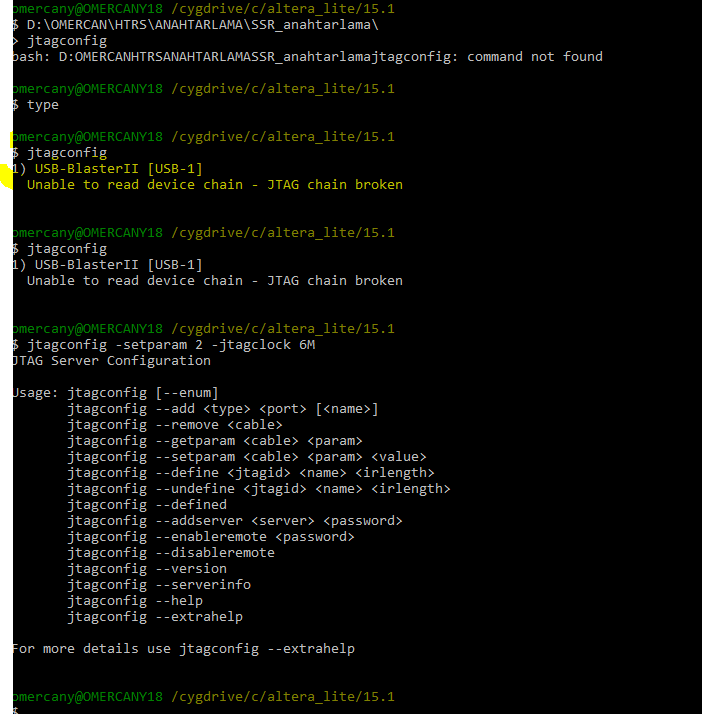
I tried step step your suggestions so step 4 ; I changed tck frequency from 24M to 6M:
My file is loading succesfully, thank u very much for reply my message.
Regards...
- ocan
hi,
I can try but ıt does not work.
ERROR MESSAGE;
Can not access jtag chain.
Can not configure device. Expected JTAG id code 0X031820DD for device 1 , but found JTAG id code 0xE0000001.
Can you help me please?
Why did not work it ?
- ocan
I write 1 at part so The screen not write sometihng for example ; succesfully.
Why did not the screen write somwthing?
- Carlhermann
Hi,
I would assume your cable no is "1" rather "2", thus use Jtagconfig -setparam 1 ….
- Carlhermann
Changing the frequency is done by using the command Shell, Change Dir to Quartus\Bin64 (assuming you are using Windows) and type Jtagconfig -setparam 1 JtagClock 16M ("1" is the number of the cable within the System, should be noted in the programmer Window: USB-0 / USB-1 ,..) and 16M or 6M are 16 or 6MHz Clock frequency (either being support, you may try 16M whether it is ok or go with 6M directly which is identical to USB-Blaster's frequency)
- ocan
- Carlhermann
Hi,
according to https://www.intel.com/content/www/us/en/programmable/support/support-resources/knowledge-base/solutions/rd03112009_879.html the USB Blaster operates at 6MHz, while the USB-Blaster II operates at 24MHz (see https://www.intel.com/content/www/us/en/programmable/support/support-resources/knowledge-base/solutions/rd06242013_922.html). In the 2nd link there is also the hint, howto reduce the frequency :-)
Kind regards, Carlhermann
- ocan
I will try your idea now, so results will share with you.
Thank you very much...
- ocan
Hi Carlhermann,
I have question that how to reduce clock speed usb blaster II. Normally, I can use the same project with usb blaster I and 2.
What do u know that usb blaster I clock speed ?
Thanks ...
- ocan
- ocan