Forum Discussion

 New Contributor
USB Blaster I is working but USB blaster II NOT working? (important)
 7 years ago
Hi,
MAX10M08SAU169 can be programmed using USB Blaster II without changing the frequency. Could you please check the details,
1. First close the programmer & update the drivers for USB Blaster II using "1.5. Installing the Intel FPGA Download Cable II Driver on Windows 7/8 Systems" below user guide,
https://www.intel.com/content/dam/www/programmable/us/en/pdfs/literature/ug/ug_usb_blstr_ii_cable.pdf
2. Check 10 pin header connection : 1.4. Installing the Intel FPGA Download Cable II for Configuration or Programming
3. Refer 1.8. Setting Up the Intel FPGA Download Cable II Hardware with the Quartus Prime Software from manual
4. Eventually Auto Detect -> Change File->"Start" 5.you can refer the 2.8. Changing the TCK Frequency
Regards,
Vicky

 Occasional Contributor
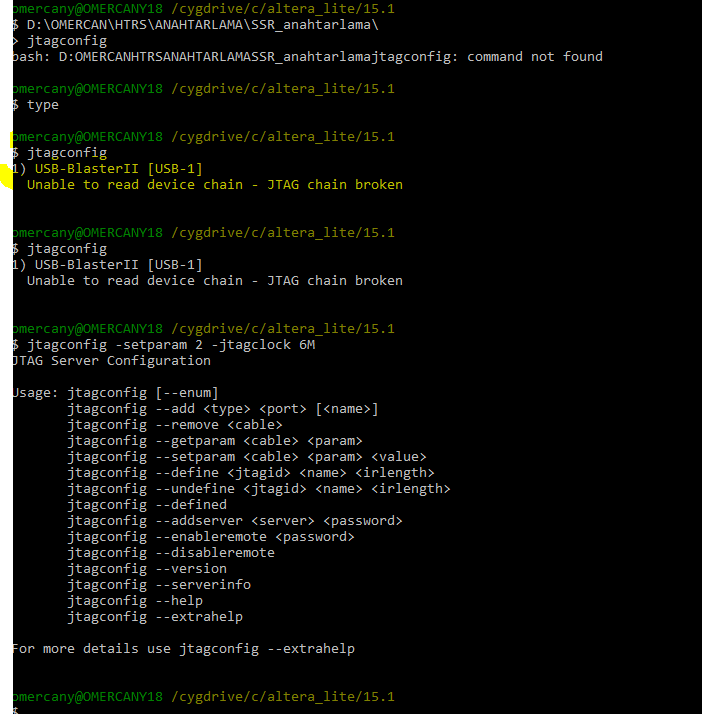
Changing the frequency is done by using the command Shell, Change Dir to Quartus\Bin64 (assuming you are using Windows) and type Jtagconfig -setparam 1 JtagClock 16M ("1" is the number of the cable within the System, should be noted in the programmer Window: USB-0 / USB-1 ,..) and 16M or 6M are 16 or 6MHz Clock frequency (either being support, you may try 16M whether it is ok or go with 6M directly which is identical to USB-Blaster's frequency)
- ocan7 years ago
I wrote your message information but It does not.
My pc cant see USB blaster II.