Forum Discussion

 New Contributor
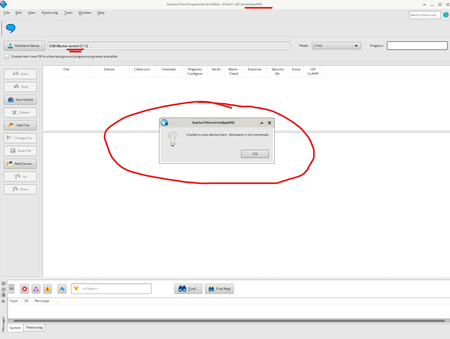
[USB-Blaster] Detected as "USB-Blaster Variant" on SLES12 – Causing Detection Issues
 New Contributor
Hi,
I have the same issue on windows 11 PC and drivers from actual Quartus (25.3, or 25.1.1 or 24.3) with the original Intel/Altera USB Blaster II device (yes the expensive one I have received yesterday). USB-BlasterII [USB-1] switches to the USB Blaster variant [USB-1] and doesn't work. The solution is to remove driver in the device manager (both, JTAG interface and also System Console interface ), reboot the PC and install drivers again. Than the Blaster works but only short time. The situation repeats (switched to the variant). It is a stupid workflow to spend whole working time with the driver issue...
 FvM10 months ago
Super Contributor
Hi,
it hasn't been yet described what USB Blaster variant actually is in driver and USB VID terms. What's displayed in device manager under Properties->Details->Hardware-IDs?
Which driver description (oemxxx.inf) is shown USB Blaster variant if you display Devices by Driver in device manager, is it the same as for USB Blaster II? If not, may be you have a second conflicting *.inf file on your PC that has to be deleted.
It may be related to two-step enumeration of the Cypress USB adapter that starts as unfigured device with VID 6810 and is reenumerated as JTAG adpater with VID 6010 after downloading firmware. In Windows, the second step is triggered by JTAG server, if it's stopped, device manager shows USB Blaster II (Unconfigured).
In Linux, it may be necessary to setup a rule file for correct operation of USB Blaster as described in Quartus installation manual.
Regards
Frank- Milan_S9 months ago
I don’t think the OS driver is the issue. The JTAG device IDs are:
JTAG:
USB\VID_09FB&PID_6010&REV_0142&MI_00
USB\VID_09FB&PID_6010&MI_00System Console:
USB\VID_09FB&PID_6010&REV_0142&MI_01
USB\VID_09FB&PID_6010&MI_01The driver date is 1/6/2025 and the version is 0.0.0.0.
It looks like Quartus is interacting incorrectly with the USB-Blaster. Sometimes it switches from “USB-Blaster II” to the “USB-Blaster variant”, and it seems to depend on the connected hardware and the MSEL configuration. When MSEL is set to JTAG mode, the probability of a USB-Blaster failure is lower than in AS mode. I’m also not sure whether the QSPI owner setting in the device configuration (Agilex 5) plays any role in this USB-Blaster issue.

