Forum Discussion

 Occasional Contributor
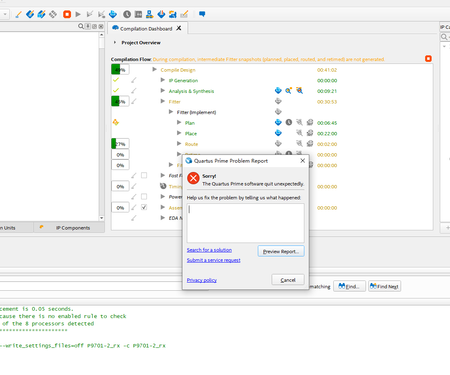
The Quartus Prime software quit unexpectedly!

 Super Contributor
For fatal error, this is most likely caused by the user system.
There are a few things that you can troubleshoot:
1. Ensure that you are using the latest version of Quartus 24.3 Pro as there are a few bug fixed.
2. Try restarting Quartus and your computer. This can help clear any temporary issues that may be causing the error.
3. Check your system resources, including memory, CPU usage, and disk space. Make sure you have enough available resources to run Quartus.
4. Try disabling any antivirus or firewall software temporarily, as they may be interfering with Quartus.
5. Run Quartus as administrator.
6. Install currprocess https://www.nirsoft.net/utils/cprocess.html and disable all the software running behind in the background.
7. Check your OS history update, e.g. to check if the issue happen after some specific Window update.
If the issue still persists, kindly share your design by archiving the project (Project > Archive Project) so I can duplicate the issue.
Regards,
Richard Tan


