Forum Discussion

 Occasional Contributor
SDC constrains for async static RAM
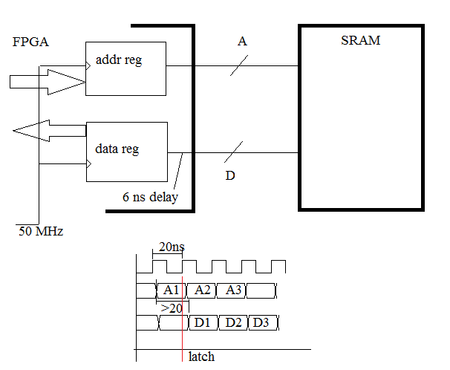
 Occasional Contributor
And I forgot to mention.
I've added yesterday
set_max_delay -from [get_ports {data_pin[*]}] -to [get_registers {data_reg[*]}] 3.0
W/o this all data were corrupted. With this line only few.
Then I've assigned fast_input_register to data_pin (not data_reg, fitter keep ignoring this). Nothing changed. How to check is it actually fast now?
Then I've change 3.0 to 2.0, and it working fine.
So as I see, I've manually fixed delay between pin and reg. Chip planner confirms this, the register is now much closer to the pin.
But it is definitely bad approach. I think quartus should do this automatically with correct constrains.
I've tried to put
set_input_delay -clock [get_clocks {50M}] -max 8.5 [get_ports data_pin*]
set_input_delay -clock [get_clocks {50M}] -min 0 [get_ports data_pin*]
and get lot of slacks (setup 50M), mostly all data are corrupted. For example one of them
Obviously, that constrains are wrong, because they do reverse things.
So, again, the question: how to tell quartus automatically reduce delay on data path? What constrains should be there?
UPD: and I'm stuck again.
Data were slightly corrupted after some changes, and I've changed 2.0 to 1.0. All works fine (again), but in chip planner data_reg is veeery far away from data_pin. And data path from TimeQuest reports 3.9 ns (it was about 2.2 before)...
I don't understand why it is working, what am I doing, and what to do next.


