Forum Discussion

 New Contributor
Intel FPGA Questor simulation doesn't see lower level components
- 3 years ago
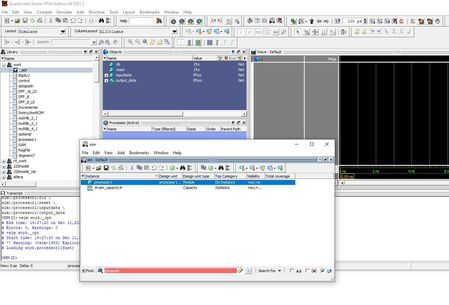
Ah! I think there is a slight different between Questa and Modelsim. The double-click on the processor1 in Modelsim provide full visibility into every aspect of the design (+acc=<full>). While Questa only provide visibility to ports only. (+acc=p)
Reference on -voptargs: https://users.ece.cmu.edu/~jhoe/doku/doku.php?id=a_short_intro_to_modelsim_verilog_simulator
I am not too sure why the changes though, people from the Siemen probably know this.
A few ways to get full visibility are:
1) Enter below command to get the full visibility. By adding -voptargs=+acc .
vsim -voptargs=+acc work.processor1
2) Right-click the processor1 and select simulate. Instead of double-click.
Best Regards,
Richard Tan

 Super Contributor
Wishing you a Happy New Year 2023!
My apology for the late reply as I was on vacation last week.
I seem to be able to simulate the same result using both Questa and Modelsim.
Attached the simulation screenshot between Questa (left) and Modelsim(right). Using the cmd: do testprocessor.do @ ../studentProcessor/simulation/modelsim
I don't quite get what's wrong here. Do you mind to pinpoint the expected behavior vs the current behavior?
Best Regards,
Richard Tan
 New Contributor
Hi Richard,
Thanks for taking timing looking into this.
This is the screenshot before I click processor1 to simulate it.
this is the screenshot I have after clicking processor1,
As you can see, I cannot see the hierarchy below processor1.
Is it because I am using a lite version of Quartus?
Regards
Helen


