Forum Discussion

 New Contributor
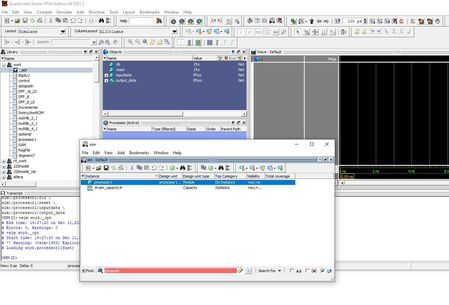
Intel FPGA Questor simulation doesn't see lower level components
- 3 years ago
Ah! I think there is a slight different between Questa and Modelsim. The double-click on the processor1 in Modelsim provide full visibility into every aspect of the design (+acc=<full>). While Questa only provide visibility to ports only. (+acc=p)
Reference on -voptargs: https://users.ece.cmu.edu/~jhoe/doku/doku.php?id=a_short_intro_to_modelsim_verilog_simulator
I am not too sure why the changes though, people from the Siemen probably know this.
A few ways to get full visibility are:
1) Enter below command to get the full visibility. By adding -voptargs=+acc .
vsim -voptargs=+acc work.processor1
2) Right-click the processor1 and select simulate. Instead of double-click.
Best Regards,
Richard Tan

 Super Contributor
Could you share the project so I can duplicate this issue on Questa and modelsim?
Do you just invoke the simulator tool and compile/simulate the design?
Or you are using nativelink or scripted simulation flow?
Best Regard,
Richard Tan
 Helen53 years ago
Hi Richard,
Any though on this?
Thanks
- Helen53 years ago
Hi Richard,
Thanks for you quick reply.
I am using NativeLink flow, without any scripts. i.e. compile under Quartus Prime, then Tools -> Run Simulation Tool -> RTL simulation
By the way, the version I am using doesn't allow me to create a script for simulation, there is no such option under the Tools manual.
Please see attached project file for the design.


