Forum Discussion

Altera_Forum Honored Contributor
11 years agoHonored ContributorHow to set the display color of Putty or Minicom in serial port mode?
Hi all,
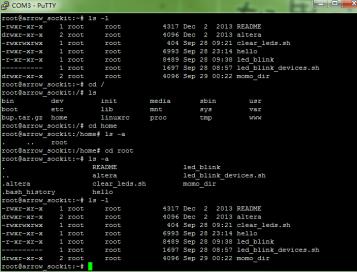
I just got a Cyclone V ArrowSoC kit, and have tried the linux boot example using serial port. However, after login to the linux system, I found that putty in serial port mode can't display any color, as listed in the attachment. Both file and directory, and any type of files, are grey. So, what, and how to set so that the serial port terminal as putty and minicom could show different type of files in different color, like directory in blue, .sh in green? i have tried the color setting in putty itself, and it doesn't work at all. To me, putty and minicom is just a communication terminal used to send and receive character data, which may not be the same as the typical shell terminal in linux. Thanks for your time and possible reply in advance~~2 Replies
 Altera_Forum
I think the colors are defined in /etc/profile file. My linux OS shows different color for files, directories and such. I have attached the file I have. Try it out! Make sure you make a back up of the original file.
NOTE: /etc/profile doesn't have an extension. I uploaded it as .txt to upload to this forum. It wouldn't allow me to upload without an extension.- Altera_Forum
I think you answered your own question, I don't think I have seen a terminal that performs the colour coding you are looking for. If one existed it would probably need to know what is running on the target since you wouldn't want a terminal to use colour coding for Linux when Windows is running on the target for example.