Forum Discussion

 New Contributor
How to calculate Setup slack and Hold slack?
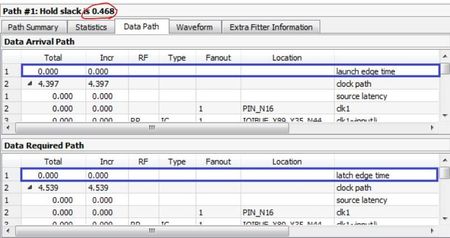
 3 years ago
Your screenshots are not showing the whole picture (scroll to the bottom to get the data arrival and data required times; you've highlighted the clock edges, not the arrival and required times). Look at the Waveform tab in the timing analyzer reports. They show where the data arrival and data required times are located. Then correlate that to the numbers in the path reports in the Data Path tab.
Also check out this training: https://cdrdv2.intel.com/v1/dl/getContent/653046

 Super Contributor
As sstrell mentioned, if you click on the Waveform tab, it will help you to visualize how the timing slack is calculated.
The Data Path tab traces timing paths through the FPGA so you will only see the exact Data Arrival Time(DAT) and the Data Required Time(DRT) at the table's last row. You can find the DAT and DRT at the Path Summary tab as well.
Attached screenshot for clearer understanding.
Best Regards,
Richard Tan
p/s: If you find any answers from the community or Intel Support to be helpful, we encourage you to mark them as the best answer or rate them 4/5 in the survey


