Forum Discussion

 Contributor
Flash memory not detected - Arria 10 Development kit
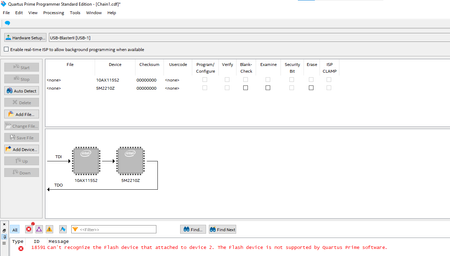

 Super Contributor
Hi,
user manual is suggesting this procedure to update flash memory through .pof
6.8.2. Programming the Flash Using Quartus Programmer
You can use the Quartus Programmer to program the flash with your Programmer Object File (.pof). Ensure the following conditions are met before you proceed:
• The Quartus Programmer and the USB-Blaster II driver are installed on the host computer.
• The micro-USB cable is connected to the FPGA development board.
• Power to the board is on, and no other applications that use the JTAG chain are running.
• The design running in the FPGA does not drive the FM bus.
Execute the steps below to program the Flash
1. Start the Quartus Programmer.
2. Click Auto Detect to display the devices in the JTAG chain.
3. Select the flash attached to the MAX V and then click Change File and select the path to the desired .pof. If the flash is not detected, configure the FPGA with \examples\board_test_system\image \\dummy.sof and then go to step 2, refer to Configuring the FPGA Using Programmer.
4. Turn on the Program/Configure option for the added file.
5. Click Start to program the selected file to the flash. Programming is complete when the progress bar reaches 100%.
I understand post #1 so that you are basically following the procedure, but attached flash doesn't show up with MAX V.
Possible reasons are:
- The MAX V isn't configured with the original design including PFL IP
- The loaded A10 design blocks flash memory bus, I guess that's the case e.g. with board update portal design. In this case the said dummy design should be loaded instead.
I'm assuming so far that user manual is correct and MAX V PFL has the described feature to show flash memory on autodetect.
It should be mentioned that flash programming through .pof and MAX V PFL is one of several options. I understand that the shipped examples are more focussing on using .flash files and board update portal. Therfore .pof option isn't described as detailed as it should.
The only explicite .pof programming files are in examples\board_test_system\image\PRD\cfi
If you load fpp_config.cdf, can access flash?

