Forum Discussion

 New Contributor
Failed Co simulation of a Example HLS design
Hi ,
I am have installed the intel Quartus prime 22.2 development suite in my system and tried to compile and test the HLS counter example design but it fails in the Co-simulation.
i++ counter.cpp  -v   -march=Arria10 -o test-fpga
Target FPGA part name:   10AX115U1F45I1SG
Target FPGA family name: Arria10
Target FPGA speed grade: -1
Analyzing counter.cpp for testbench generation
Creating x86-64 testbench
Analyzing counter.cpp for hardware generation
Verifying version information in the included files.
Expecting version 22.2.0.46.1 for all included files.
Included files passed version check. Checked:  none.
Optimizing component(s) and generating Verilog files
Generating cosimulation support
Generating simulation files for components: count
HLS simulation directory: /home/lsai_nikhil/intelFPGA_pro/22.2/hls/examples/counter/test-fpga.prj/verification.
HLS Elaborate verification testbench FAILED.
See /home/lsai_nikhil/intelFPGA_pro/22.2/hls/examples/counter/test-fpga.prj/debug.log for details.
Error: Cosim testbench elaboration failed.

Makefile:53: recipe for target 't
I have checked the debug .log ,
Debug log output:
/home/lsai_nikhil/intelFPGA_pro/22.2/hls/host/linux64/lib/libhls_cosim_msim32
# -dpioutoftheblue 1 -sv_lib /home/lsai_nikhil/intelFPGA_pro/22.2/hls/host/linux64/lib/libhls_cosim_msim32
# [exec] elab
# vsim -dpioutoftheblue 1 -sv_lib /home/lsai_nikhil/intelFPGA_pro/22.2/hls/host/linux64/lib/libhls_cosim_msim32 -L work -L work_lib -L altera_ver -L lpm_ver -L sgate_ver -L altera_mf_ver -L altera_lnsim_v
er -L twentynm_ver -L twentynm_hssi_ver -L twentynm_hip_ver -L altera -L lpm -L sgate -L altera_mf -L altera_lnsim -L twentynm -L twentynm_hssi -L twentynm_hip -L hls_sim_main_dpi_controller_10 -L main_dp
i_controller -L hls_sim_component_dpi_controller_10 -L dpic_count -L avalon_conduit_fanout_10 -L count_cfan -L count_en_cfan -L hls_sim_clock_reset_10 -L clock_reset -L avalon_concatenate_singlebit_condui
ts_10 -L cat_done -L count_internal_10 -L count -L cat_cwfsw -L avalon_split_multibit_conduit_10 -L sp_cstart -L altera_irq_mapper_2000 -L tb tb.tb
# Start time: 10:26:00 on Oct 19,2022
# ** Fatal: ** Fatal: (vsim-3827) Could not compile 'export_tramp.so': cmd = '/home/lsai_nikhil/intelFPGA_pro/22.2/gcc/bin/gcc   -shared -fPIC -m32 -B/usr/lib32  -g  -I. -I"/home/lsai_nikhil/intelFPGA_pro
/19.3/modelsim_ase/include" -I"/home/lsai_nikhil/intelFPGA_pro/19.3/modelsim_ase/../oem/include" -o "/tmp/lsai_nikhil@server1_dpi_11933/linuxpe_gcc-9.3.0/export_tramp.so" "/tmp/lsai_nikhil@server1_dpi_119
33/linuxpe_gcc-9.3.0/export_tramp.S"'
# (vsim-50) A call to system(/home/lsai_nikhil/intelFPGA_pro/22.2/gcc/bin/gcc   -shared -fPIC -m32 -B/usr/lib32  -g  -I. -I"/home/lsai_nikhil/intelFPGA_pro/19.3/modelsim_ase/include" -I"/home/lsai_nikhil/
intelFPGA_pro/19.3/modelsim_ase/../oem/include" -o "/tmp/lsai_nikhil@server1_dpi_11933/linuxpe_gcc-9.3.0/export_tramp.so" "/tmp/lsai_nikhil@server1_dpi_11933/linuxpe_gcc-9.3.0/export_tramp.S" >'/tmp/quest
atmp.j5QHxs' 2>&1) returned error code '1'.
# The logfile contains the following messages:
# /home/lsai_nikhil/intelFPGA_pro/22.2/gcc/bin/../lib/gcc/x86_64-pc-linux-gnu/9.3.0/../../../../x86_64-pc-linux-gnu/bin/ld: skipping incompatible /home/lsai_nikhil/intelFPGA_pro/22.2/gcc/bin/../lib/gcc/x8
6_64-pc-linux-gnu/9.3.0/libgcc.a when searching for -lgcc
# /home/lsai_nikhil/intelFPGA_pro/22.2/gcc/bin/../lib/gcc/x86_64-pc-linux-gnu/9.3.0/../../../../x86_64-pc-linux-gnu/bin/ld: cannot find -lgcc
# /home/lsai_nikhil/intelFPGA_pro/22.2/gcc/bin/../lib/gcc/x86_64-pc-linux-gnu/9.3.0/../../../../x86_64-pc-linux-gnu/bin/ld: cannot find -lgcc_s
# collect2: error: ld returned 1 exit status
#
# No such file or directory. (errno = ENOENT)
#
#
# FATAL ERROR while loading design
# ** Error: Error loading design
# Executing ONERROR command at macro ./msim_compile.tcl line 15
# End time: 10:26:15 on Oct 19,2022, Elapsed time: 0:00:15
Can anyone help me to resolve the issue?
20 Replies
 hareesh
Frequent Contributor
As we do not receive any response from you on the previous question/reply/answer that we have provided. Please login to ‘https://supporttickets.intel.com’, view details of the desire request, and post a feed/response within the next 15 days to allow me to continue to support you. After 15 days, this thread will be transitioned to community support. The community users will be able to help you on your follow-up questions.
- hareesh
Hi,
any update?
- hareesh
Hi,
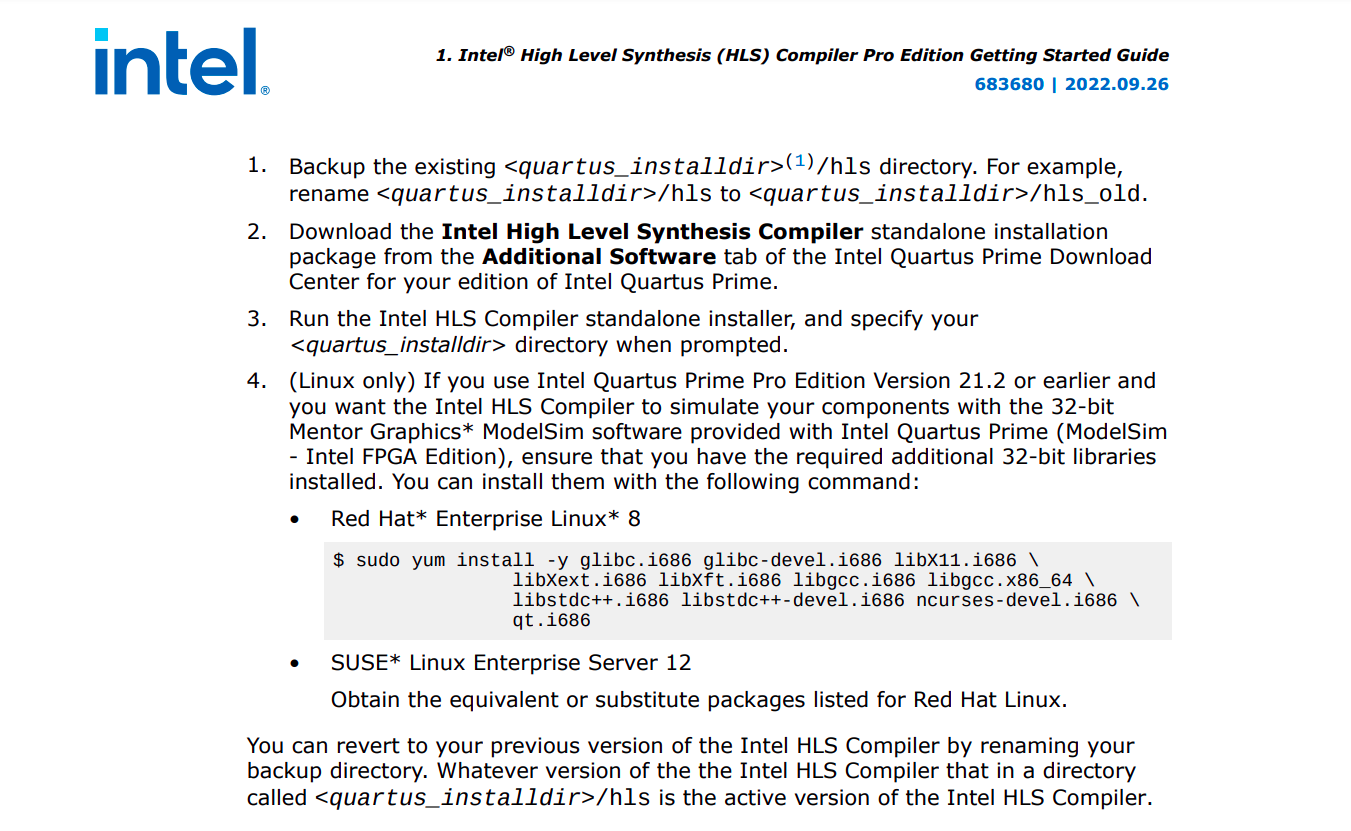
please follow bellow attachment for installing the 32 bit libraries.
- hareesh
Hi,
any update about?
your problem has solved or not?
- hareesh
Hi,
follow the this article for run HLS design
Thanks,
- hareesh
Hi,
i am trying to duplicate your issue. pls give me some time.
 nikhl
nikhl- hareesh
Hi,
pls share your project file