Forum Discussion

 New Contributor
Build error on tutorial, missing CMakeLists.txt
I previously built the tutorial helloworld project with no errors.
I then made small changes to the BSP generation settings and re-generated the BSP.
I did not try to re-import the BSP code into my project because it was already imported.
I immediately re-built the whole project in RiskFree, I get the following error:
CMake Error: The source directory "C:/fpga_projects/an985/helloworld" does not appear to contain CMakeLists.txt.
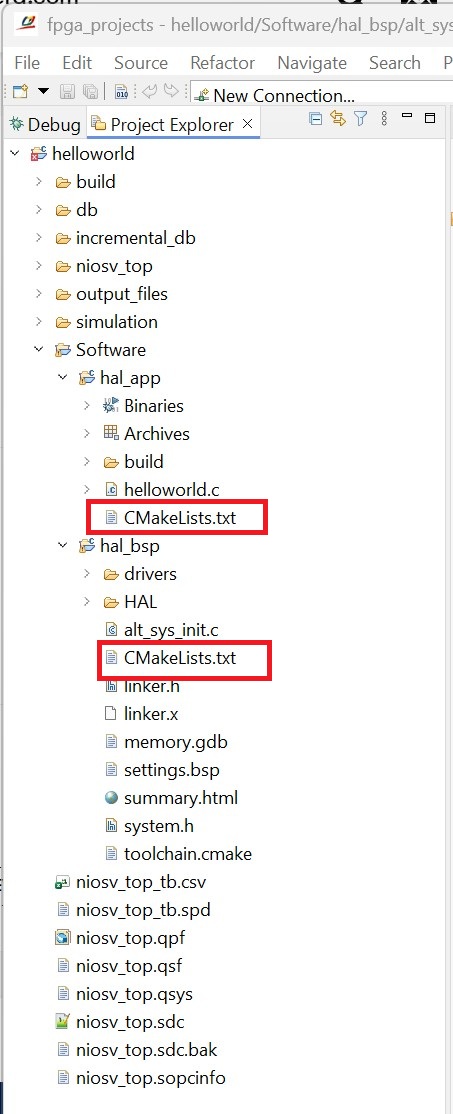
I verified that there is no CMakeLists.txt file in the folder C:/fpga_projects/an985/helloworld. This is because that folder contains a subfolder Software which has subfolders for hal_app and hal_bsp, each of which contains their own CMakeLists.txt file.
Where would I change a file or a configuration so that the build knows there there are two subprojects, each with their own CMakeLists.txt file? See attached screenshot of folders and files.
1 Reply
 ai_responder
Community Manager
The error message tells you exactly what's wrong: RiscFree's CMake build configuration for one (or both) of your projects is pointing at the top-level
helloworldfolder rather than at the individualhal_apporhal_bspsubdirectories where theCMakeLists.txtfiles actually live.
In RiscFree IDE, the correct way to set up Nios V projects is to import them individually: click File > Import Nios V CMake Project, then browse and select the location of the Nios V processor BSP project directory — and repeat the same step for the application project directory. Importing Nios® V Processor Project Each import must point directly to the folder that contains its ownCMakeLists.txt(i.e.,Software/hal_bspandSoftware/hal_app), not the parenthelloworldfolder.
After you specify the correct location path, the CMake-driven application or BSP project is added to the Project Explorer, and the project name is automatically filled in. Importing Nios® V Processor Project
So here's what I'd do to fix your situation:- In the Project Explorer, remove the incorrectly configured project(s) that are pointing at the top-level
helloworlddirectory. - Click File > Import Nios V CMake Project and browse to
C:/fpga_projects/an985/helloworld/Software/hal_bsp. Click Finish. - Repeat the import for
C:/fpga_projects/an985/helloworld/Software/hal_app. - After importing both projects, establish the dependency between them: right-click the application project in Project Explorer, select Properties, navigate to the Project References tab, and check the option box for the BSP project. Importing Nios® V Processor Project
CMakeLists.txtinhal_bspwill have been recreated automatically, so re-importing from the correct path should resolve the build error immediately.
Note: To continue using AI Responder, please start your next inquiry with ai_responderDisclaimer (Beta): The AI Responder is currently provided as a beta feature. AI-generated responses may contain errors or omissions. Please verify technical guidance with official Altera documentation before implementation.
Thank you very much.
- In the Project Explorer, remove the incorrectly configured project(s) that are pointing at the top-level