Forum Discussion

 New Contributor
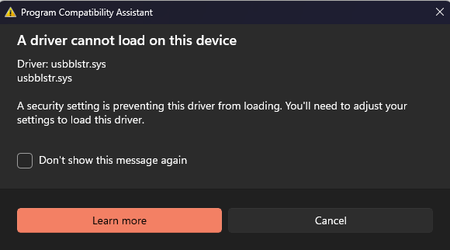
Altera USB blaster not loading due to Windows 11 security setting
 15 days ago
Hi R_MOTA,
Thank you for the screenshot and the version details, and thanks to Frank for the guidance.
Windows 11 is blocking the USB-Blaster driver that came with Quartus Prime 15.1, because that driver does not meet the current Windows security requirements (Memory Integrity). A newer driver resolves this, and you can keep Quartus 15.1 for your project:
- Download Quartus Prime Programmer and Tools (or the driver-only installer) from the current Quartus Prime Standard/Lite 25.1std release. The download links are in the [25.1std Release Notes](https://docs.altera.com/r/docs/683593/25.1std/quartus-prime-standard-and-lite-editions-version-25.1std-software-and-device-support-release-notes/quartus-prime-standard-edition-version-25.1std-software-and-device-support-release-notes).
- In Device Manager, uninstall the existing USB-Blaster entry and select "Delete the driver software for this device" ([steps](https://docs.altera.com/r/docs/683076/current/altera-fpga-download-cable-user-guide/install/reinstall-the-altera-fpga-download-cable-driver)).
- Install the new driver from `<install dir>\quartus\drivers\usb-blaster` ([guide](https://docs.altera.com/r/docs/683076/current/altera-fpga-download-cable-user-guide/installing-the-altera-fpga-download-cable-driver-on-windows)), then reconnect the cable.
The newer JTAG server is also used by Quartus 15.1, so you can keep programming from 15.1. Please keep Memory Integrity enabled.
Could you confirm whether the cable is now detected? If so, may we close this thread?
Regards,
Fakhrul

 Super Contributor
Hi,
did you try latest USB Blaster driver which is clearly Windows 11 compatible?


