Forum Discussion

 New Contributor
Altera USB BLASTER is not recognized in device manager
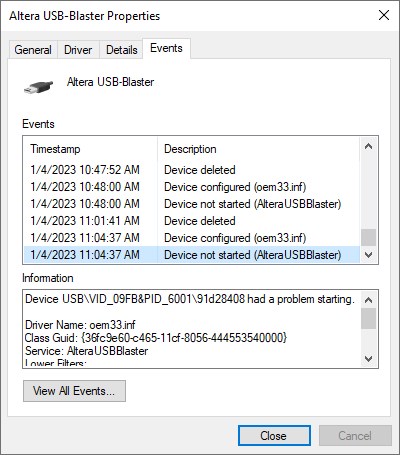
USB Blaster is not recognized correctly in the device manager and it showing warning symbol. and device is not started with below error massage
Device USB\VID_09FB&PID_6001\91d28408 had a problem starting.
Driver Name: oem33.inf
Class Guid: {36fc9e60-c465-11cf-8056-444553540000}
Service: AlteraUSBBlaster
Lower Filters:
Upper Filters:
Problem: 0x27
Problem Status: 0xC000007B
Can you please help me to resolve the Issue. I am using Intel Quartus 17.1 version , to resolve the issue I Installed / reinstalled and restarted the PC many times but it is not helping me to resolve the Issue.
and the below error massage on the general Tab on the device manager
Windows cannot load the device driver for this hardware. The driver may be corrupted or missing. (Code 39)
{Bad Image}
%hs is either not designed to run on Windows or it contains an error. Try installing the program again using the original installation media or contact your system administrator or the software vendor for support. Error status 0x
Thanks,
Ramesh S
Hi,
It might be due to the problem with the Quartus. Can you try the workaround in the KDB below?
https://www.intel.com/content/www/us/en/support/programmable/articles/000087354.html
Or you can also install the latest version of Quartus.
Regards,
Aiman
8 Replies
 NurAiman_M_Intel
Super Contributor
I’m glad that your question has been addressed, I now transition this thread to community support. If you have a new question, feel free to open a new thread to get the support from Intel experts. Otherwise, the community users will continue to help you on this thread. Thank you.
- NurAiman_M_Intel
Hi,
We do have some problem with expired license for some Quartus version. Can you try the patch in below link;
https://www.intel.com/content/www/us/en/support/programmable/articles/000086243.html
Regards,
Aiman
 ak6dn
ak6dnRegular Contributor
What version/release of Windows are you using?
Rather important to know this to help you resolve the issue.
- NurAiman_M_Intel
Hi,
It might be due to the problem with the Quartus. Can you try the workaround in the KDB below?
https://www.intel.com/content/www/us/en/support/programmable/articles/000087354.html
Or you can also install the latest version of Quartus.
Regards,
Aiman
 INITDONE
Hi Aiman , Ak6dn
Thanks a lot for your help.
Intel USB Blaster is working on windows 10 version 21H2 with Intel® Quartus® Prime Standard Edition Software version 21.1 drivers.
Older software version also working with 21.1 drivers , just replaced the old driver folder with 21.1 driver and it is started working fine.
Thanks & Regards,
Ramesh S.
- INITDONE
Hi Aiman,
Thanks a lot for your reply, I am using Intel quartus 17.1 standard edition version, I tried this solution with Intel quartus 18.1 standard edition as well as Intel quartus 16.1 standard edition but still same error is occurring.
If you have any driver which will resolve this issue please share , I will try with that driver.
Please help me to resolve the issue .
Thanks and Regards,
Ramesh.