Forum Discussion

leond95 New Contributor
6 years agoNew Contributorquartus (11.1sp2 and 15.1) not detecting de0 nano
Hello everyone,
I have both quartus 11.1sp2 and quartus 15.0, and both can't find my altera boards (de0 nano and 5CG), the usb blaster drivers are installed and windows 10 can detect my boards as y...

leond95New Contributor
6 years agoNew Contributoryes, when I use the programmer tool, and click on hardware setup, I don't find usb blaster, that happened on both version of quartus

ak6dn Regular Contributor
6 years agoRegular ContributorDid you click on 'Add Hardware' over on the right hand side in the Quartus Programmer?
You need to do that the first time, then Quartus will remember you have that device.
- leond956 years ago
yes i did but nothing happen
- ak6dn6 years ago
Need to check if you have a compatible USB Blaster device driver installed and configured.
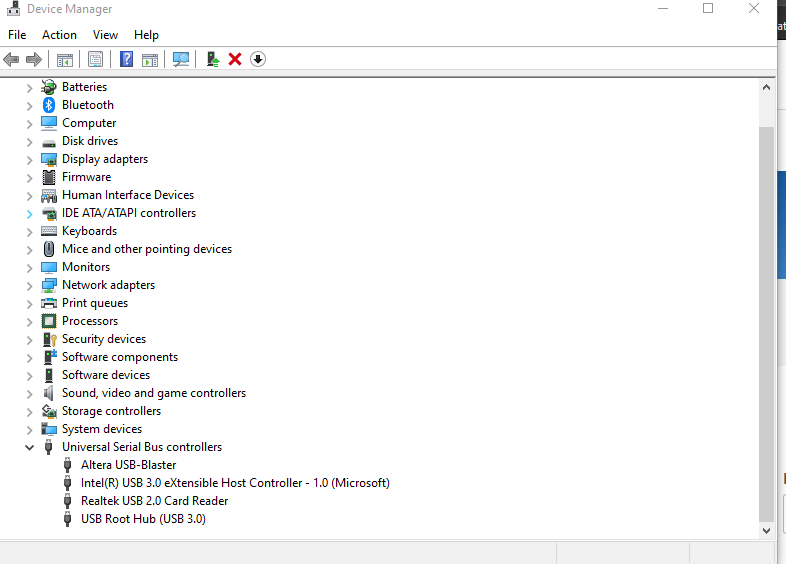
Go to Control Panel / Device Manager and expand Universal Serial Bus controllers. You should have an entry for Altera USB-Blaster there. Right click on it and select Properties. They should show something similar to what I have done on my system. See below images.
- leond956 years ago
this is what i have.