Forum Discussion

Altera_Forum Honored Contributor
14 years agoHonored ContributorProblem with Quartus II 11.0 Programmer detecting Altera Cyclone II DE2 Dev Kit
After tools -> programmer the Programmer these show up like in the attached image. For hardware type, there is none other then ethernet blaster; and auto detect didn't work. Basically the ...

Altera_ForumHonored Contributor
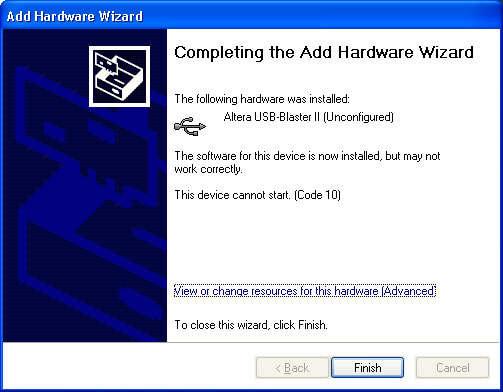
14 years agoHonored Contributor --- Quote Start --- This is more easy and applicable for those find it hard to run their altera de-2 board..and itz a conform working method 1. Unzip the usb-blaster.zip file provided to a convenient location (e.g., your desktop). This will create a usb-blaster folder. a. http://myweb.msoe.edu/durant/courses/ce1900/usb-blaster.zip 2. Connect USB Blaster to USB port on laptop (UP2 board does not need to be plugged in) 3. Receive unsuccessful installation message 4. Go to the Device Manager (can search from Start menu) 5. Right click on Unknown device under Other devices 6. Update driver software… 7. Browse my computer for driver software 8. Browse to the folder with the zip file contents. Do not go into a subdirectory (e.g., use usb-blaster, not x64) 9. Ok, Ok, Next 10. Warning message appears: “Windows can’t verify the publisher of this driver software” 11. Click “install this driver software anyway” 12. Receive success message that “Altera USB-Blaster” has been installed 13. Close Cheers Alen --- Quote End --- Well, I'm just not able to get the USB-Blaster to install on my XP machine... It's driving me crazy... The best I can get to is a screen that shows a code(10) error.http://www.running2win.com/images/usb-blaster.jpg (http://www.running2win.com/images/usb-blaster.jpg) Nothing seems to work. I tried the zip file and I get a message saying "The specified location does not contain information about your hardware." I really need to be able to work from home but I feel like I've tried everything.