Forum Discussion

 New Contributor
JTAG Chain Broken – Unable to Program Agilex 5 Modular Development Board

 Regular Contributor
Hello,
Can you use Configuration Debugger tool?
Menu > Tools > Configuration Debugger
load device > see if it can detect the Agilex 5.
regards,
Farabi
 New Contributor
Hi Farabi,
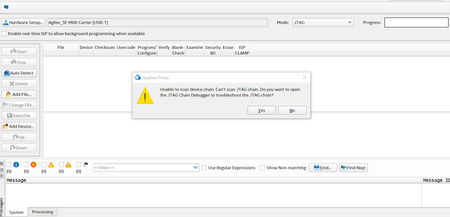
As shown in the images in my original post, when I try to select the Agilex 5 in the Configuration Debugger, an error code appears in the Programmer messages window.
More specifically, I go to Menu > Tools > Configuration Debugger > Hardware Setup, then under “Currently selected hardware” I choose “Agilex_5E MDK Carrier [USB-1]” and click “Close,” and immediately after closing the dialog the error message appears.
- Farabi_Altera9 months ago
Hello Daniel,
Looks like the on-board usb blaster has problem/damaged?
Do you have USB-Blaster II programming cable and try to connect to JTAG port and program?
Please give me your board serial number, lets see if it still under warranty.
regards,
Farabi


