Forum Discussion

 New Contributor
HPS(Hard Process system) generate Verilog for Simulation

 Regular Contributor
Hi,
Are you familiar with the Platform Designer?
Also, I am not exactly sure how it got the value as you mentioned, I tried to do the same settings as you did but I do have the value according to what was set in the HPS IP.
Value: 1,2,3 = drop down selection from Top to Bottom, with 0 being unused.
My guess would be, that you had no connection with the H2F interconnect, despite it being enabled or you might have not re-generate it after you had set it.
Anyway, we always recommend customer to go from our GHRD and build/remove any peripherals etc., of their own design from there. The GHRD is based of our dev kit, for you it will be the Agilex 7 SoC Dev Kit:
https://www.rocketboards.org/foswiki/Documentation/AgilexSoCGSRD
https://github.com/altera-opensource/ghrd-socfpga
You can view how the GHRD interconnects are and use the GHRD. Are you okay with proceeding with the GHRD? If not, you could try to create a new .qsys and add all new IPs as per the GHRD that you would want to work/play around with then try again.
p/s: If any answer from the community or Intel Support are helpful, please feel free to give best answer or rate 4/5 survey.
 New Contributor
Linux Quartus version : Quartus Prime Verison 22.4.0 Build 94
Agilex FPGA AGFB027R25A****
Hi,
After many attempts, I encountered a very strange phenomenon.
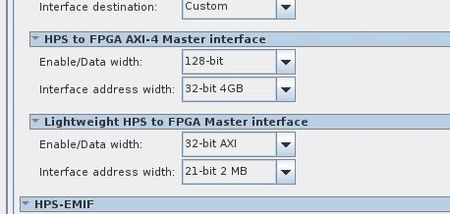
Please check my IP configuration options.
option 1:
When I configure F2H data width 128 and H2F data width 128(max), Compile the generated verilog ip file to find the data bit width parameter is normal 128.
option 2:
When I configure F2H data width 256 and H2F data width 128(max), Compile the generated verilog ip file and find that the F2S data bit width parameter is normal 256, but the S2F data bit width parameter is wrong 0.
Option 1 & option2 only the F2H bit width parameter was modified.
We may need to set the F2H bit width parameter 256, but we cannot solve the problem of setting the S2F bitwidth parameter to 0


