Forum Discussion

WShep1 Contributor
6 years agoContributorHow do you activate NIOS II SBT for Eclipse in Quartus 19.1
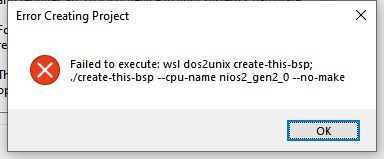
I am trying to get the NIOS II SBT for Eclipse to work with Quartus 19.1. I have followed the activation instructions referenced at the end of this message. In Step 2 below, by running Winzip a...

WShep1Contributor
6 years agoContributorThis is not an answer, but I forgot to include the installation instructions that i have been using. Here they are:
3.1. Installing Eclipse IDE into Nios II EDS
Starting with Nios® II EDS v19.1, the Nios® II EDS requires the Eclipse IDE component to be manually installed.
The procedure for installing Eclipse IDE:
- Download CDT 8.8.1 which is Eclipse C/C++ IDE for Mars.2.
- Extract the downloaded file into this directory: < Intel® Quartus® Prime installation directory>/nios2eds/bin.
- You should see the < Intel® Quartus® Prime installation directory>/nios2eds/bin/eclipse folder after extraction is done.
- Rename the < Intel® Quartus® Prime installation directory>/nios2eds/bin/eclipse folder to < Intel® Quartus® Prime installation directory>/nios2eds/bin/eclipse_nios2.
- Extract < Intel® Quartus® Prime installation directory>/nios2eds/bin/eclipse_nios2_plugins.zip for Windows or < Intel® Quartus® Prime installation directory>/nios2eds/bin/eclipse_nios2_plugins.tar.gz for Linux* to < Intel® Quartus® Prime installation directory>/nios2eds/bin.
- The extraction overrides files in < Intel® Quartus® Prime installation directory>/nios2eds/bin/eclipse_nios2.
- Verify the extraction is done correctly by making sure you see the < Intel® Quartus® Prime installation directory>/nios2eds/bin/eclipse_nios2/plugin_customization.ini file.
- You can now launch Nios® II SBT for Eclipse using eclipse-nios2.exe.
- Note: The instructions are also included in the < Intel® Quartus® Prime installation directory>/nios2eds/bin/README file.
