Forum Discussion

 Occasional Contributor
Factory Restore fails Arria 10 Dev Kit PRD version
I've been using my Arria 10 Dev Kit for a while, and all of a sudden the BTS system (and other programs) refuses to work. I get the following error most of the time.
"Failed to read production information from this SOF in the FPGA.
Please select compatible FPGA design from Configure option in the menu bar.
If you still meet this issue, please try to restart the BTS GUI."
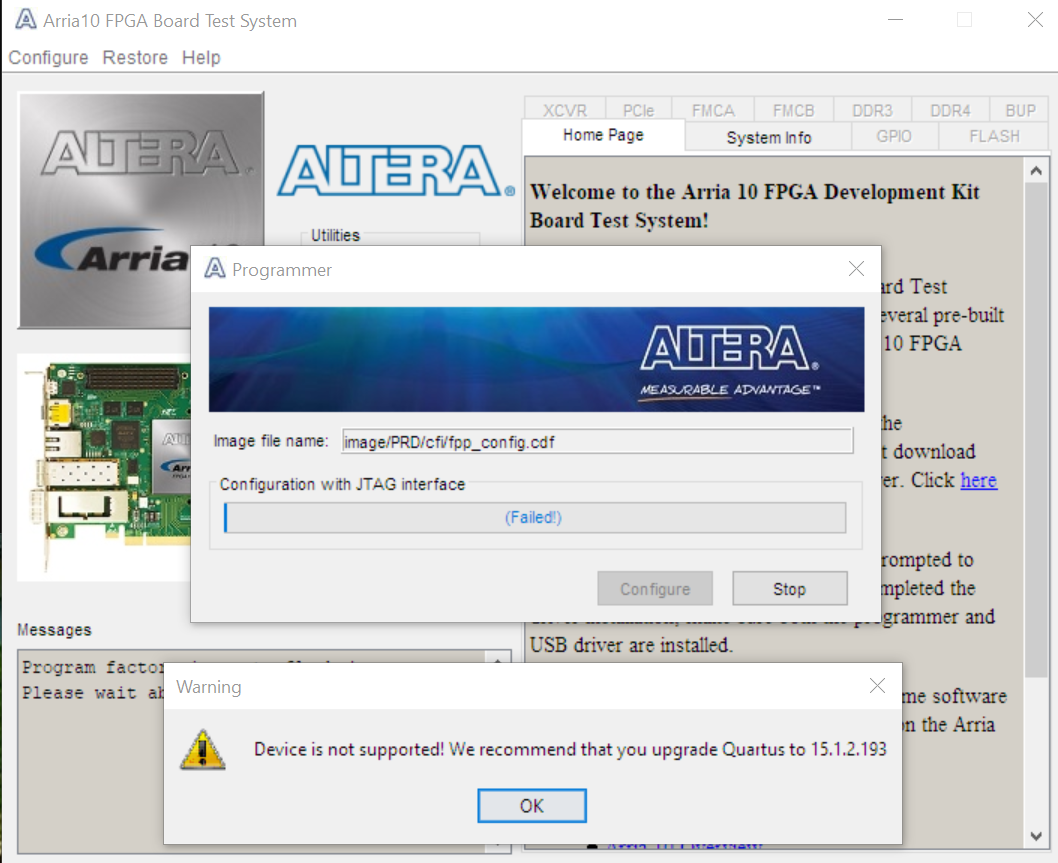
After a while of messing around with this, I decide to do a factory restore. I fill out the form, and the factory restore fails with the massively unhelpful: "Device not supported" and suggesting that I should "upgrade" to Quartus 15.1.2.193 (screenshot)
Dead in the water.
Also, sometimes bts comes up with the Screenshot 2, having lost its mind totally. Other times it remembers its serial number, PRD and MAC address. Rev G board, about 1 month old.
10 Replies
 AR_A_Intel
Super Contributor
Hello
May we know, is this the board that you’re referring to? https://www.intel.com/content/www/us/en/programmable/products/boards_and_kits/dev-kits/altera/kit-a10-gx-fpga.html
And Quartus version you use for BTS test?
 KCMurphy
Yes. I'm using 20.1 due to some Analog Devices scripts that check for that. I also have similar issues with 21.2, although I'm not sure that weird Quartus 15 message happens with that.
On occasion a bts test program will load, but mostly not. My actual project files not at all.
- AR_A_Intel
Hi
Could you help check on this? The manufactured board’s BTS was built with Quartus version 15.1.2. and the error you get possibly caused by the difference in system console of different Quartus revisions. We strongly recommended to use the right Quartus version as it was tested. Thanks
- KCMurphy
My mistake. BTS, not Quartus.
This BTS says it is 15.1.2.193
So, I need to install Quartus 15.1.2.193 in order to get the proper image for the factory reset? I note that the bts version with Quartus 21.2 is also "15.1.2.193"
- KCMurphy
OK. These instructions make no sense at all.
The BTS is a separate download from Intel, included in https://www.intel.com/content/dam/altera-www/global/en_US/support/boards-kits/arria10/FPGA/arria10GX_10ax115sf45_fpga_v15.1.2p2.zip
As expected, installing 15.1.2.193 does not affect the process.
The BTS apparently does not come in any Quartus version, and its test images are pre-built. It is designed to test the Development kit and the tests all fail. Attempting to restore the factory load fails strangely. The card was a bit flaky when I got it, but I assumed that was my error. But then my own builds would not respond, and when I ran the tests again they all failed.
The board no longer returns its MAC address, rev level or serial number, as seen above in "screenshot2" in the original post, and usually does not return the FPGA product ID.
Is there a warranty on these things?
- AR_A_Intel
Hi
Thanks for update. Could you provide the following for warranty checking?
Name:
Email Address:
Company/University Name:
Dev kit OPN :
Serial Number :
You can reply/attach your file in private message.
- KCMurphy
Private message sent
- AR_A_Intel
Continue support in private message mail
- AR_A_Intel
Solution is provided in private message mail. This thread will be transitioned to community support. If you have a new question, feel free to open a new thread to get the support from Intel experts. Otherwise, the community users will continue to help you on this thread. Thank you