Forum Discussion

 Occasional Contributor
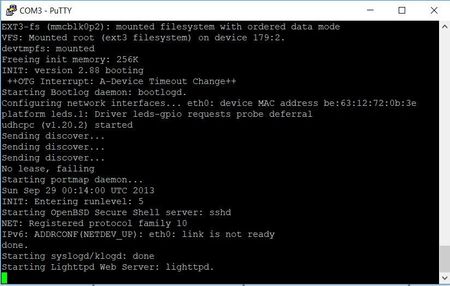
Bootup stuck at starting lighttpd web server: lighttpd
 7 years ago
Hello,
Even if you change the FPGA image (any customization), you still can use the sdcard after updating the following files:
1- rbf file, remove the old and replace it with the new one.
2- update uboot and preloader.
3- update the device tree.
I would suggest to backup the sdcard image first, you can use win32diskimager to read your sdcard, and store the factory image.
After that, you can generate the new rbf file, uboot and preloader with device tree.
This link will help you to check how to update the files above:
https://rocketboards.org/foswiki/Main/GettingStarted
Select your board, select your quartus version, and then select the flow.
You might not be able to see your board in the list, you can select Cyclone V SoC.
Thanks
 Occasional Contributor
Hi, thank you for your message. Terasic is not able to help as this is issue of LINUX booting and Terasic is not responsible for Linux issues. However, they have provided me with factory restored SD card image which is working fine and well now.
The problem was that whenever you modify your FPGA design then you have to modify all the boot structure like preboot image and device tree files etc. So, it is always better not to use SD card image from other websites and use factory SD card image provided by Terasic because the SD card image provided by Terasic is made so that it may work with every modified FPGA design.
- FawazJ_Altera7 years ago
Frequent Contributor
Hello,
Even if you change the FPGA image (any customization), you still can use the sdcard after updating the following files:
1- rbf file, remove the old and replace it with the new one.
2- update uboot and preloader.
3- update the device tree.
I would suggest to backup the sdcard image first, you can use win32diskimager to read your sdcard, and store the factory image.
After that, you can generate the new rbf file, uboot and preloader with device tree.
This link will help you to check how to update the files above:
https://rocketboards.org/foswiki/Main/GettingStarted
Select your board, select your quartus version, and then select the flow.
You might not be able to see your board in the list, you can select Cyclone V SoC.
Thanks

