Forum Discussion

 Contributor
boardtestsystem not run
Dear Support,
I installed quartus 21.3, on win10 64. I proved the usb cable is working by programming the FPGA on the A10GX dev board.
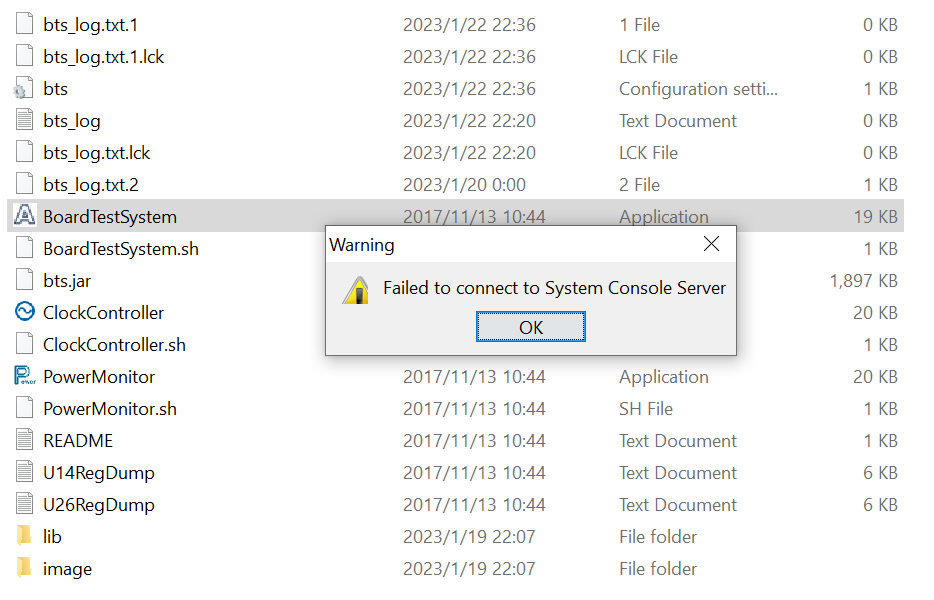
when I run BoardTesSystem.exe,
after I "select version directly" to PRD.
I got a pop up saying, "Failed to connect to system console server."
I guess I did something wrong, I have searched the database, but didn't find anything like directly to this error message, please help me get this BoardTest system.exe run.
Thank you,
David
7 Replies
 AR_A_Intel
Super Contributor
Hello
Welcome to INTEL forum. May I know, have you tested BTS with Quartus v15.1.2? If not, could you try it?
Based on my understanding, the manufactured board’s BTS for A10GX was built with Quartus v15.1.2. The error is possibly caused by the difference in system console of different Quartus revisions. Can refer to readme.txt file in BTS installation folder.
Also, could you help to set all DIP switch back to factory default state. You could refer to web regarding this.
There is also a log file in the BTS directory, customer can use this to check the reason of failure.
Report back if failure happen with the log file and error screenshot.
For privacy, you can reply/attach your file in private message
 dsun01
It's not easy to install a win7 or install a Quartus V15. I know most of the time there is no shortcut, if someone had met this problem before, it may save me hours of installation of outdated software. because it is for learning to board and tools in very short term.
attached is the log file and screen capture.
I hope someone understands what this line means.
SEVERE: java.io.IOException: Cannot run program "C:\intelFPGA_pro\21.3\quartus/sopc_builder/bin/system-console": CreateProcess error=2, The system cannot find the file specified
Thank you very much,
David
 Farabi_Altera
Regular Contributor
Hello,
Is this the board you are using now?
link : https://www.intel.com/content/www/us/en/products/details/fpga/development-kits/arria/10-gx.html
We will try debug at the same board. please confirm if this is the same board.
regards,
Farabi
- dsun01
yes, I will provide all information you need, thank you very much for helping.
by the way, I just installed a win7 system. and going to test it again on my win 7. will get back to you once I have results.
David
- dsun01
Hi Farabi,
I installed a win7 and Quartus 18.1.0. now I can run
boardtestsystem successfully.
it is good news that my board and process is good, it is a good step forward.
the bad news is that even on win7. I couldn't run Altera_pcie_gui.
I have another thread in the forum.
please have a look if you are familiar with the PCie and program.
Thank you very much.
David
- AR_A_Intel
Hi
Thanks for update. PCie program or related it is out of my expertise. I’m only familiar with board basic usage enquiry. Please be inform that we have different engineers to handle different field of specialty. If you need help on PCie program support/error debug, I suggest you to open/submit a new request for Intel support team to take a look into it.
Please accept my apologies for not being able to assist you fully as this is out of my expertise.
- AR_A_Intel
We have not heard from you and I hope that my last note clears up this matter. I will now transition this thread to community support. If you have a new question, feel free to open a new thread to get the support from Intel experts. Otherwise, the community users will continue to help you on this thread. Thank you.