Forum Discussion

 Occasional Contributor
FIM and BMC Firmware not available on Acceleration Board A10
 6 years ago
Hi,
Since your PAC card is from 1.0Beta version, you will need to update it to 1.1 version before proceeding to 1.2.
So you will need to update the board to 1.1 PV before updating to 1.2 PV. Sorry for the inconvenience.
Follow the "Identifying and Updating FIM" section of the 1.1PV version of the Intel Acceleration Stack Quick Start Guide for Intel Programmable Acceleration Card with Intel Arria 10 GX FPGA to first update to 1.1PV FIM (dcp_1_1.rpd).
Note: • It is acceptable to leverage the 1.2 OPAE packages when following the FIM update instructions from the 1.1PV version of the Intel Acceleration Stack Quick Start Guide for Intel Programmable Acceleration Card with Intel Arria 10 GX FPGA.
• 1.1PV runtime download package can be located here. For access to the previous version of the Intel Acceleration Stack Quick Start Guide for Intel Programmable Acceleration Card with Intel Arria 10 GX FPGA, refer to the "Intel Acceleration Stack Quick Start Guide for Intel Programmable Acceleration Card with Intel Arria 10 GX FPGA Archives" section.
2. Follow the instructions in the "Updating FPGA Flash and BMC Firmware" section in the current version of this document
 Regular Contributor
Hi,
May I know if you have configure the FPGA using bitstream from 1.2? Could you provide me the step that you used?
 FL6 years ago
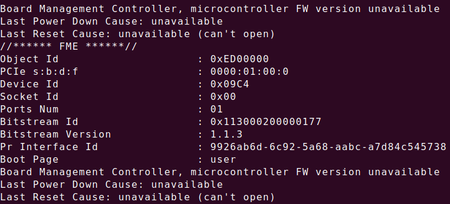
So first of all, after the update, I ran sudo fpgainfo fme to check FIM and BMC version
After that, I ran
sudo sh -c "echo 20 > /sys/kernel/mm/hugepages/hugepages-\2048kB/nr_hugepages"
to configure the number of system hugepages the FPGA fpgadiag utility requires.
Then I ran
sudo fpgabist $OPAE_PLATFORM_ROOT/hw/samples/nlb_mode_3/bin/\nlb_mode_3.gbsto configure and run diagnostics with NLB_3 AFU image and get the result of screenshot in previous reply.
On top of that, I ignored this issue and ran the hello_fpga example getting the result as shown in following screenshot:
Does it mean I've already brought up the card?

