Forum Discussion

 Occasional Contributor
FIM and BMC Firmware not available on Acceleration Board A10
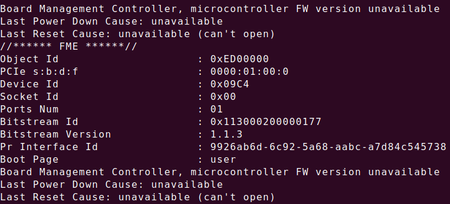
 6 years ago
Hi,
Since your PAC card is from 1.0Beta version, you will need to update it to 1.1 version before proceeding to 1.2.
So you will need to update the board to 1.1 PV before updating to 1.2 PV. Sorry for the inconvenience.
Follow the "Identifying and Updating FIM" section of the 1.1PV version of the Intel Acceleration Stack Quick Start Guide for Intel Programmable Acceleration Card with Intel Arria 10 GX FPGA to first update to 1.1PV FIM (dcp_1_1.rpd).
Note: • It is acceptable to leverage the 1.2 OPAE packages when following the FIM update instructions from the 1.1PV version of the Intel Acceleration Stack Quick Start Guide for Intel Programmable Acceleration Card with Intel Arria 10 GX FPGA.
• 1.1PV runtime download package can be located here. For access to the previous version of the Intel Acceleration Stack Quick Start Guide for Intel Programmable Acceleration Card with Intel Arria 10 GX FPGA, refer to the "Intel Acceleration Stack Quick Start Guide for Intel Programmable Acceleration Card with Intel Arria 10 GX FPGA Archives" section.
2. Follow the instructions in the "Updating FPGA Flash and BMC Firmware" section in the current version of this document
 Regular Contributor
Hi,
Since your PAC card is from 1.0Beta version, you will need to update it to 1.1 version before proceeding to 1.2.
So you will need to update the board to 1.1 PV before updating to 1.2 PV. Sorry for the inconvenience.
Follow the "Identifying and Updating FIM" section of the 1.1PV version of the Intel Acceleration Stack Quick Start Guide for Intel Programmable Acceleration Card with Intel Arria 10 GX FPGA to first update to 1.1PV FIM (dcp_1_1.rpd).
Note: • It is acceptable to leverage the 1.2 OPAE packages when following the FIM update instructions from the 1.1PV version of the Intel Acceleration Stack Quick Start Guide for Intel Programmable Acceleration Card with Intel Arria 10 GX FPGA.
• 1.1PV runtime download package can be located here. For access to the previous version of the Intel Acceleration Stack Quick Start Guide for Intel Programmable Acceleration Card with Intel Arria 10 GX FPGA, refer to the "Intel Acceleration Stack Quick Start Guide for Intel Programmable Acceleration Card with Intel Arria 10 GX FPGA Archives" section.
2. Follow the instructions in the "Updating FPGA Flash and BMC Firmware" section in the current version of this document
 Occasional Contributor
Thanks for the advice. I've successfully upgraded the card to 1.2 version.
Well, the new problem is when I moved on to the next part, Running FPGA Diagnostics, in the user guide and run the command sudo fpgabist $OPAE_PLATFORM_ROOT/hw/samples/nlb_mode_3/bin/\
nlb_mode_3.gbs it gave the result of Unknown AFU for available BIST Modes: /hw/samples/dma_afu/bin/dma_afu.gbs rather than the sample output.
What does this mean? Was I missing something?

