Forum Discussion

 Occasional Contributor
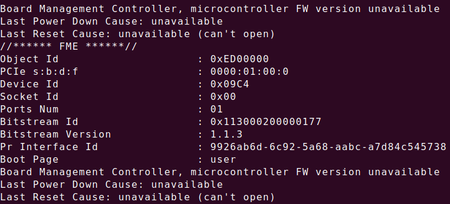
FIM and BMC Firmware not available on Acceleration Board A10
 6 years ago
Hi,
Since your PAC card is from 1.0Beta version, you will need to update it to 1.1 version before proceeding to 1.2.
So you will need to update the board to 1.1 PV before updating to 1.2 PV. Sorry for the inconvenience.
Follow the "Identifying and Updating FIM" section of the 1.1PV version of the Intel Acceleration Stack Quick Start Guide for Intel Programmable Acceleration Card with Intel Arria 10 GX FPGA to first update to 1.1PV FIM (dcp_1_1.rpd).
Note: • It is acceptable to leverage the 1.2 OPAE packages when following the FIM update instructions from the 1.1PV version of the Intel Acceleration Stack Quick Start Guide for Intel Programmable Acceleration Card with Intel Arria 10 GX FPGA.
• 1.1PV runtime download package can be located here. For access to the previous version of the Intel Acceleration Stack Quick Start Guide for Intel Programmable Acceleration Card with Intel Arria 10 GX FPGA, refer to the "Intel Acceleration Stack Quick Start Guide for Intel Programmable Acceleration Card with Intel Arria 10 GX FPGA Archives" section.
2. Follow the instructions in the "Updating FPGA Flash and BMC Firmware" section in the current version of this document
 Regular Contributor
Hi.
Could provide me the step you used and where it is stuck?
 FL6 years ago
Here are my steps: first executing script, then answering Y, typing 1, and providing the directory where I put the Bitware Tool. It always stuck on sudo setpci ... this step and quit.
- FL6 years ago
This is my specific log in terms of updating.
Starting the updating process:
sl@v-pc:~/inteldevstack/a10_gx_pac_ias_1_2_pv$ ./setup_fim_and_bmc.sh -b 01 -d 0 -f 0 -p /home/sl/inteldevstack/a10_gx_pac_ias_1_2_pv
Pre-requisites
- Intel FPGA driver and OPAE must be installed
- Bittware Tools must be installed
CentOS tool version: sudo yum install bw2tk-lite-2018.4.0.el7.x86_64.rpm
Ubuntu tool version: sudo dpkg -i bw2tk-lite-2018.4.0.u1604.amd64.deb
Bittware tools must be added to PATH; export PATH=/opt/bwtk/2018.4.0L/bin/:$PATH
- Only one PAC card must be connected to the host server using the Intel FPGA Download cable
- Do not interrupt the script flow, this could brick the board
!!!Exit(Ctrl- C) and Refer to the Intel Acceleration Stack for Intel Programmable Acceleration Card with Intel A10 GX FPGA Quick Start Guide if above steps are not completed
Do you want to continue with the FIM and BMC upgrade? (Y/n): y
Two part install process:
Part 1: Install FIM and program BMC application
<Power Cycle>; reboot is not sufficient
Part 2: Install BMC bootloader and update remainder of BMC application
Please type a selection or press Enter to accept default choice [ 1 ]: 1
Provide directory path to BMC firmware and Bootloader: /home/sl/inteldevstack
[sudo] password for sl:
>>> Running cmd:
bwconfig --scan=usb
Scanning for devices
[result]: Board Type (Name), Serial, VendorID, DeviceID, USB-Address
[0]: 0x5f (A10SA4) 203511 0x2528 0x0004 0x6
Updating the FIM Image
>>> Running cmd:
sudo fpgaflash user /home/sl/inteldevstack/a10_gx_pac_ias_1_2_pv/hw/blue_bits/dcp*.rpd 0000:01:00.0
flash size is 134217728
reversing bits
erasing flash
writing flash
reading back flash
verifying flash
flash successfully verified
>>> Running cmd:
bwmonitor --dev=0 --type=bmc --flags=0x81 --write
BMC flags set to 81
Mon Jul 13 15:19:46 2020
Disable AER for PCIe Root Port
>>> Running cmd:
sudo setpci -s 0000:00:01.0 ECAP_AER+0x08.L=0xFFFFFFFF
setpci: 0000:00:01.0: Extended capability 0001 not found
Command: "sudo setpci -s 0000:00:01.0 ECAP_AER+0x08.L=0xFFFFFFFF" exited with error code: 1
Here is where the error occurs and quits the script.

