User Profile

ToddW
 Occasional Contributor
Joined 8 years ago


User Widgets
Contributions
Cyclone V (5CGTFD9) 4X PCIe Connections for Data Lines and RefClk
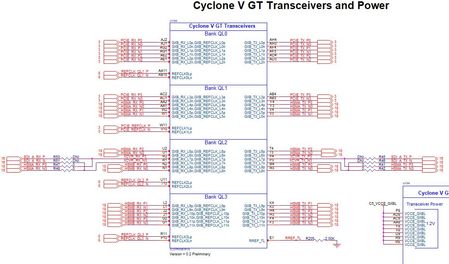
I need some guidance on properly connecting PCIe interface to the XCVR banks on a Cyclone V D9 (12 XCVR channels) to get PCIe Gen2 X4 (5Gbps) signaling to work correctly. I copied the C5 DVK layout, but am only getting 2.5 Gbps rates and only 1-2X lanes are connecting. The C5 datasheet (cv_5v3-683586-670578) for XCVRs for this device in Figure 1-5 describes the XCVR configuration for our Cyclone V chip (a GT device with 12 XCVR channels). It says that Ch1-2 in both GXB_L0 and GXB_L2 are the "PCIe Hard IP" regions. However, the C5 DVK schematic (which I copied for our design), shows the PCIe signals connected to GXB_L0/L1 Channels 0-3. Channels 0 and 3 are not part of the PCIe Hard IP. Consequently, there appears to be a conflict between how the DVK PCIe lines are connected vs the recommended connection guidelines from the datasheet. Please clarify the proper connections to realize a PCIe 4X Gen2 (5Gbps). Another question that I have is what is the best reference clock input to enable our 4X 5Gbps configuration? The C5 DVK has the PCIe RefClk pair coming into REFCLK1L (pins W11/V10). Should this be connected to REFCLK0L (pins AA11/AB10)? The "Configuration via Protocol (CvP) datasheet (ug_cvp-683889-666868) states in Notes 2 & 3 of Figure 1-1: 2. PCIe Hard IP block (bottom left) for CvP and other PCIe applications. 3. PCIe Hard IP block only for PCIe applications and cannot be used for CvP.1.2KViews0likes5CommentsWindows 10/11 PCIe Driver for Cyclone V Memory Mapped design
Is anyone aware of any other driver platforms other than Jungo that support a PCIe interface into Intel’s FPGAs? We are implementing two peripherals in a PXI Express (Compact PCIe) rackmount solution. The peripherals both are using a Cyclone V GX FPGA and are identical from a PCIe backplane standpoint. Hopefully, considering the importance of the PCIe platform, Intel has come up with a standardized driver to support the PCIe interface into their FPGAs. I see this as an issue that should be a priority to Intel. We are running into ongoing issues with Jungo in terms of responsiveness as well as the capabilities of their drivers. Most recently, we have encountered issues with getting two peripherals that both are PCIe based (Gen2 x4) working in the same chassis. Thanks in advance.2KViews0likes4CommentsRe: Uniphy Platform Designer Error: "Cannot find sequencer/sequencer.elf"
I copied the text of your post and sent it to the Intel engineer that was helping me with this. It's been a couple of months since I've heard anything from them. Your investigation into the problem sure seems plausible to me. Thanks, --Todd8.4KViews0likes1CommentRe: Uniphy Platform Designer Error: "Cannot find sequencer/sequencer.elf"
I tried your proposed solution. I also have a space in my user account name. So I created a local name without spaces and tried re-running the project. No joy. Same result as before. Intel engineering sent me a patch to try. It didn't work either. This is happening on two separate computers. Both have Ubuntu 18.04 and WLS v1 installed. Both successfully run Nios Command Shell from the Start menu. I don't understand why this commonly reported error has not been successfully addressed for the past 3-4 years.8.9KViews0likes0CommentsRe: Uniphy Platform Designer Error: "Cannot find sequencer/sequencer.elf"
I had an online meeting with a couple support engineers at Intel regarding this topic. It appears they concur this is potentially a bug and they have generated a HSD (whatever that is) and submitted to Intel Engineering for review/follow-up. Time to watch some paint dry. For now, I am reverting to Quartus Prime Std v18.1 so I can continue to work my project.9.2KViews1like0CommentsRe: Uniphy Platform Designer Error: "Cannot find sequencer/sequencer.elf"
Yes. In my opening paragraph of this forum post I said, Prior to Quartus Prime Std v19, Intel used Cygwin for the Nios II Command Shell. Version 19.1 and beyond, they switched to using Ubunto 18.04 TLS and Windows Subsystem for Linux (WSL) to operate the Nios Command Shell. Here's a quote from the following support article. https://www.intel.com/content/www/us/en/support/programmable/articles/000074066.html "Starting with the Nios® II EDS in the Intel® Quartus® Prime Pro Edition software version 19.2 and Intel® Quartus® Prime Standard Edition software version 19.1, the Cygwin component in the Windows* version of Nios II EDS has been removed and replaced with WSL." So, prior to Quartus v19, the Platform Designer used Cygwin instead of WSL to run the Nios Shell used to generate the projects.9.3KViews1like0CommentsRe: Uniphy Platform Designer Error: "Cannot find sequencer/sequencer.elf"
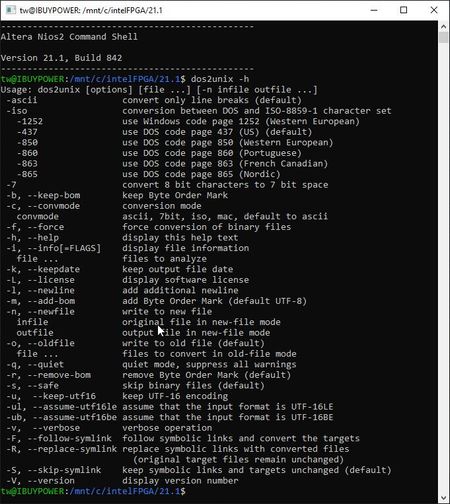
Correct. I had already done the steps shown in the link you posted. The Terasic article is actually more detailed than the one you posted. Even after carefully going through all of the steps described in the articles, I am still getting the same error as originally mentioned. I am able to successfully run Nios II Command Shell from the Start Menu (even not as an Administrator). See below. However, I am still getting the "Cannot find sequencer/sequencer.elf" error when attempting to compile my DDR3 Platform Designer project.9.5KViews1like0CommentsRe: Uniphy Platform Designer Error: "Cannot find sequencer/sequencer.elf"
Thank you for your response. However, I have installed/removed/reinstalled Ubunto 18.04 and WSL while carefully following the instructions in the support article you mentioned as well as the more thorough Terasic article I mention above. I am able to run Nios II Command Shell by itself from the Start menu. It recognizes typed commands as expected. I have verified that the WSL is set to version 1. I have verified the Environment variables are pointing to the correct locations: QUARTUS_ROOTDIR C:\intelFPGA\21.1\quartus QSYS_ROOTDIR C:\intelFPGA\21.1\quartus\sopc_builder\bin SOPC_KIT_NIOS2 C:\intelFPGA\21.1\nios2eds I am still receiving the same errors as mentioned earlier. Is there a means to interrupt the flow to just prior to the error occurring to see what the state of the machine is at that point?9.5KViews1like0CommentsRe: Uniphy Platform Designer Error: "Cannot find sequencer/sequencer.elf"
Here are some helpful links I've uncovered from others on the issue. However, even after carefully following the instructions contained in these links, I am still having the same problem. https://www.terasic.com.tw/wiki/Getting_Start_Install_WSL https://wiki.trenz-electronic.de/display/PD/Install+Intel+Development+Tools https://medium.com/@jpablo.pinilla/intel-quartus-19-1-university-program-extensions-and-nios-ii-command-shell-for-windows-10-8a37182fc07b9.6KViews1like0Comments