User Profile

VGopa7
 New Contributor
Joined 7 years ago


User Widgets
Contributions
Re: Issue using "External Memory Interface Intel Arria 10 FPGA IP" in Platform designer
I don't think it is a bad installation issue, The perl.exe is present in that path. As we observe the path from the error log, i see that there us an extra '/' in the path which might cause this issue. Is this path emitted by Quartus ?1KViews0likes0CommentsIssue using "External Memory Interface Intel Arria 10 FPGA IP" in Platform designer
Hi, I am using the "External Memory Interface Intel Arria 10 FPGA IP" in my Platform designer using Intel Quartus pro Version 23.3 (windows operating system). I am getting this below error when i try to Generate HDL for this ip. Info: system_soc_ddr4_emif: "Naming system components in system: system_soc_ddr4_emif" Info: system_soc_ddr4_emif: "Processing generation queue" Info: system_soc_ddr4_emif: "Generating: system_soc_ddr4_emif" Info: system_soc_ddr4_emif: "Generating: system_soc_ddr4_emif_altera_emif_1922_7piftvy" Info: system_soc_ddr4_emif: "Generating: system_soc_ddr4_emif_altera_emif_arch_nf_191_jdgfjqq" Info: system_soc_ddr4_emif: "Generating: system_soc_ddr4_emif_altera_emif_ecc_191_6wg4omy" Info: system_soc_ddr4_emif: "Generating: system_soc_ddr4_emif_altera_ip_col_if_1911_rqtxiaa" Info: system_soc_ddr4_emif: "Generating: system_soc_ddr4_emif_altera_emif_cal_slave_nf_191_rmzieji" Info: system_soc_ddr4_emif: "Generating: system_soc_ddr4_emif_altera_mm_interconnect_1920_mnl7iba" Info: system_soc_ddr4_emif: "Generating: altera_emif_ecc_core" Info: system_soc_ddr4_emif: "Generating: system_soc_ddr4_emif_altera_avalon_mm_bridge_2001_k2bg7dq" Info: system_soc_ddr4_emif: "Generating: system_soc_ddr4_emif_alt_mem_if_jtag_master_191_rksoe3i" Info: system_soc_ddr4_emif: "Generating: system_soc_ddr4_emif_altera_mm_interconnect_1920_mlnx7ry" Info: system_soc_ddr4_emif: "Generating: system_soc_ddr4_emif_altera_avalon_onchip_memory2_1938_eldd3ri" Error: ioaux_soft_ram: Can't find path executable Y:/share/apps/hdltools/altera/23.3-mw-0_pro/windows/quartus/bin64//perl/bin/perl.exe shipped with Quartus Error: Generation stopped, 15 or more modules remaining Info: system_soc_ddr4_emif: Done "system_soc_ddr4_emif" with 24 modules, 80 files Error: Generation failed with exit code 1: 2 Errors, 2 Warnings Info: Finished: Create HDL design files for synthesis Info: Generation of D:/DDRDesign/quartus_prj/qsys_prj/ip/system_soc/system_soc_ddr4_emif.ip (system_soc_ddr4_emif) took 46545 ms Info: Starting: Generate IP Core Documentation Info: No documentation filesets were found for components in system_soc. No files generated. Info: Finished: Generate IP Core Documentation Info: Finished: Platform Designer system generation Note: I don't see any issue when i try the same in Linux Platform. In Linux it always passes.1.1KViews0likes4CommentsTcl command to change the output clock frequency of the PLL
Hi, I am using a PLL in my platform designer design. I want to change one of the output clock frequency of the PLL using tcl command. What is the tcl command to change the output clock frequency of the PLL ? I am using Intel Quartus Pro 23.3 Note: I use the below command to change the clock frequency in Quartus Standard. set_instance_parameter_value iopll_0 {gui_output_clock_frequency1} {125.000000} The same command does not work in Quartus pro. Any suggestions on this issue? Thanks1.2KViews0likes3CommentsTool version number not displaying properly in Quartus Standard 22.1.1
Hi, I am using the latest version of Intel Quartus Standard Version 22.1.1. The version number is not displayed properly when i try to execute the below commands ------------------------------------------------------------------------------------------ D:\Altera\22.1.1\Windows\quartus\bin64>quartus_sh -v Quartus Prime Shell Version 22.1std.1 Build 917 02/14/2023 SC Standard Edition Copyright (C) 2023 Intel Corporation. All rights reserved. ------------------------------------------------------------------------------------------ D:\Altera\22.1.1\Windows\quartus\bin64>quartus_sh -h Quartus Prime Shell Version 22.1std.1 Build 917 02/14/2023 SC Standard Edition Copyright (C) 2023 Intel Corporation. All rights reserved. Usage: ------ quartus_sh [-h | --help[=<option|topic>] | -v] quartus_sh -g | --gui [<project_name>] quartus_sh <other options> quartus_sh -t <script file> [<script args>] quartus_sh -s quartus_sh --tcl_eval <tcl command> Description: ------------ Options: -------- -f <argument file> --archive --clean --flow --ip_upgrade --lower_priority --platform --platform_install --prepare --qboard --qhelp --qslave --relcon --restore --set --simlib_comp --write_flow_template Help Topics: ------------ arguments return_codes tcl For more information on specific options, use --help=<option|topic>. ------------------------------------------------------------------------------------------ Is there any other command to get the clear tool version number usinIntel Quartus Standard 22.1.1 ? Thanks & Regards Venu1.2KViews0likes2CommentsError in Qsys with AXI4LiteSlave component
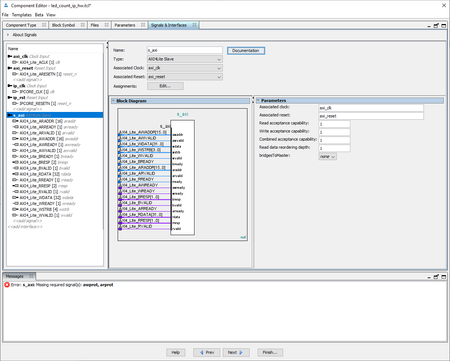
Hi, I am using Intel Quartus Standard 21.1. I created a new component with Type as AXI4Lite Slave as shown in the below screenshot. I am getting this error: Missing required signal(s): awprot, arprot. Is this a know issue in Intel Quartus Standard ? Note: But when I try the same in Intel Quartus Pro 22.4. I don't get any error.1.2KViews0likes3Commentsqpro.exe is missing in the new version of Quartus Pro 22.4
Hi, In the latest version of Quartus Pro 22.4, I observed that the qpro.exe is missing in the installed directory path E:\intelFPGA_pro\22.4\quartus\bin64. The older version 22.3 has this qpro.exe in the installed path. I observed this change in new version of Quartus pro 22.4 What is the executable to launch Quartus pro in this latest version 22.4 ? Thanks Venu1.9KViews0likes3CommentsRe: Adding Library per file in QSYS component _hw.tcl file
Hi, My HDL files are from a different libraries. Where to specify the library name for the HDL files in the component editor window? Can you share the step in the component editor where we can specify the library name for the HDL file. Thanks2.4KViews1like1CommentAdding Library per file in QSYS component _hw.tcl file
Hi, I am working on QSYS (Platform designer) and i need to add few of my IPs in .qsys project. I created a _hw.tcl for my IP and specified all the required .vhd files in this _hw.tcl. (using "add_fileset_file" command) But these .vhd files are present in different libraries (different folder path). When I use QSYS(Platform designer) to integrate my IP, I see QSYS copies all files from my IP folder to one single directory. The result is that the "Analysis & Synthesis" process in Quartus fails. (Error (13785): VHDL Use Clause error at mytopdesignfile.vhd(33): design library "mylib1" does not contain primary unit "mySubDesign" file). How to specify the library name in the _hw.tcl file ? Is there any workaround for this issue ? I am working on “Intel Quartus Pro Version 21.3” Thanks2.6KViews0likes7Comments