User Profile

msaideroglu
 New Contributor
Joined 2 years ago


User Widgets
Contributions
- 1.5KViews0likes0Comments
Re: OpenCL host failed
Hi. I'm using Ubuntu 22.04. I'm aware that my OS doesn't supported according to release notes. However Quartus 19.2 includes a10_ref and s10_ref BSP's in hld/board directory. Newer versions doesn't come with a reference BSP inside their hld/board directory. I found a code update from some of users in Intel Community for newer kernels with newer OS versions. So, I did that code changes and my gcc compiled it without error. About suggested steps: 1. Set the environment variable AOCL_BOARD_PACKAGE_ROOT to the correct board package. (Sure.) 2. Install the driver from the selected board package.(Jtag programmer does this and doesnt give any error.) 3. Properly install the device in the host machine.(gcc compiles driver during installation without error.) So for newer versions of Quartus Prime, can I find a reference BSP for Arria10 and Stratix10 FPGAs? Thanks.1.6KViews0likes0CommentsRe: Intel OPAE with Stratix 10 DevKit
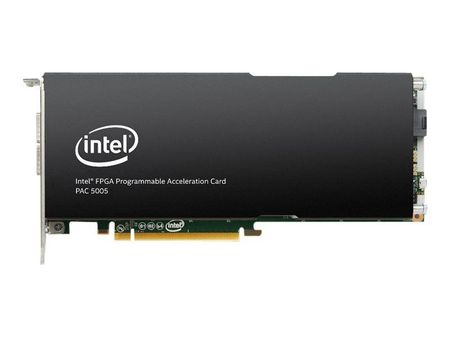
Hi Kian, Thanks for return. For OPAE related link you shared, it shows board installation and server environment setup of Intel® FPGA PAC D5005 which is an accelerator card with Stratix 10. The product's image is: However I have a Stratix 10 Development Kit FPGA. You can see its image below: Does OPAE drivers support my Stratix 10 DevKit and can I use it as accelerator? Thanks Regards Sait878Views0likes1CommentOpenCL host failed
Hi, I'm using Arria10 DevKit to run OpenCL on it with OpenCL SDK. I followed the guide carefully however aocl flash acl0 boardtest.aocx gives Device not part of know packages. -------------------------------------------------------------------- ICD System Diagnostics -------------------------------------------------------------------- Using the following location for ICD installation: /etc/OpenCL/vendors Found 1 icd entry at that location: /etc/OpenCL/vendors/intel.icd the following OpenCL libraries are referenced in the icd files: /usr/lib/x86_64-linux-gnu/intel-opencl/libigdrcl.so checking LD_LIBRARY_PATH for registered libraries: /usr/lib/x86_64-linux-gnu/intel-opencl/libigdrcl.so was registered on the system. Using the following location for fcd installations: /opt/Intel/OpenCL/Boards Found 1 fcd entry at that location: /opt/Intel/OpenCL/Boards/a10_ref.fcd the following OpenCL libraries are referenced in the fcd files: /home/msaid/intelFPGA_pro/19.2/hld/board/a10_ref/linux64/lib/libaltera_a10_ref_mmd.so checking LD_LIBRARY_PATH for registered libraries: /home/msaid/intelFPGA_pro/19.2/hld/board/a10_ref/linux64/lib/libaltera_a10_ref_mmd.so was registered on the system. ERROR: Query for number of platforms failed -1001 ERROR: OpenCL host failed -------------------------------------------------------------------- ICD diagnostics FAILED -------------------------------------------------------------------- -------------------------------------------------------------------- BSP Diagnostics -------------------------------------------------------------------- -------------------------------------------------------------------- Warning: No devices attached for package: /home/msaid/intelFPGA_pro/19.2/hld/board/a10_ref -------------------------------------------------------------------- -------------------------------------------------------------------- Warning: No devices attached for package: /home/msaid/intelFPGA_pro/19.2/hld/board/a10_ref -------------------------------------------------------------------- Call "aocl diagnose <device-names>" to run diagnose for specified devices Call "aocl diagnose all" to run diagnose for all devices Also aocl diagnose gives -------------------------------------------------------------------- ICD System Diagnostics -------------------------------------------------------------------- Using the following location for ICD installation: /etc/OpenCL/vendors Found 1 icd entry at that location: /etc/OpenCL/vendors/intel.icd the following OpenCL libraries are referenced in the icd files: /usr/lib/x86_64-linux-gnu/intel-opencl/libigdrcl.so checking LD_LIBRARY_PATH for registered libraries: /usr/lib/x86_64-linux-gnu/intel-opencl/libigdrcl.so was registered on the system. Using the following location for fcd installations: /opt/Intel/OpenCL/Boards Found 1 fcd entry at that location: /opt/Intel/OpenCL/Boards/a10_ref.fcd the following OpenCL libraries are referenced in the fcd files: /home/msaid/intelFPGA_pro/19.2/hld/board/a10_ref/linux64/lib/libaltera_a10_ref_mmd.so checking LD_LIBRARY_PATH for registered libraries: /home/msaid/intelFPGA_pro/19.2/hld/board/a10_ref/linux64/lib/libaltera_a10_ref_mmd.so was registered on the system. ERROR: Query for number of platforms failed -1001 ERROR: OpenCL host failed -------------------------------------------------------------------- ICD diagnostics FAILED -------------------------------------------------------------------- -------------------------------------------------------------------- BSP Diagnostics -------------------------------------------------------------------- -------------------------------------------------------------------- Warning: No devices attached for package: /home/msaid/intelFPGA_pro/19.2/hld/board/a10_ref -------------------------------------------------------------------- Vendor: Intel(R) Corporation Found no active device installed on the host machine. Please make sure to: 1. Set the environment variable AOCL_BOARD_PACKAGE_ROOT to the correct board package. 2. Install the driver from the selected board package. 3. Properly install the device in the host machine. 4. Configure the device with a supported OpenCL design. 5. Reboot the machine if the PCI Express link failed. DIAGNOSTIC_FAILED -------------------------------------------------------------------- Call "aocl diagnose <device-names>" to run diagnose for specified devices Call "aocl diagnose all" to run diagnose for all devices1.8KViews0likes7CommentsIntel OPAE with Stratix 10 DevKit
Hi, I had a question about Intel OPAE Drivers. I have Stratix 10 Development Kit FPGA in my hand. I want to use that FPGA as an OpenCL accelerator with its PCIe ports. Currently Intel Devcloud had Stratix 10 and Arria 10 PAC Cards. Do I have to use a PAC(Programmable Accelerator Card) instead of a standalone FPGA such as Stratix 10 DevKit which is mine. Or is there any way to use my FPGA as an accelerator same as Intel PACs? Thanks, SaitSolved1.1KViews0likes5Comments