User Profile

SeanAB
 Occasional Contributor
Joined 4 years ago


User Widgets
Contributions
Re: ALTPLL will not get installed in Platform Builder
@KennyTan_Altera thank you for the response. Replying to both responses: 1. I am using Quartus Prime Lite 24.1 for a MAX10 10M50 Evaluation Kit. Pro edition 25.1.1 is not possible. 2. There is no error message. It just closes without adding the ATPLL After implementing the fix shared in an older Stack Exchange post, the wizard completes successfully.1.1KViews0likes0CommentsRe: ALTPLL will not get installed in Platform Builder
Can confirm that the wizard installs the ALTPLL in Platform Designer in Linux. I found this older post that is exactly what I am seeing: fpga - Problem in adding IP to Platform Designer - Electrical Engineering Stack Exchange1.3KViews0likes0CommentsALTPLL will not get installed in Platform Builder
Quartus Prime Lite 24.1 on Windows 1. I am able to add ALTPLL as a component to blank project without issue. The wizard builds the files no problem. I was able to do the basic blink mux counter project. 2. Platform Designer is another story. When attempting to add ALTPLL via Platform Designer, click Finish in the Wizard and the component gets cleared out. In version 23.1 there was a fatal error per this message: Why do I get a fatal error when creating an ALTPLL IP? Now, there is no error, just nothing. Is there a work around?1.5KViews0likes7CommentsRe: On Board JTAG Debug failed in RiscFree IDE NIOS V Cyclone 10LP
Thank you for the follow up. As stated before, the external JTAG tool is working ok as a workaround. When Standard/Lite 24.1 is released, I will retest. Hopefully, the 24.1 fixes the connection issue and the MegaWizard issue as well.938Views0likes0CommentsRe: On Board JTAG Debug failed in RiscFree IDE NIOS V Cyclone 10LP
@JingyangTeh_Altera Thanks for the suggestion. I lowered the frequency to 6, 4 , 2 , and 1, and the results were the same. If this is a RiscFree IDE version compatibility issue, I am not too worried about it since this is an older board. I have the EthernetBlaster II working, which is fine for my needs.1.1KViews0likes0CommentsOn Board JTAG Debug failed in RiscFree IDE NIOS V Cyclone 10LP
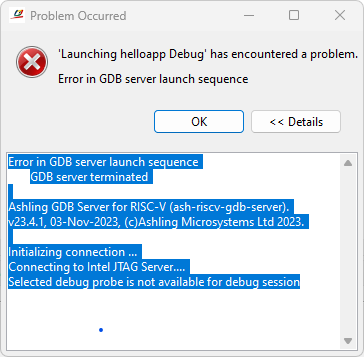
Strange issue with JTAG debug connection with RiscFree IDE Basics: Board: Intel® Cyclone® 10 LP Evaluation Kit Quartus 23.1.1 RiscFree™ IDE for Intel FPGAs v23.4.1, 3rd Nov 2023 Host system: Windows 11 The application is a simple NIOS V hello world. I am able to program the .sof file over the boards Altera USB-Blaster II. Debugging the application in RiscFree IDE result in an error "Selected debug probe is not available for debug session" I have the MAX 10 10M08 Evaluation kit, which required an external JTAG to program the board. I used the EthernetBlaster II to program this board with a similar NIOS V hello world program without issue. I switched to use EthernetBlaster II on the Cyclone® 10 LP Evaluation Kit and I was able to debug. The response was a little slow, but it worked. What is the issue with the on-board USB Blaster II not working?1.3KViews0likes7CommentsRe: Riscfree complains about missing build program for MinGW Makefiles
@EBERLAZARE_I_Intel @Gino_Ashling I think I resolved the issue. I imported the project instead of creating an empty cmake project using the same name as the NIOS V app creation tool. With NIOS II, the Eclipse tool had the BSP and app creation process worked seamlessly. I understand all this is new, but NIOS V feels like a step backwards at the moment. I am using Quartus Prime Std Lite 22.1 - and I am running into the IP License issue. I need to get the Standard edition to complete the task.2.5KViews0likes0CommentsRe: Riscfree complains about missing build program for MinGW Makefiles
@EBERLAZARE_I_Intel This video is what I am loosely following: Navigating Nios V - YouTube I made a little progress by going into the properties, and I see some settings for tool chain editor. Please see attached picture. I don't even know how that would be creating the error. I closed the program and restarted, and now, I get build error that I have seen before and know how to fix.2.6KViews0likes0CommentsRiscfree complains about missing build program for MinGW Makefiles
I created a NIOS V project with Quartus Prime Lite edition. Used the NIOS V command line to create the BSP using the BSP editor, and then create application project. Using RiscFree IDE, I am able to open the project, but building the project results in an error: "CMake Error: CMake was unable to find a build program corresponding to "MinGW Makefiles". CMAKE_MAKE_PROGRAM is not set. You probably need to select a different build tool." CMAKE was already installed, and I see another version that comes with RiscFree. I thought RiscFree contains all the tools. What am I missing? Windows 10 is the development OS.Solved2.8KViews0likes6Comments