User Profile

skbeh
 Contributor
Joined 4 years ago


User Widgets
Contributions
Re: JESD204B on Cyclone V SE
Hi Peter Cyclone V SE device doesn't support JESD204B. JESD204B is an interface protocol that required transceiver channels, it won't works if the selected FPGA doesn't have transceiver channels. For Cyclone V family, need to choose GX or GT device to support JESD204B up to 5000 Mbps.4.2KViews0likes1CommentAgilex® 7 P-Tile Multi-Channel DMA Debug Toolkit isn't working in Quartus® v22.4
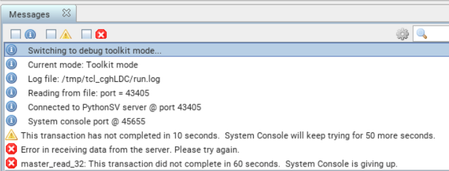
This is an issue sharing of Agilex P-tile MCDMA PCIe Debug Toolkit : Agilex® 7 P-tile Multi Channel DMA Intel® FPGA IP for PCI Express Debug Toolkit isn't working for Gen4 1x8 in Quartus® v22.4. However the P-Tile MCDMA DTK is working fine in Gen4 1x16. Gen4 1x8: Not able to open Toolkit as it throws a timeout error. This problem is planned to be fixed in future release of Quartus® Pro software version. For more information about P-tile MCDMA PCIe IP, refer to the 'Multi Channel DMA Intel® FPGA IP for PCI Express User Guide' https://www.intel.com/content/www/us/en/docs/programmable/683821/23-1/before-you-begin.html18KViews1like4CommentsRe: JESD204B deassembler
Hi David The suggestion would be generate the JESD204B design example. Refer to the design example for the connection between transport layer and IP core. Choose the closest allowable parameter values for generation. Modify the post-generated design parameters manually in the Quartus software to match your desire parameter settings. The generated JESD design example has a transport_layer folder with 4 RTL files. 1) For information about the path data remapping in the Transport Layer. Refer to https://www.intel.com/content/www/us/en/docs/programmable/683094/22-1/design-example-user-guide.html For example Table 19, case M=4, S=1 where F=2, F2_FRAMECLK_DIV=2, user have to reorder the samples at application layer so it inputs correct data format to the transport layer and then generate expected Data Out as indicated in table below. The data mapping in Table 19 jesd204_tx_datain[127:0]: jesd204_tx_datain[127:0] = {{F14F15, F10F11,F6F7, F2F3}, {F12F13, F8F9,F4F5, F0F1}} is equivalent to jesd204_tx_datain[127:0] = {{M3S0, M2S0,M1S0, M0S0}, {M3S0, M2S0,M1S0, M0S0}} 2) Refer to section 'Customizing the Design Example' on page 50 of below user guide for more information about customizing the design example. JESD204B Intel® Arria 10 FPGA IP Design Example User Guide https://www.intel.com/content/www/us/en/docs/programmable/683113/5.2KViews0likes0CommentsRe: JESD204B deassembler
Hi David The JESD204B IP does not incorporate the Transport Layer that controls the frame assembly and disassembly. The Transport Layer and test components are provided as part of a design example component where you can customize the design for different converter devices. Hence customer need to build/modify per their use case.5.3KViews0likes1CommentRe: JESD204B IP (RX) - K28 character not recognized
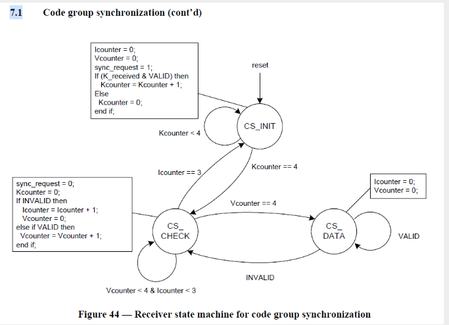
Hi Roman Regarding the questions about rx_status4 and rx_status5 registers: rx_status4 is the current state of the "Code Group Synchronization" state machine from the JESD204B spec shown here: The encoding is as follows: CS_INIT = 2'b00 CS_CHECK = 2'b01 CS_DATA = 2'b10 Similarly, rx_status5 reflects the current state of the "Frame Synchronization" state machine shown here: Note that in practice, these (2) registers might not necessary to be used for any meaningful debug. The suggestion is to use the rx_err0 and rx_err1 registers and perhaps a signaltap of the PCS data and status bits as shown in Figure 33 of the JESD204B user guide.1.9KViews0likes0CommentsR-Tile Avalon Streaming Intel FPGA IP for PCIe Debug Toolkit fails to work in v22.4
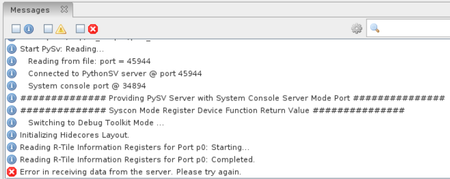
This is an issue sharing for Agilex R-tile PCIe: The Rtile PCIe Debug Toolkit fails to launch in Quartus v22.4 with below message: "Error in receiving data from the server? Please try again." The steps to run the PCIe Debug Toolkit are documented here: https://www.intel.com/content/www/us/en/docs/programmable/683501/22-4-8-0-0/launching-the-r-tile-debug-toolkit.html Once the Debug Toolkit is initialized and loaded, you will see the following message in the Messages window: To work around this problem, download and install patch 0.14 for the Intel® Quartus® Prime Pro Edition Software version 22.4. https://www.intel.com/content/www/us/en/support/programmable/articles/000094124.html This issue has been fixed in v23.1 and onwards.1.1KViews0likes0CommentsRe: JESD204B IP (RX) - K28 character not recognized
Hi Roman It looks like you are facing SYNCN signal not de-aserted issue, hence the K28 character not being recognized. You can refer to below Fault Tree Analysis (FTA) of JESD204B SYNCN Signal to determine the possible root causes. Fault Tree Analysis (FTA) JESD204B SYNCN Signal Not De-asserted link: https://community.intel.com/t5/FPGA-Wiki/FTA-JESD204B-SYNCN-Signal-Not-De-asserted-Issue/ta-p/735963 This FTA_JESD204B_sync_n_not_de-assert consists of a FTA diagram and table used to debug and root cause the SYNC_N signal not de-asserted issue happens in the JESD204B subsystem. In the FTA diagram, multiple hypothesis are made based on the failure symptom as described. For each of the hypothesis, it can have 2nd level or up to 3rd level suspects. Hope this helps. Regards Soon2KViews0likes0Comments