User Profile

RolandoS_Altera
 Occasional Contributor
Joined 4 years ago


User Widgets
Contributions
Release 26.1.1
Version: Release 26.1.1 PRO Quartus Build/TAG: B130/QPDS26.1.1_REL_GSRD_PR Release Date: August 17, 2026 Device Affected: Agilex™ 3, Agilex™ 5, Agilex™ 7, Startix® 10 Release Type: Major release/Binary release Binary Release Path: http://releases.rocketboards.org/2026.08/ Release Page: https://github.com/altera-fpga/gsrd-socfpga/releases/tag/QPDS26.1.1_REL_GSRD_PR Major Features Released Agilex™ 5 XEN Hypervisor 5 System Example Design https://altera-fpga.github.io/rel-26.1.1/virtualization/hypervisors/xen/ug-xen-agx5e-premium-065b/ , https://altera-fpga.github.io/rel-26.1.1/virtualization/hypervisors/xen/ug-xen-agx5e-premium-065a/ Agilex™ 5 RYO OPTE System Example Design Agilex™ 5 Quartus Reference Design using VDS Agilex™ 3 Time-Sensitive Networking (TSN): PHY configuration 2 (RGMII from FPGA HVIO) System Example Design Agilex™ 5 Performance Optimized Baseline SED support Agilex™ 5 DataMover / Bridge and Memory Benchmark System Example Design https://altera-fpga.github.io/rel-26.1.1/embedded-designs/agilex-5/e-series/premium-065a/data-mover/ug-data-mover-agx5e-premium-065a/ Agilex™ 3 support of FreeRTOS Agilex™ 5 Terasic DE25-Nano Board System Example DesignRelease 26.1 PRO
Version: Release 26.1 PRO Quartus Build/TAG: B110/QPDS26.1_REL_GSRD_PR Release Date: April 13, 2026 Device Affected: Agilex™ 3, Agilex™ 5, Agilex™ 7, Startix® 10, Arria® 10 Release Type: Major release/Binary release Binary Release Path: http://releases.rocketboards.org/2026.04/ Release Page: https://github.com/altera-fpga/gsrd-socfpga/releases/tag/QPDS26.1_REL_GSRD_PR Major Features Released Support of SD/eMMC High Speed Modes (SDR104/HS200/HS400) for the in Agilex™ 5 and Agilex™ 3. FreeRTOS release for Agilex™ 5 and Agilex™ 3. Released by 3rd party partner. Support of CPU Benchmarks applications as part of the Agilex™ 5 baseline system example design. Support Mainline + Latest LTS Yocto versions Provide a System Reference Design that boots from eMMC for Agilex™ 7 F-Series Transceiver production Dev kit (agf014e_si_devkit) and for Stratix® 10 H-Tile DevKit (DK-SOC-1SSX-H-D). Provide a Baseline System Reference Design for Agilex™ 5 Premium (SD Card, QSPI, Debug, eMMC and NAND) and Modular (SD Card, QSPI) Production development kits.145Views0likes0CommentsRelease 25.3.1 PRO
Version: Release 25.3.1 PRO Quartus Build/TAG: B100/QPDS25.3.1_REL_GSRD_PR Release Date: January 16, 2026 Device Affected: Agilex™ 3, Agilex™ 5, Agilex™ 7 Release Type: Major release/Binary release Binary Release Path: http://releases.rocketboards.org/2026.01/ Release Page: https://github.com/altera-fpga/gsrd-socfpga/releases/tag/QPDS25.3.1_REL_GSRD_PR Major Features Released Roll-your-own Linux GSRD 2.0 for Agilex™ 5 PDK OOBE DC on baseline design. Created the GSRD 2.0 rol-your-own Linux script for the Agilex™ 5 E-Series Premium DevKit with OOBE daughtercard for the GHRD 2.0 baseline design. Removed Legacy GSRD from Agilex™ 5 Premium Development kit + OOB Daughter card, keeping only Baseline (GSRD 2.0).123Views0likes0CommentsRe: Why do I intermittently see reboot failure in the u-boot stage when running the Arria 10?
Hi ktabacchi The fix for this issue was deployed in 25.3.1 release. You can find this in the Fixed Issues list. The commit seems to be related to the HSD: 15018450482-2. Thanks Rolando64Views0likes0CommentsRe: Linux not booting - can't get kernel image
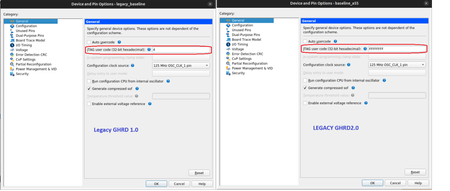
Hi pmarques From this thread, I see the the JTAG_USER_CODE is being set a 4 as it was set with that value in the example design used for the SD_CARD daughter card. I think that in the new design, this should be either 0 or undefined: You can find this value from Quartus in the Assignments >> Device >> Device and Pin Options >> General. Also you may find this in your .qsf: set_global_assignment -name STRATIX_JTAG_USER_CODE 4 So, you can either change this value to 0 or remove it. There is some documentation about how this JTAG_USER_CODE was used in GSRD 1.0 https://www.rocketboards.org/foswiki/Documentation/SingleImageBoot , Seems that something about this is still used in GSDR 2.0, but the board IDs changed in GSRD 2.0. In this file you will see how the kernel.itb is created. This includes 2 sets of images: board-0 and board-1. The USER_CODE=0 will use the board-0 configuration and USER_CODE=1 will use the board-1 configuration (it's the same but doesn't include the core.rbf in the kernel.itb. I am guessing that when this is not defined it will use also the board-0 configuration. https://github.com/altera-fpga/meta-altera-fpga/blob/main/meta-altera-bsp/recipes-kernel/linux/linux-socfpga-lts/fit_agilex5_kernel.its47Views0likes1CommentRe: Agilex 5 RSU Reboot without any Image
Hello Eric At this time, the only way to force decision firmware to act during a reboot is with the --request command. We could check with the SDM firmware team how feasible it would be to allow the decision firmware to act under the corruption of the current application. I think that at this time the assumption is that if you already got to Linux it means that it was not corrupted, but it's always possible that any Linux application corrupted the current image in the QSPI. It may take some time to get this implemented if this is accepted, so at this point, we need to rely on what we currently support. Something that perhaps could be done is, early when we start Linux (before the application gets corrupted), we can identify the slot that is being used for the current application and download a copy of this application (with --copy) and keep this file in the file system. Then, in the reboot handler, we can also retrieve the slot number and compare the current content with the downloaded version. If there is a mismatch, we can restore this using the --add option. In this way, we can guarantee that the current application is valid regardless of any other Linux application that had called before the --request option. Not sure if this could be feasible for your project. I will talk with some of my peers to check if there is another option to solve this problem. If so, I will let you know. Thanks Rolando35Views0likes0CommentsRe: Agilex 5 RSU Reboot without any Image
Hello Eric I think that the behavior that you are seeing is expected. First, related to 'reboot' command in Linux, the selection of Cold of Warm reset depends on how you define the 'reboot' parameter in the Kenrel command line in U-Boot. We normally have something like this, in which we omitted the 'reboot' parameter, meaning that a 'cold' reset will be applied. Kernel command line: console=ttyS0,115200 initrd=0x90000000 root=/dev/ram0 rw init=/sbin/init ramdisk_size=10000000 earlycon panic=-1 nosmp kvm-arm.mode=nvhe root=/dev/mmcblk0p2 rw rootwait If we would like to apply a warm reset, then we will need to add reboot=warm to the command line, so I think you are actually applying a cold reset. In the case of the watchdog timer, you can configure the action after it expires from the GHRD. In our examples we configure it to triger a RSU configuration. Second thing to take in account. The 'cold' reset that we are talking about is only related to the HPS. This means that the HPS is being reset, including HPS memory and HPS OCRAM, but the SDM is not reset. The SDM is the one in charge of running the decision firmware, which is the one that checks the priority and integrity of the applications. So, when we applied a reboot + cold reset, the SDM firmware (not the decision firmware) will load the same FSBL for the current application selected (in this case the erased one) so nothing is going to be loaded and this is why we don't see any output in the serial console. In other hand, if we do a power cycle, everything is restarted, including the SDM, which will execute the decision firmware, and this will check the integrity of the application, and after it finds that this is corrupted, then it will switch to the factory image. We have a command that allows you to tell the decision firmware to take action after the reboot command. The 'rsu_client --request <slot num>'. With this, you are telling the decision firmware to load an application from a slot. If this is corrupted, then the decision firmware will now check for the next priority application. So, in order to achieve what you want to do you can try (assuming that the application you want to erase is in slot 0): root@linux:~# ./rsu_client --erase 0 Operation completed root@linux:~# ./rsu_client --enable 0 Operation completed root@linux:~# ./rsu_client --request 0 Operation completed root@linux:~# reboot With this, you can observe that the application loaded was the factory image.15Views0likes2CommentsRe: ERROR: Config PwrMgr handoff failed. error -1
Hello, I just tried to build a simple Zephyr Hello World application using the Toolchain setup, GHRD, ATF instructions from https://altera-fpga.github.io/rel-25.3/embedded-designs/agilex-5/e-series/premium/boot-examples/ug-linux-boot-agx5e-premium/#boot-from-qspi_1 together with the Zephyr instructions in the https://altera-fpga.github.io/rel-24.3/embedded-designs/agilex-5/e-series/premium/gsrd_zephyr/ug-zgsrd-agx5e-premium/ and this is working correctly as you can see below: NOTICE: DDR: Reset type is 'Power-On' NOTICE: IOSSM: Calibration success status check... NOTICE: IOSSM: All EMIF instances within the IO96 have calibrated successfully! NOTICE: DDR: Calibration success NOTICE: DDR: ECC is enabled NOTICE: IOSSM: Memory initialized successfully on IO96B NOTICE: ###DDR:init success### NOTICE: DFI interface selected successfully to SDEMMC NOTICE: SOCFPGA: QSPI boot NOTICE: BL2: v2.13.0(release):QPDS25.3_REL_GSRD_PR NOTICE: BL2: Built : 15:51:35, Oct 22 2025 NOTICE: BL2: Booting BL31 NOTICE: SOCFPGA: Boot Core = 0 NOTICE: SOCFPGA: CPU ID = 0 NOTICE: SOCFPGA: Setting CLUSTERECTRL_EL1 NOTICE: BL31: v2.13.0(release):QPDS25.3_REL_GSRD_PR NOTICE: BL31: Built : 15:51:35, Oct 22 2025 *** Booting Zephyr OS build b755e7bab5f8 *** Secondary CPU core 1 (MPID:0x100) is up Secondary CPU core 2 (MPID:0x200) is up Secondary CPU core 3 (MPID:0x300) is up Hello World! intel_socfpga_agilex5_socdk Thanks Rolando31Views0likes0CommentsRe: ERROR: Config PwrMgr handoff failed. error -1
Hello The error that you are seeing is observed in the First Stage Boot Loader(FSBL), which corresponds to ATF in this flow. This is related to the SDRAM bring-up. From the hardware configuration, some settings (stored in the bitrstream in QSPI) are read by the FSBL and this configures some HPS/EMIF registers to bring some peripherals or the SDRAM. In this case, seems that the problem is related to any incorrect configuration in the hardware design in the pss_sram_power_off() function (https://github.com/altera-fpga/arm-trusted-firmware/blob/socfpga_v2.13.0/plat/intel/soc/agilex5/soc/agilex5_power_manager.c#L42), which is reporting a failure. Unfortunately, we have not updated the Zephyr GSRD after 24.3, so the instructions in https://altera-fpga.github.io/rel-24.3/embedded-designs/agilex-5/e-series/premium/gsrd_zephyr/ug-zgsrd-agx5e-premium/ have not been tested with Quartus 25.3. Now, the failure that you see is observed at ATF stage before Zephyr is launched, and we support some flows that also use ATF as bootloader. The flow described in Direct ATF to Linux Boot (https://altera-fpga.github.io/rel-25.3/embedded-designs/agilex-5/e-series/premium/boot-examples/ug-linux-boot-agx5e-premium/#boot-from-qspi_1) can be used as a reference to build your hardware desgin and your ATF for 25.3 release. You can build these and then use it with your original Zephyr build instructions and see if your error is not longer seen. You can also compare the HPS configuration in Quartus between your current hardware build and the one that you create using the Direct ATF to Linux Boot and identify any difference that could be creating the error that you are seeing. Please let me know if this information helps you to move forward. Thanks Rolando39Views0likes1Comment25.3 PRO Release
Version: Release 25.3 PRO Quartus Build/TAG: B109/QPDS25.3_REL_GSRD_PR Release Date: October 10, 2025 Device Affected: Agilex™ 3, Agilex™ 5, Agilex™ 7, Startix® 10, Arria® 10 Release Type: Major release/Binary release Binary Release Path: http://releases.rocketboards.org/2025.10/ Major Features Released Support of GHRD 2.0 in Agilex™ 5 which includes foundational boot to Linux, ability to create compatible phase 2 bitstreams, parameterized HPS for maximum performance and best practices. Support of GSRD 2.0 Yocto layers for the Agilex 5 E-Series Premium DevKit with OOBE daughtercard for the GHRD 2.0 baseline design. Agilex 5 GSRD Development User Experience Improvement through KAS using a graphical/text interface to configure a limited number of high-level options on top of simplified Yocto recipes. - GSRD 2.0 with Kas Build System Support for running Agilex 5 Simics Simulation under the GSRD 2.0 framework. Booting from SD Card and QSPI is supported. - Exercising Simics Simulation from GSRD 2.0 Support GHRD and GSRD for Agilex™ M-Series PRQ HBM2e for DK-Sl-AGM039EA development kit. The GSRD is capable of booting to Linux. - Build the GSRD for DK-DEV-AGM039EA Hypervisor Multi-OS Support Example, demonstrating Linux and Zephyr running side-by-side in the HPS cluster. - HPS Xen Hypervisor GSRD System Example Design: Agilex™ 3 FPGA and SoC C-Series Development Kit Support for monitoring of SEU errors from the SDM in the HPS in Agilex™ 7. Add capability to measure the latency of Linux SMC calls. Support Nios V Lockstep application with a fail-safe mechanism505Views3likes9Comments