User Profile

Divya_lsai
 New Contributor
Joined 5 years ago


User Widgets
Contributions
Re: A10 GX FPGA Devkit - "DDR calibration failed" and Factory Reset Error
Hello @AdzimZM_Intel, We have purchased the Arria 10 GX FPGA Development kit from Macnica Cytech Pte Ltd. So, what would be the procedure in case of Devkit replacement? Kindly let me know, I wasn't able to reply the board details in the private email because it's a "noreply" email. So please let me know if there's an alternative email id that I can send the board details to?2.8KViews0likes0CommentsRe: A10 GX FPGA Devkit - "DDR calibration failed" and Factory Reset Error
Hello @AdzimZM_Intel, Thank you for your reply. As per your suggestion, I generated an example project for A10 GX FPGA Development kit applying DDR4 Hilo preset. I programmed the board and opened the External Memory Interface Toolkit. I set up the Connections and generated the connections report. DDR4 Calibration passed in A10 Devkit 1 (screenshot 1) However, it failed on A10 Devkit 2 (screenshot 2) Then, I exchanged the DDR4 Hilo Daughter cards of both the Devkits and tested. Again, DDR4 was calibrated successfully on A10 Devkit 1 but it failed on A10 Devkit 2. So, according to my test cases, both the DDR4 daughter cards are working fine with A10 Devkit 1 but not with A10 Devkit 2, Please let me know what might be the issue. Thank you!2.8KViews0likes0CommentsA10 GX FPGA Devkit - "DDR calibration failed" and Factory Reset Error
We have tested both the Arria 10 GX FPGA Development kits using the Board Test System (BTS) application and the following are noted, A10 Devkit 1 - S/N 10APCIe0004116 P/N K11695-001 The following tests were successful, - Testing GPIO pins by verifying LEDs, push buttons and display port - Testing xcvr pins by verifying SFP internal and external loopback - Testing xcvr and com pins by verifying FMCA and FMCB internal and external loopback - Testing DDR4 by verifying DDR4 memory writing/reading A10 Devkit 2 - S/N 10APCIe0004133 P/N K11695-001 The following tests were successful, - Testing GPIO pins by verifying LEDs, push buttons and display port - Testing xcvr pins by verifying SFP internal and external loopback - Testing xcvr and com pins by verifying FMCA and FMCB internal and external loopback However, there was an issue while testing DDR4. We got this error "DDR calibration failed, test won't work". (screenshot 1) We swapped the DDR4 HiLo daughter card with DDR3 HiLo daughter card and the same error showed up. So, we tried to doing 'Factory Reset' by filling in the devkit details as mentioned in the 'System Info' tab. (screenshot 3). But "Device is not supported. We recommend that you upgrade Quartus to 15.1.2.193" error showed up. (screenshot 2). This 'Factory Reset' was performed on both the Devkits and the same error showed up on both of them. The BTS application was downloaded from the official Intel Arria 10 FPGA Development kit website. The readme file of BTS application mentions that Quartus needs to be v15.1.2 or higher. We are using Quartus v21.2. We have gone through the A10 Devkit user guide but couldn't resolve this issue. On the bottom side of the devkit, they've mentioned Rev E3.1 but in the system info tab it's getting detected as RevG. Kindly request you to suggest appropriate solutions. Thank you!2.9KViews0likes5CommentsRe: modelsim.exe - System error because of MSVCR120.dll not found
Hello @sstrell and @RichardTanSY_Altera , Thank you for your reply. I generated the Questa license file from the provided link. I updated the LM_LICENSE_FILE path and now, I am able to open Questa successfully. Thank you very much for your help!7.1KViews0likes1CommentRe: modelsim.exe - System error because of MSVCR120.dll not found
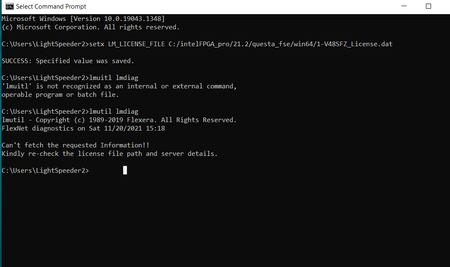
Hello @RichardTanSY_Altera , thank you for your reply. As per your suggestion, I downloaded Questa - Intel FPGA Starter Edition v21.2. I have setup the LM_LICENSE_FILE in Quartus. Now I'm getting this error - " Unable to checkout a license. Make sure your license file environment variables are set correctly and then run 'lmutil lmdiag' to diagnose the problem." I verified the environment variable settings and it has the license path as follows - C:\intelFPGA_pro\21.2\questa_fse\win64\1-V48SFZ_License.dat I ran the 'lmutil lmdiag' on the console (refer to the attached image) Request you to suggest resolves for this issue.7.1KViews0likes0Commentsmodelsim.exe - System error because of MSVCR120.dll not found
Hello there, I have downloaded and installed Quartus Prime Pro 21.2 along with Modelsim - Intel FPGA Starter edition and Arria 10 device family support. Quartus opens fine but when I try to open Modelsim, I get this error - "The code execution cannot proceed because MSVCR120.dll was not found. Reinstalling may fix this problem." Using Windows 10 x64 I have gone through the forums and already tried the following solutions, unfortunately nothing worked, - Downloaded the Quartus Prime Pro and Modelsim from official Intel Download centre - Reinstalling the mentioned software several times - Formatted the laptop and reinstalled the software - Installed the Visual Studio C++ Redistributable package 2015-2019 - Added the missing MSVCR120.dll file separately into C:\Windows\System32 - Setup the LM_LICENSE_FILE location properly in Quartus License Setup Kindly request you to provide any solution. Please let me know if you require any other information. Please help!Solved7.3KViews0likes6Comments