User Profile

Hidetaka
 New Contributor
Joined 6 years ago


User Widgets
Contributions
Re: Can I use Quartus Prime Standard 24.1 and Quartus Prime Pro 25.1 at the same time?
Thank you, Kian. Apologies for the late response. Currently, I have a separate USB-Blaster II connected to each of the Cyclone VGX and Cyclone 10GX, and I'm using Signaltap II simultaneously on both FPGAs. I'm also running the Nios V IDE in separate workspaces/directories. I'm currently debugging the data transfer between these two FPGAs. Thank you. Regards, Hidetaka.224Views0likes0CommentsRe: Can I use Quartus Prime Standard 24.1 and Quartus Prime Pro 25.1 at the same time?
sstrell-san, Frank-san, thank you for your quick response. I use the GUI-based Quartus and Platform Designer. Therefore, I can use both Quartus Prime Standard 24.1 and Quartus Prime Pro 25.1 on the same PC. My concern is that Nios V is embedded in both the Cyclone VGX and Cyclone 10GX FPGAs used in this system. Will I be able to run both Nios V IDEs at the same time and debug (build) without any problems? Regards, Hidetaka.644Views0likes0CommentsCan I use Quartus Prime Standard 24.1 and Quartus Prime Pro 25.1 at the same time?
Hello, I am currently using two types of FPGAs in one system: Cyclone VGX and Cyclone 10GX. Both FPGAs use Nios V. I have Quartus Prime Standard 24.1 and Quartus Prime Pro 25.1 installed on one PC. In this case, is it okay to list both versions in the system environment variables? Is it okay to set the system environment variables as follows? QSYS_ROOTDIR = C:\intelFPGA_standard\24.1std\quartus\sopc_builder\bin;C:\altera_pro\25.1\qsys\bin QUARTUS_ROOTDIR = C:\intelFPGA_standard\24.1std\quartus\bin64;C:\altera_pro\25.1\quartus\bin64 path = C:\intelFPGA_standard\24.1std\questa_fe\win64;C:\intelFPGA_standard\24.1std\niosv\bin;C:\intelFPGA_standard\24.1std\niosv\cmake-3.21.4-windows-x86_64\bin;%PATH%; path = C:\intelFPGA_standard\24.1std\niosv\xpack-riscv-none-embed-gcc-8.3.0-2.3\bin;C:\intelFPGA_standard\24.1std\niosv\xpack-windows-build-tools-4.2.1-2\bin:%PATH%; path = C:\altera_pro\25.1\questa_fe\win64;C:\altera_pro\25.1\niosv\bin;C:\altera_pro\25.1\niosv\cmake-3.21.4-windows-x86_64\bin;%PATH%; path = C:\altera_pro\25.1\niosv\xpack-riscv-none-embed-gcc-8.3.0-2.3\bin;C:\altera_pro\25.1\niosv\xpack-windows-build-tools-4.2.1-2\bin;%PATH% Regards, Hidetaka.Solved1.1KViews0likes5CommentsRe: fitter error in Quartus Prime Pro 25.1.0.
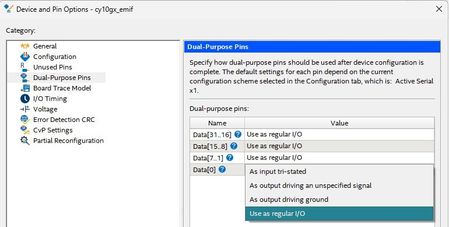
Hello, sstrell-san. This has been resolved for now, so you may close this case. Personally, I thought it would be better if Quartus would automatically set Data[0] to "Use as regular I/O" when I selected Active Serial in the Configuration scheme. Thanks, Hidetaka.1.4KViews0likes1CommentRe: fitter error in Quartus Prime Pro 25.1.0.
Hello, sstrell-san. Your message gave me a hint. When I looked at the Dual-Purpose Pins setting, I saw that Data[0] was in Dual-Purpose Pins. This is my first time using the Cyclone 10GX, and in the Flex10K and other Cyclone families that I have used up until now, AS_Data0 and Data[0] were assigned to the same pin, so I assumed they were the same. When I set DATA[0] to "Use as regular I/O", I was able to compile without errors. By the way, this is the board we will be using this time. https://www.hdl.co.jp/ACM-115L/ This board was first released in March 2019, but it seems that the Enpirion power supply IC was discontinued and replaced with a new one, resulting in the current version. Thanks, hidetaka.1.4KViews0likes3CommentsRe: fitter error in Quartus Prime Pro 25.1.0.
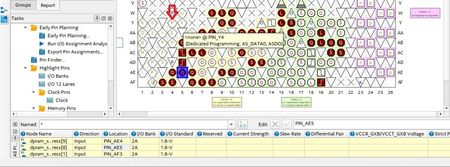
Hello, sstrell-san. I don't think you've correctly understood my inquiry. I'm assigning a signal to Pin_AE5. I'm getting a message saying that the Quartus Fitter cannot assign that pin to "~ALTERA_DATA0~". However, "~ALTERA_DATA0~" for this device should be Pin_Y4. The fitter pin is clearly wrong. There is an error in the device data used by the fitter. I think the problem is on the Quartus fitter side. Incidentally, the configuration scheme is AS mode. Regards, Hidetaka,1.5KViews0likes0Commentsfitter error in Quartus Prime Pro 25.1.0.
Hello, I am having trouble with a fitter error in Quartus Prime Pro 25.1. set_global_assignment -name DEVICE 10CX105YF672I5G I purchased a board with a 10CX105YF672I5G mounted on it, and am creating an FPGA design. The tool I am using is Quartus Prime Pro 25.1.0. I am assigning a user pin to Pin_AE5 in the design I am creating, but the fitter is displaying the following error message: "Pin ~ALTERA_DATA0~ is assigned to pin location Pin_AE5 (IOPAD_X38_Y17_N61)" However, Pin ~ALTERA_DATA0~ for this device should be Pin_Y4. I think the pin information the fitter is using is incorrect. Please let me know if there is a solution. Regards, Hidetaka1.6KViews0likes7CommentsRe: Problem with Quartus prim standard 24.1: I cannot generate IP for the hardware memory controller of
Hello Richard-san, I had another issue in the Support Community. I added "TBB_MALLOC_DISABLE_REPLACEMENT=1" to the system environment variables that Adzim-san told me about, and was able to generate the Example Design without any errors. See here. I am unable to generate the Cyclone VGX LPDDR2 controller IP due to an error. - Intel Community I am very grateful to you. Please close this issue.3.4KViews0likes0CommentsRe: I am unable to generate the Cyclone VGX LPDDR2 controller IP due to an error.
Hello Adzim-san, I added "TBB_MALLOC_DISABLE_REPLACEMENT=1" to the system environment variables you told me about, and was able to generate the Example Design without any errors. I'm very grateful to you. Please close this case here. Thanks, Hidetaka.1.1KViews0likes0CommentsRe: Problem with Quartus prim standard 24.1: I cannot generate IP for the hardware memory controller of
Hello, Richard-san. I uninstalled Quartus Prime standard 24.1 and then reinstalled it. I did not install CDT8.8.1 and generated the LPDDR2 IP again. The result was the same; an error occurred when checking "Generate Example Design". If I uncheck it, generate completed successfully. For the time being I will continue development without checking "Generate Example Design", but I would like this to be improved. ////////// error message Error: Execution of script C:/Users/xxxx/AppData/Local/Temp/alt0224_5461300254259846718.dir/0008_LPDDR2_top2_gen/simulation/generate_sim_example_design.tcl failed ///////// Regards, Hidetaka.3.9KViews0likes1Comment