embedded - hard processor system (hps)
21 Topics
Why is the LPDDR5 option unavailable in the External Memory Interfaces for HPS IP in Quartus® Prime Pro Edition Software version 26.1.1 for Agilex® 3 SoC FPGA?
Description In Quartus® Prime Pro Edition Software version 26.1.1, the LPDDR5 option is not available in the External Memory Interfaces for HPS IP for Agilex® 3 SoC FPGA device because support for this option has not been enabled for the IP. Resolution A patch is available to resolve this issue in Quartus Prime Pro Edition Software version 26.1.1. To install the fix: Download Patch 1.02 for your operating system. Install Patch 1.02 into your Quartus Prime Pro Edition Software version 26.1.1. The patch files are available below: quartus-26.1.1-1.02-windows.exe quartus-26.1.1-1.02-linux.run After installing the patch, the option LPDDR5 will be available in the External Memory Interfaces for HPS IP for Agilex 3 SoC FPGA device.197Views0likes0CommentsWhy does the Agilex® 7 FPGA HPS EMIF and fabric EMIF hang after core reconfiguration when both interfaces share the same IO bank in x72 configuration?
Description Due to a problem in the Quartus® Prime Pro Edition Software version 24.2, when Agilex® 7 FPGA F-Series and I-Series HPS EMIF and fabric EMIF share the same IO bank in x72 configuration and the design operates in HPS-first mode, the initial configuration can succeed, but subsequent core reconfigurations can cause the fabric EMIF calibration firmware to hang for designs targeting in Agilex® 7 FPGA F-Series and I-Series devices. The observed failure signature is that, after the FPGA is reconfigured without a full board power cycle, the fabric EMIF no longer responds correctly and the calibration flow does not assert cal_success or cal_fail. Resolution A patch is available to fix this problem for the Quartus® Prime Pro Edition Software version 24.2. Download and install patch 0.70fw below. quartus-24.2-0.70fw-linux.zip quartus-24.2-0.70fw-readme.zip quartus-24.2-0.70fw-windows.zip A patch is available to fix this problem for the Quartus® Prime Pro Edition Software version 25.1.1. Download and install patch 1.54fw below. quartus-25.1.1-1.54fw-linux.zip quartus-25.1.1-1.54fw-readme.zip quartus-25.1.1-1.54fw-windows.zip This problem is resolved in Quartus® Prime Pro Edition Software version 26.1.1.70Views0likes0Comments
Why do I see intermittent device recovery failures with error code 0x3ff in ASx4 configuration mode with HPS?
Description When configuring Agilex® 5 or Agilex® 3 SoC FPGAs in Active Serial x4 (ASx4) mode, intermittent device recovery failures with error code 0x3ff may occur if the mailbox interface is under heavy usage from the Hard Processor System (HPS). This issue is more likely to happen when nCONFIG is toggled multiple times in quick succession, particularly under stress or repeated reconfiguration scenarios. Resolution To minimize the chance of this error: Reduce mailbox traffic from the HPS during configuration and reconfiguration. If error 0x3ff occurs, reassert nCONFIG and attempt to reconfigure the device. In rare cases, if the error persists, a full power cycle of the device may be required to restore normal operation. The problem has been fixed starting with Quartus® Prime Pro Edition software version 25.3. For more details on configuration modes refer to the Device Configuration User Guide: Agilex® 5 FPGAs and SoCs or Device Configuration User Guide: Agilex® 3 FPGAs and SoCs, for error handling refer to Agilex® 5 Hard Processor System Technical Reference Manual or Agilex® 3 Hard Processor System Technical Reference Manual.152Views0likes0CommentsWhy does FPGA configuration (Phase 2) fail in HPS first boot mode on Agilex® 5 and Agilex® 3 SoC FPGAs when using Quartus® Prime Pro Edition Software version 25.3.1?
Description Due to a problem in Quartus® Prime Pro Edition Software version 25.3.1, Phase 2 configuration (FPGA fabric configuration from HPS) may fail on Agilex® 5 and Agilex® 3 FPGA devices when Phase 1 and Phase 2 bitstreams originate from different designs or design revisions. This is caused by HPS IO hash mismatches between compilations. Resolution To work around this problem, download and install the patch below. You must recompile both the design generating the Phase 1 bitstream and the design generating the Phase 2 bitstream using the patched version of Quartus® Prime Pro Edition Software version 25.3.1. The problem has been fixed starting with Quartus® Prime Pro Edition software version 26.1. Additional Information HPS IO hash mismatches can also occur for other reasons independent of this Quartus® Prime Pro Edition Software problem. For more information about other potential causes and how to avoid them, refer to the HPS IO Hash Compatibility section in the Hard Processor System Booting User Guide: Agilex™ 3 and Agilex™ 5 SoCs110Views1like0CommentsWhy is the HPS booting process on Agilex® 5 and Agilex® 3 SoC FPGA devices stuck at the U-boot stage?
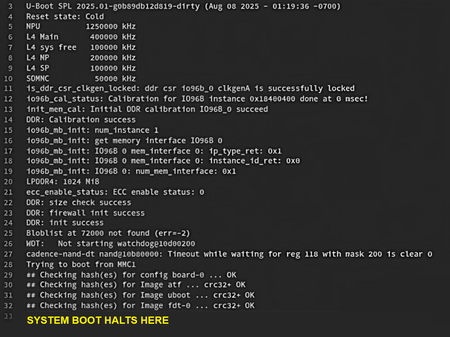
Description Due to a problem in the Agilex® 5 and Agilex® 3 SoC FPGA devices' HPS RAM Repair mechanism sequencing in Quartus® Prime Pro Edition Software version 25.3.1 and earlier, the HPS may fail to boot up normally after a RAM Repair happens. The failure signature is shown in the image below: Resolution To solve the issue, please consider the following options: Upgrade to Quartus® Prime Pro Edition Software 26.1 and newer. Which the fix is included. For Quartus version 25.3.1, apply the Quartus firmware patch attached in this KDB. For older Quartus version, contact Altera to check for the availability of patch. Additional Information Add these notes for the patches for Quartus® Prime Pro Edition Software version 25.3.1: Patches must be applied to the Quartus® Prime Pro Edition Software and the Quartus® Prime Pro Edition Software Programmer and Tools. Recompilation is not required. All programming files should be recreated. Re-run the programming file generation or conversion using the Quartus® Prime Software programming file generator.120Views0likes0CommentsWhy does EMIF for HPS LPDDR4 fail calibration on the Agilex® 5 FPGA and SoC FPGA?
Description In the Quartus® Prime Pro Edition Software 24.3, when configuring the Agilex® 5 FPGAs and SoC FPGAs with the EMIF for HPS IP and LPDDR4 device implemented as dual rank (2 chip selects), dual channels (i.e., 4 dies each being 16 Gbit in density), calibration can fail. Resolution This issue is fixed in 24.3.1 Quartus® Prime Pro Edition Software release. quartus-24.3-0.11-windows.exe quartus-24.3-0.11-linux.run quartus-24.3-0.11-readme.txt168Views0likes0CommentsWhy does the RSU update cause the HPS to hang in Stratix® 10 FPGA devices with bitstreams containing large fabric designs from Quartus® Prime Pro version 25.1.1 and earlier?
Description Due to a problem in the calculation of a timeout value by the System Design Manager (SDM) firmware during the Remote System Update (RSU) process in Stratix® 10 FPGA devices, the Hard Processor System (HPS) hangs because of an SDM timeout expiration. The timeout is determined by multiplying the fabric design size in the bitstream by 10,000 and storing the result in a 32-bit variable. For large fabric designs, this value exceeds the 32-bit limit, causing it to wrap around to a smaller number. This leads to a short timeout value, and therefore a timeout expiration. The problem occurs in the FPGA Configuration First boot mode and affects Quartus® Prime Pro Edition releases 25.1.1 and earlier with bitstreams from those releases. Resolution The problem has been fixed starting with Quartus Prime Pro Edition software version 25.3.134Views0likes0CommentsWhy does the MIPI link fail despite successful FPGA reconfiguration (Phase 2) in HPS First boot mode on Agilex® 5 or Agilex® 3 SoC FPGAs?
Description For HPS First Agilex® 5 or Agilex® 3 SoC FPGAs designs that include shared IO in the HPS EMIF banks, a firmware problem may cause the MIPI link to fail. This is due to the shared IO potentially getting stuck in reset after FPGA reconfiguration (Phase 2). This failure is not observed for FPGA First designs or designs that do not use shared IO. Refer to 3.5. Agilex® 5 EMIF IP for Hard Processor Subsystem (HPS) or A.1.13.1. Restrictions on I/O Bank Usage for Agilex® 3 EMIF IP with HPS for more information regarding IO sharing. Resolution The problem has been fixed starting with Quartus® Prime Pro Edition software version 25.3.114Views0likes0CommentsWhy the Agilex® 5 FPGA Hard Processor System CoreSight Trace is not working?
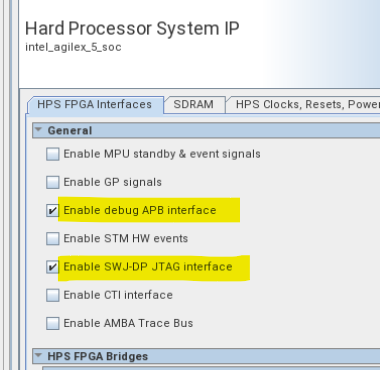
Description Due to a problem in the Quartus® Prime Pro Edition Software version 25.3, when enabling the Agilex® 5 FPGA Hard Processor System Coresight Trace it is not functioning. Resolution To work around this problem, enable either one of the fabric debug feature such as APB or JTAG and tie off the signals if they are not used. The problem has been fixed starting with Quartus® Prime Pro Edition software version 26.1.60Views0likes0CommentsWhy are there unexpected timing paths with HPS EMAC clocks in the timing report when HPS EMAC is routed to the FPGA?
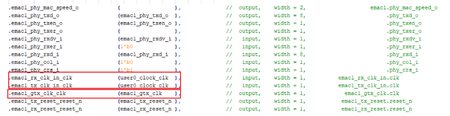
Description Due to a problem in the Quartus® Prime Pro Edition Software version 24.1 and earlier, you may see unexpected timing paths in the timing report for EMAC clocks when HPS EMAC is routed to the FPGA. Resolution The top entity below helps to understand the EMAC clocks, "emac1_gtx_clk" and "user0_clock_clk" used in the design, where EMAC1 is routed to the FPGA: To work around this problem, use the following SDC constraints: set_false_path -fall_from emac1_gtx_clk -rise_to emac1_gtx_clk set_false_path -fall_from emac1_gtx_clk -rise_to user0_clock_clk Additional Information The problem will be fixed in a future release of the Quartus® Prime Pro Edition Software.139Views0likes0Comments