cyclone® iv fpgas
438 Topics
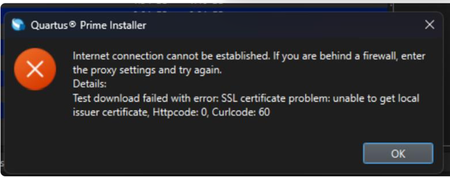
Why does my Quartus® Prime Installation fail with certificate error: SSL certificate problem: unable to get local issuer certificate (curlcode 60)?
Description Due to a problem in the Quartus® Prime Installer Software, you might see the error message shown below when you click Download & Install. This happens because the certificate bundled with the Quartus® Prime Installer Software is no longer accepted by the Altera® Content Delivery Network (CDN). As a result, secure downloads initiated during the installation process cannot be verified using the outdated certificate. The issue impacts the Installer for the following versions of Quartus software: Operating System Quartus Prime Pro Installer Version(s) Quartus Std/Lite Installer Version(s) Microsoft Windows* 23.3 to 25.3.1 23.1std to 25.1std Linux* 23.3 to 23.4 23.1std The KDB workaround provided below applies to the following versions of Quartus software: Quartus Prime Pro Installer Version(s) Quartus Std/Lite Installer Version(s) KDB workaround applies to 24.3 to 25.3.1 24.1std to 25.1std Note that for all other affected versions not covered by the KDB, you cannot use the installer workaround and must download Quartus software package files individually without using the installer. Separate packages can be found in the Individual Files tab of the Quartus Software Download pages. Resolution To work around this problem, follow these steps: 1. Download and unzip the cacert.zip, which contains the cacert.pem certificate file. 2. Specify the new certificate using one of the following methods: i) Command Line Interface (CLI): Open a command prompt or terminal and run the installer with the--cacert option, pointing to the new certificate file. Windows*: qinst_<version>.exe -sp"--cacert <full path to cacert.pem>" Linux*: qinst_<version>.run -- --cacert <full path to cacert.pem> ii) Graphical User Interface (GUI): - Open the Quartus® Prime Installer, navigate to Settings, locate the CA Certificate Path, and specify the full path to the cacert.pem certificate file. - Then, click Apply > OK. This problem is scheduled to be resolved in a future release of the Quartus® Prime Installer Software.11KViews1like0CommentsWhy does the text overlap in the ALTPLL IP Parameter Editor?
Description Due to a problem in the Quartus® Prime Standard Edition Software version 25.1, you might see that the text overlaps in the ALTPLL IP Parameter Editor on the Windows* Operating System. This prevents the ALTPLL IP from being instantiated. This problem does not occur in the Quartus® Prime Standard Edition Software version 24.1 and earlier. Resolution To work around this problem in the Quartus® Prime Standard Edition Software version 25.1, download and install the patch below: This problem is scheduled to be resolved in a future release of the Quartus® Prime Standard Edition Software.1.4KViews1like0Comments
Error: TBBmalloc: skip allocation functions replacement in ucrtbase.dll: unknown prologue for function _msize
Description Due to a problem in the Quartus® Prime Standard Edition Software version 25.1 or earlier, you might see this error message when generating PLL IP on Windows* 11 Operating System. The IP generation might complete successfully even though this error message is reported. Resolution To work around this problem, follow these steps: Go to This PC, right-click, and select Properties. Click Advanced System Setting. In the Advanced tab, select Environment Variable. Under System variables, create a new variable with the name TBB_MALLOC_DISABLE_REPLACEMENT and value as 1. Click OK and restart the Quartus® Prime Software. The workaround above does not work for the Quartus® Prime Standard Edition Software version 22.1std.2 or earlier. A patch is available to fix this problem for the Quartus® Prime Standard Edition Software version 22.1std.2. The environment variable is still required to prevent the TBBmalloc message from appearing. Download and install patch 2.02 below: Patch 2.02 for Windows (.exe) Readme for patch 2.02 (.txt) This problem is not scheduled to be fixed in the Quartus® Prime Standard Edition Software.998Views1like0CommentsError (176310): Can't place multiple pins assigned to pin location <name>
Description You may see this pin placement error in the Intel® Quartus® Prime Software if you have enabled the Passive Serial (PS) configuration scheme and assigned the DCLK pin as a regular I/O pin. You can only assign the DCLK pin as a regular I/O pin if you selected the Active Serial (AS) configuration scheme. When the Passive Serial configuration scheme is selected, the DCLK pin can only be used as a programming pin. Resolution Change to the Active Serial configuration scheme or remove the user signal location assignment to the DCLK pin. Refer to the Device Pin Connection Guidelines for further details.800Views0likes0CommentsWhy is the rx_freqlocked signal stuck in deasserted state after Cyclone® IV GX transceiver PLL reconfiguration? What are the correct steps for Cyclone IV GX transceiver PLL reconfiguration?
Description Rx_freqlocked signal may get stuck in deasserted (low) state, after Cyclone® IV GX transceiver phase-locked loop (PLL) dynamic reconfiguration, even though the tx_clkout and rx_clkout have changed to a correct frequency. Resetting transceivers or MPLL does not solve the issue. You may see this issue when you try to reconfigure one MPLL configuration to another with a different M counter value. For example, you may see this issue, if the static MPLL parameters setting has M counter value of 5 and you reconfigure the MPLL with a M counter setting of 25. This issue is not seen if both the static MPLL and reconfigured MPLL parameters setting have the same M counter value. Due to a software bug, one of the input signals to the PPM detector is not being updated correctly after the PLL Reconfiguration. Resolution This issue can be corrected by performing Channel Reconfiguration after the PLL Reconfiguration to update the PPM detector input signals. To work around this issue, follow these steps: During transceiver PLL reconfiguration, hold transceiver in reset by asserting tx_digitalreset, rx_digitalreset, and rx_analogreset signals. Perform PLL Reconfiguration to update MPLL with PLL MIF files. Perform Channel Reconfiguration and update the transceiver with GXB Reconfig MIF files. If you have multiple channel instantiations connected to the same MPLL, perform channel reconfiguration on each channel. De-assert tx_digitalreset and rx_analogreset. Upon rx_freqlocked assertion (high), wait for at least 4us period, then de-assert rx_digitalreset. Notes: For Quartus® II software v11.0: You can use the software directly and implement this solution (PLL reconfiguration followed channel reconfiguration). For Quartus II software v10.1SP1: Before implementing this solution, install patch 1.03, re-generate the ALTGX_RECONFIG component file and recompile to generate the GXB MIF file. For Quartus II software v10.1: Before implementing this solution, install patch 0.36, re-generate the ALTGX_RECONFIG component file and recompile to generate the GXB MIF file. For earlier Quartus II software versions: please move your design to 11.0, re-generate the ALTGX_RECONFIG component file, recompile to generate the GXB MIF file, implement the steps provided in this solution. Patch 1.03 for Quartus II software version 10.1SP1 PC patch 1.03 for Quartus II Software version 10.1SP1 Linux patch 1.03 for Quartus II Software version 10.1SP1 Readme file for patch 1.03 for Quartus II Software version 10.1SP1 Patch 0.36 for Quartus II software version 10.1 PC patch 0.36 for Quartus II Software version 10.1 Linux patch 0.36 for Quartus II Software version 10.1 Readme file for patch 0.36 for Quartus II Software version 10.1 Related Articles Why does rx_freqlocked signal get stuck low, even though the tx_clkout and rx_clkout are successfully reconfigured, after Channel Reconfiguration in Cyclone IV GX devices?600Views0likes0CommentsCan I use the nCEO pin as a regular I/O after configuration, when it is used in multi-device configuration mode?
Description No, you cannot use the nCEO pin as a regular I/O after configuration, when it is used in multi-device configuration mode. For example, if there are two devices in a chain that are linked by connecting nCEO to nCE, then the nCEO pin on the first device must be set as "Use as Programming pin" in the Dual Purpose Pins settings dialog box in the Quartus® II software. Resolution N/A599Views0likes0CommentsError : FLEXlm version of vendor daemon is too old
Description In the Questa* FPGA Edition simulator and Questa* FPGA Starter Edition simulator version 2024.1, you might see this error or the following error if you are using the MGCLD daemon v11.16.4 “Unable to checkout a license. Make sure your license file environment variable (SALT_LICENSE_SERVER, MGLS_LICENSE_FILE, LM_LICENSE_FILE) is set correctly” Resolution To avoid this error, upgrade to the Siemens* Flexlm (SALTD) daemon v11.19.5 Download the daemon from the download page There is a change to the Siemens* License in v11.19.5.0. If you’re running a floating license server for Siemens* licenses, manually change the VENDOR daemon line in the license file from mgcld to saltd, for example: VENDOR saltd <path to saltd> Note: Do not change any of the INCREMENT lines. Leave the INCREMENT lines with the original vendor daemon name (mgcld).599Views0likes0CommentsWhen does the Quartus® Prime Design Software, IP cores, and Questa*-Altera® FPGA Edition Software check out a license?
Description Below is a description of how the Quartus® Prime Design Software, IP cores, and Questa*-Altera® FPGA Edition Software utilize licenses: Resolution Quartus® Prime Design Software: All Quartus® Prime Design Software processes check for a valid license, including the Quartus® GUI, Analysis & Synthesis, Assembler, and TimeQuest Timing Analyzer. These processes start only if a valid license is available. They do not hold or occupy the license; they only validate that one is available. However, the Fitter checks out a license when it starts and holds it for the duration of the Fitter process. IP cores: A license for an IP core is checked out when the Quartus® Prime Design Software opens the first encrypted file of the IP core for synthesis. This license is held for the duration of synthesis. The Assembler checks out the license for every IP core to create the programming file and holds it for the duration of the Assembler process. Questa*-Intel® FPGA Edition software: Once Questa*-Intel® FPGA Edition Software loads a design unit during elaboration, a Questa-Intel® FPGA Edition license is checked out. It remains checked out until the simulation ends (quit -sim), or the simulator is closed. Once a waveform is loaded into the simulator, a Questa*-Intel® FPGA Edition Software license is also checked out for viewing Wave Log Format File (.wlf), and it remains checked out until the waveform window is closed. Related Articles What happens to a license if the Quartus II software terminates unexpectedly? Can I perform multiple compilations using the Quartus II software at the same time on one computer with a one seat floating license or one fixed (node locked) license file?500Views0likes0CommentsHow do I turn on the 'offset_cancellation_reset' port on the Dynamic Reconfiguration Controller MegaWizard for Stratix IV GX/T, Arria II GX/Z, and Cyclone IV GX devices?
Description You can turn on the 'offset_cancellation_reset' port on the Dynamic Reconfiguration Controller MegaWizard™ for Stratix® IV GX/T, Arria® II GX/Z, and Cyclone® IV GX devices by running the following command. qmegawiz -silent -wiz_override="offset_cancellation_reset" <altgx_reconfig filename.v>499Views0likes0CommentsIs there a known problem with Cyclone® III or Cyclone® IV devices if a user reset is deasserted before the device has entered user mode?
Description Due to a known problem with Cyclone® III and Cyclone® IV devices, unexpected register output behaviour might be caused when a user reset is deassserted before the device enters the user mode. Resolution To avoid this problem, Intel recommends that you deassert user logic reset after the device has entered user mode, or enable the clock source to your registered logic after the device has entered user mode. The INIT_DONE signal can be used to indicate that the device has entered the user mode. If the INIT_DONE signal is not enabled, refer to the tCD2UM (CONF_DONE high to user mode) parameter in the device handbook.499Views0likes0Comments