agilex® 9 fpgas and socs
98 Topics
Why I can't change the device family in Power and Thermal Analyzer?
Description Due to a problem in the Quartus® Prime Pro Edition Software version 26.1, you may not be able to change to a different device family in Power and Thermal Analyzer (PTA) after you create or open a design. For example, if you open a design targeting a Stratix® 10 device, you may not be able to change to an Agilex® FPGA device. In version 26.1, if you select File > New File to create a new PTA design, the new file wizard does not appear. Without the wizard, you cannot select a different device family when creating a new file. Resolution PTA locks a design to the device family selected when the file is created. To explore power consumption across different device families, create a new PTA file in the target family and import your existing design. To import an existing PTA design into a different device family: Create a new PTA file targeting the desired device family. Use the Import function to bring your existing PTA design into the new file. If you chose the wrong device family when creating a file, close the existing file and create a new one. In the File menu, select New File, and select the correct device family in the new file wizard. In version 26.1 of Power and Thermal Analyzer, the new file wizard does not appear when you select New File. To work around this issue, exit and restart PTA. After restarting, select File > New File to open the new file wizard and select the correct device family.9Views0likes0CommentsWhy does the SystemConsole.refreshMasters DSP Builder function fail?
Description When using the SystemConsole.refreshMasters DSP Builder function in the Quartus® Prime Pro Edition version 26.1.1 and above, you may see the following error: Unable to resolve the name 'com.altera.systemconsole.matlabapi.SystemConsoleLink' This error occurs because the Java version used by MATLAB is incompatible with com.altera.systemconsole.matlabapi.SystemConsoleLink. For DSP Builder version 26.1.1 and later, MATLAB must use Java version 11 or later for SystemConsole.refreshMasters to run successfully. Resolution You can change MATLAB's Java version using either the jenv MATLAB function or the matlab_jenv executable. For information on how to use jenv and matlab_jenv, refer to the MATLAB documentation.7Views0likes0CommentsWhy are there no example design options available in the “Select Design” drop-down list in the DisplayPort IP Parameter Editor GUI?
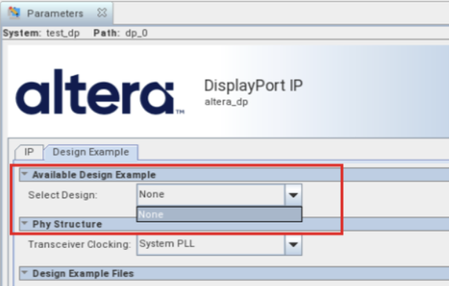
Description Due to a problem in the Quartus ® Prime Pro Edition Software version 26.1, the drop-down list for “Select Design” in the Display Port IP Parameter Editor GUI only has “None” option, as shown in the screenshot below. Resolution This problem has been fixed beginning with version 26.1.1 of the Quartus® Prime Pro Edition Software.135Views0likes0CommentsError: (vlog-7) Failed to open design unit file
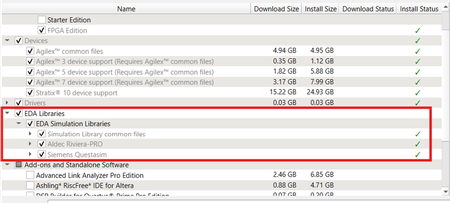
Description Due to simulation models not being installed along with the Quartus ® Prime Pro Edition Software, an error such as: Error: (vlog-7) Failed to open design unit file "C:/altera_pro/26.1.1/quartus/eda/sim_lib/220model.v" in read mode may occur during simulation. The root cause of missing files is that “EDA libraries” are not installed properly during installation of the Quartus ® Prime Pro Edition Software. Resolution To fix this problem, make sure “EDA Libraries” has been checked and installed properly during installation of the Quartus ® Prime Pro Edition Software, as shown in the screenshot below.58Views0likes0CommentsWhy am I unable to run BKP operations with Quartus® Prime Pro Edition 26.1.1 on Windows*?
Description Due to a problem in the Quartus® Prime Pro Edition Software version 26.1.1, Black Key Provisioning (BKP) operations might fail on Windows* with the following error: Error: BKP PLUGIN: [3000] Http error: Could not use specified SSL cipher because Quartus has enabled the Windows SSP interface Schannel (Secure Channel) to work with the OpenSSL library. When using libcurl with the Schannel (Windows) backend, the option CURLOPT_SSL_CIPHER_LIST does not accept individual, specific cipher suites (for example TLS_ECDHE_RSA_WITH_AES_256_GCM_SHA384). Resolution To work around this problem in the Quartus® Prime Pro Edition Software version 26.1.1, build a patched bkpprog.dll and select it through the project configuration, as follows: 1. Clone the source repository: GitHub - altera-fpga/device-security-software-services: Device Security Software and Services source code for FPGA Device Onboarding, Attestation, Secure Session, Black Key Provisioning. 2. Prepare the Windows build environment. Follow the Windows Build instructions in the repository README. Install the listed prerequisites and prepare the repository dependencies exactly as documented there. 3. Modify network_wrapper.cpp. Open the following file in the cloned repository: bkpprogrammer/src/core/cpp/network/network_wrapper.cpp In CurlWrapper::CurlWrapper, locate the TLS version and cipher-list configuration: setCurlOptionWithErrorHandling( curlHandle, CURLOPT_SSLVERSION, CURL_SSLVERSION_TLSv1_2); setCurlOptionWithErrorHandling( curlHandle, CURLOPT_SSL_CIPHER_LIST, acceptedCiphers.c_str()); Replace it with: setCurlOptionWithErrorHandling( curlHandle, CURLOPT_SSLVERSION, CURL_SSLVERSION_TLSv1_2); 4. Build the patched plug-in. Return to the repository root and build by following the repository Windows Build instructions. Confirm that bkpprog.dll is regenerated after network_wrapper.cpp was modified. 5. Place the custom plug-in. Create the following directory under the BKPS project and copy the rebuilt bkpprog.dll into it. Do not replace the DLL inside the Quartus installation. <project>\cm_provisioning\bkp_plugin\bkpprog.dll 6. Create quartus.ini. Create a quartus.ini file directly under the project cm_provisioning directory with the following line: PGM_ALLOW_CUSTOM_BKP_PLUGIN=7S6Nh0s3@on 7. Update bkp_options.txt. Use the normal project-specific BKP values and add bkp_plugin with the path to the rebuilt DLL: bkp_cfg_id = <ID> bkp_ip = <IP> bkp_port = <PORT> bkp_tls_ca_cert = "<Path_To_bkps_ssl_cert.crt>" bkp_tls_prog_cert = "<Path_To_pro_cert>" bkp_device_opn = <OPN> bkp_plugin = "<Path_To_bkpprog.dll>" 8. Run Quartus Programmer where quartus.ini is located. Set the current working directory to the cm_provisioning directory that contains quartus.ini and bkp_options.txt. Quartus reads quartus.ini from its current working directory, so run the commands from here: quartus_pgm.exe -c 1 -m jtag --bkp_options=bkp_options.txt --bkp_prefetch Use the same working directory for Set Authority and Provision operations, so Quartus continues to load the custom plug-in setting from quartus.ini. This problem is scheduled to be resolved in a future release of the Quartus® Prime Pro Edition Software.29Views0likes0CommentsError(14394): Verilog HDL error at <module_name>.sv(<line>): vector/single is not declared under the prefix ""
Description Due to a problem in the Quartus® Prime Pro Edition Software version 26.1.1 or earlier, you might see this error when synthesizing the SystemVerilog HDL code where a typedef struct declared inside an interface is referenced within a nested submodule. The SystemVerilog HDL code as below: interface my_interface #( parameter int WIDTH = 1 )(); typedef struct packed { logic single; logic [WIDTH-1:0] vector; } MY_STRUCT; logic req; logic ack; MY_STRUCT data; modport src ( output req, input ack, output data ); modport dst ( input req, output ack, input data ); endinterface module testmodule ( input wire clock, my_interface.dst data_in, my_interface.src data_out ); typedef data_in.MY_STRUCT ITYPE; typedef data_out.MY_STRUCT OTYPE; … ITYPE demo_in; OTYPE demo_out; assign demo_in = data_in.data; assign data_out.data = demo_out; submodule my_sub ( .data_in ( demo_in ), .data_out ( demo_out ) ); module submodule ( input ITYPE data_in, output OTYPE data_out ); … endmodule endmodule Resolution To work around this problem in the Quartus® Prime Pro Edition Software version 26.1, download and install the patch 0.37 below. This problem is scheduled to be fixed in a future release of the Quartus® Prime Pro Edition Software.128Views0likes0CommentsCan the F-Tile FGT PMA lane in neutral state of Dynamic Reconfiguration be preserved?
Description Yes, the F-Tile FGT PMA lane can be preserved even after moving to neutral state from normal state by Dynamic Reconfiguration. Resolution While the F-Tile FGT PMA lanes are in the neutral state, users need to keep the TX PMA and RX PMA of the unused lanes in reset until those lanes are reactivated and placed back into operating mode in the future. The performance of those lanes will not be degraded after they are reactivated.96Views0likes0CommentsWhy does Nios® V/g experience data corruption when using DTCM?
Description Due to a problem in Quartus® Prime software, data corruption may occur when running a Nios® V/g processor application that interacts with a Tightly-Coupled Memory (TCM). This happens because of a RTL bug in the load-store unit. This problem is affecting Nios® V/g processor in, Quartus® Prime Pro Edition release 25.3.1 and earlier Quartus® Prime Standard Edition release 25.1 and earlier When Nios® V/g processor executes a non-TCM load (i.e. Load from On-Chip Memory or memory-mapped CSR) followed by a Data TCM load, the latter corrupts the former. This causes the non-TCM load to receive incorrect load data. For example, lw rd1,0(non-TCM) lw rd2,0(TCM) Expectation Actual Failure rd1 = load data from address “non-TCM” rd1 = load data from address “TCM” rd2 = load data from address “TCM“ rd2 = load data from address “TCM“ Resolution This problem is fixed in Quartus® Prime Pro Edition 26.1 and is scheduled to be resolved in a future Quartus® Prime Standard Edition release. Additional Information A patch is available to fix this problem. Quartus® Prime Standard Edition Software v25.1 Patch 0.01 Please contact Altera Support for additional support.162Views0likes0CommentsError(24244): Found an error when generating the IBIS Output File for board analysis. Refer to "<project_directory>/output_files/xxx.log" for more information
Description Due to a problem in the Quartus® Prime Pro Edition Software version 24.3 and earlier, you mat see this error when using the EDA Netlist Writer to generate an IBIS Model. This problem occurs when the project includes R-tile or P-tile I/O pins. Resolution This problem has been fixed beginning with version 24.3 of the Quartus® Prime Pro Edition Software.67Views0likes0CommentsWhy is the bus ordering reversed in the Technology Map Viewer?
Description Due to a problem in the Quartus® Prime Pro Edition Software version 26.1 or earlier, you might see that the bus ordering is reversed in the Technology Map Viewer. This problem occurs when a design contains a Block Design File (BDF) whose output bus is connected to a SystemVerilog HDL packed array from a top-level SystemVerilog HDL module. For example, the expected mapping in the Technology Map Viewer is: inst0 -> Out[0] inst1 -> Out[1] inst2 -> Out[2] inst3 -> Out[3] However, the actual mapping after compilation in the Technology Map Viewer become: inst0 -> Out[3] inst1 -> Out[2] inst2 -> Out[1] inst3 -> Out[0] Resolution To work around this problem, do one of the following: Convert the BDF file to Verilog HDL or VHDL. Open the BDF file in the Quartus® Prime Standard Edition Software. Select File > Create / Update > Create HDL Design File from Current File. Choose Verilog HDL or VHDL. Replace the original BDF module in the Quartus® Prime Pro Edition Software project with the generated HDL file. Explicitly reorder the bits in the top-level SystemVerilog HDL module by using a SystemVerilog HDL streaming operator in the port connection.37Views0likes0Comments