Forum Discussion

 New Contributor
SoC EDS issue
Hi,
I attempted the SoC EDS as per the pdf SoC_software_lab_16.0.pdf on rocketboards.org. I was asked to see the link to create a u-boot-socfpga. In that, it was told to clone a github file which I did but when I tried to use the command 'make', I get the same issue again and again.
Kindly help me out of this.
20 Replies
 aikeu
aikeuRegular Contributor
Hi jjac705,
I think the document you are referring to may not work if using later version of Quartus.
Refer to this link for building bootloader:
https://www.rocketboards.org/foswiki/Documentation/BuildingBootloaderCycloneVAndArria10
Thanks.
Regards,
Aik Eu
 jjac705
- aikeu
Hi jjac705,
You will require a linux environment to build the necessary files. Either you use virtual machine or install WSL to have the linux environment.
https://learn.microsoft.com/en-us/windows/wsl/install
Thanks.
Regards,
Aik Eu
- jjac705
Hi Aik Eu,
I have the WSL in Windows 10 and have installed Ubuntu 20.04 LTS.
I am not sure on how to use this link https://www.rocketboards.org/foswiki/Documentation/BuildingBootloaderCycloneVAndArria10 to create the u-boot.
I am not sure on where should I start especially while using a Windows platform.
Jerry Jacob
- aikeu
Hi jjac705,
Follow from the top of the web page where there you can click on the different instructions provided.
First you will need to know how your system is booting from, etc qspi or sd card.
You can start with looking into the building the U-boot section and try to execute the steps to generate the required files for your system to boot up.
Thanks.
Regards,
Aik Eu
- jjac705
Hi aikeu,
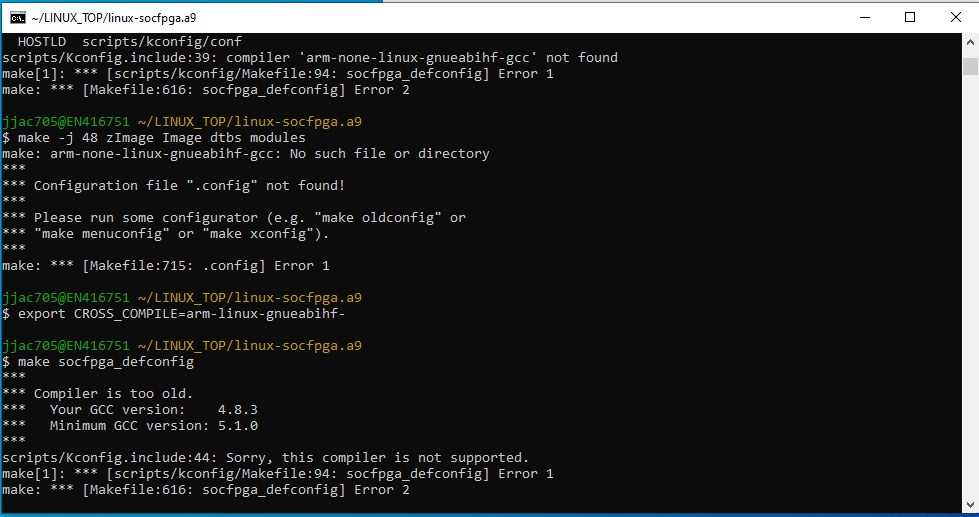
I have attempted to make the Linux kernel as per the instructions given in the link https://www.rocketboards.org/foswiki/Documentation/BuildingBootloaderCycloneVAndArria10?elq_cid=7076518_ts1673294693388&erpm_id=10201171_ts1673294693388. I have done this in the Embedded Command Shell.bat.
I am using Quartus Prime Standard 19.1.
When I put the command 'export CROSS_COMPILE=arm-none-linux-gnueabihf' and then make socfpga_defconfig, I got an error.
However, I changed to 'export CROSS_COMPILE=arm-linux-gnueabihf' and then did make socfpga_defconfig then it says that the compiler is old.
What can I do to get out of this?
Regards,
Jerry Jacob
- aikeu
Hi jjac705,
In the building bootloader document, you will need to start with download and setup the toolchain first. example as below:
Depends on your requirement, you can build U-boot first without the Linux kernel to have the system boot up.
Download and setup the toolchain required for Cyclone V SoC and Arria 10 SoC:
tar xf gcc-arm-11.2-2022.02-x86_64-arm-none-linux-gnueabihf.tar.xz
rm gcc-arm-11.2-2022.02-x86_64-arm-none-linux-gnueabihf.tar.xz
export PATH=`pwd`/gcc-arm-11.2-2022.02-x86_64-arm-none-linux-gnueabihf/bin:$PATH
Thanks.
Regards,
Aik Eu
- jjac705
Hi Aikeu,
I attempted to use the above. When I used, rm gcc-arm-11.2-2022.02-x86_64-arm-none-linux-gnueabihf.tar.xz, I got an info where it says No such file or directory.
Regards,
Jerry Jacob
- aikeu
Hi jjac705,
"rm gcc-arm-11.2-2022.02-x86_64-arm-none-linux-gnueabihf.tar.xz" is to remove the tar.xz files which you get from
"wget https://developer.arm.com/-/media/Files/downloads/gnu/11.2-2022.02/binrel/gcc-arm-11.2-2022.02-x86_64-arm-none-linux-gnueabihf.tar.xz" after that files have been extracted with "tar xf gcc-arm-11.2-2022.02-x86_64-arm-none-linux-gnueabihf.tar.xz".
The tar.xz file will not be required after it has been extracted so that line using the rm cmd is used to remove it.
Thanks
Regards,
Aik Eu
- aikeu