Forum Discussion

 New Contributor
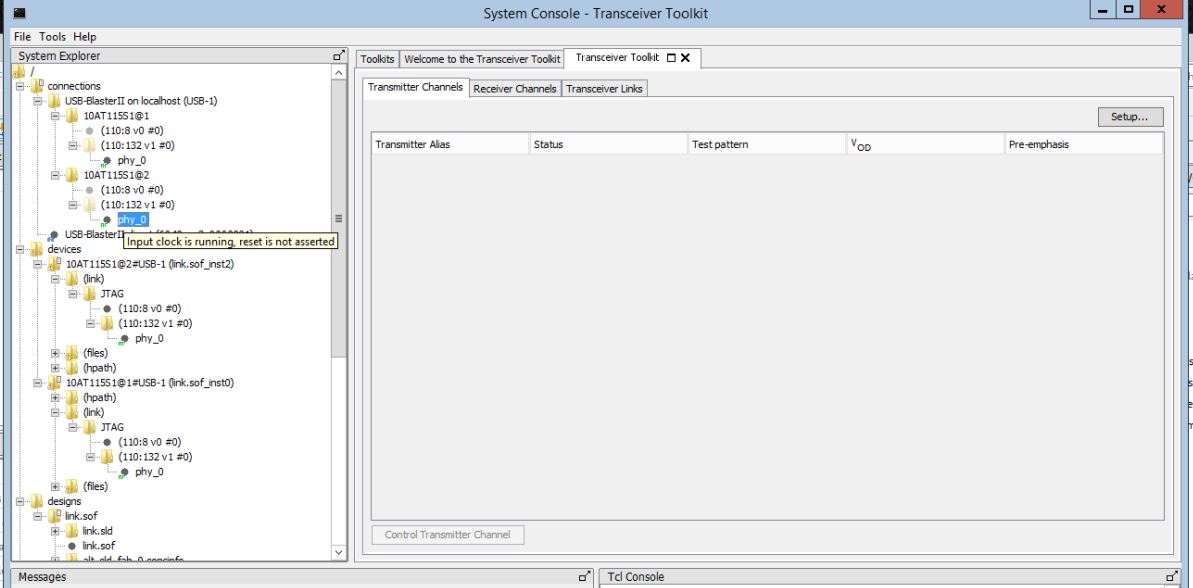
Why transceiver links are not detected in Transceiver Toolkit?

 Occasional Contributor
So I'm having exactly the same issue is Quartus Standard 22.1 with the Transceiver Toolkit trying to check the status of transceivers in the JESD204 IP core (configured for recieve only). I've enabled the various parameters necessary to enable the debug master endpoint:
But after compiling and running, no links are shown in transciever toolkit. I just get a blank screen. I can see `phy_0` in the system explorer, which I assume means that the endpoints are correctly set up (I haven't specifically connected thte reconfig interface to a JTAG master as I believe that's what the "Altera Debug Master Endpoint" bit is for). I get the same "input clock is running, reset not asserted" tooltip on the PHY.
I note that this thread is 4 years old. Did you actually find any resolution to this? Could you post any details from your "meeting online"?
I can't use the example designs because this is not the Arria 10 GX development kit, but rather another SoM product using an Arria 10. But comparing the entity list from the compiled example project, and my project, both seem to have the same contents. The JTAG ADME core is there.
I mean, I'm sure all of you being intel employees is great for you to be able to go offline and have an internal meeting to resolve it, but does absolutely nothing to help your customers who have paid for your products.
Occasional ContributorSo the only way I could get this working is to manually re-enable all of the ODI Soft Logic parameter code which was commented out and disabled by Altera at some point around Quartus 16
1. Modifying the JESD core TCL files to find any reference to `set_odi_soft_logic_enable` or similar and uncomment them
2. Add the following to a `quartus.ini` file in the project directory:
altera_xcvr_native_a10_enable_odi_acc=on
altera_xcvr_native_a10_debug=on
altera_xcvr_native_a10_advanced=on
altera_xcvr_avmm_a10_advanced=on
After that regenerate the HDL for Platform Design, recompile, and voila: