Forum Discussion

UTech New Contributor
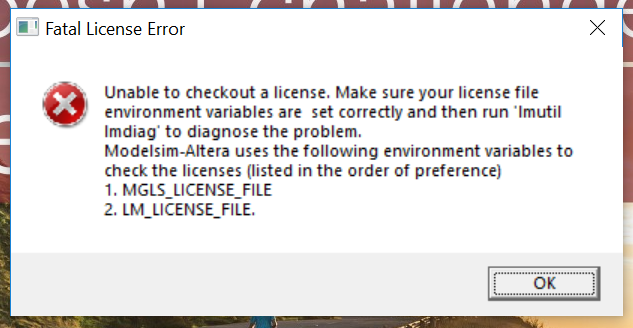
7 years agoNew ContributorUnable to open ModelSim-Altera edition 10.4b(Quartus prime 15.1). Facing fatal licence error
I have taken the licence for ModelSim-Altera edition 10.4b, I created the environmental variables for the licence, but still I'm facing the fatal licence error. Do I require Quartus prime licence als...

Abe Frequent Contributor
7 years agoFrequent ContributorIS the license a Node-locked or Floating License? If its a Node-locked license make sure to set the Environment Variables to point to the correct file path.
- Right-click the Windows icon on the Start Menu and Select System.
- Scroll down in the About Settings window and click the "System info" link under Related Settings heading.
- In the next window that pops up, click the Advanced Settings in the left Pane.
- In the Advanced settings pop-up select the Advanced tab and click Environment Variables... button.
- In the next screen, under the User Variables for ... area, click the "New..." button.
- In the "Variable Name" box type LM_LICENSE_FILE
- In the "Variable Value" box type the path to the license file, ie, the location where you have saved the license file. For example, if you have saved the license file (license.dat) in a licenses folder under C:\ drive (C:\licenses). Then the Variable Value box should have C:\licenses\license.dat .
- Click OK button and close the window, then close all other windows.
- Once this is done, Launch Quartus II , from the Tools menu select License Setup... (Tools -> License Setup..)
- Here you can choose either of the two following options:
- In the License File box, type the entire path to the license file as in #7, OR,
- Enable the Use LM_LICENSE_FILE Variable check box and make sure its pointing to the license file.
- Click Apply/Ok and Quartus should now launch without the License error.