Forum Discussion

Altera_Forum's avatar
Altera_Forum
Icon for Honored Contributor rankHonored Contributor
14 years ago

system console model is invalid

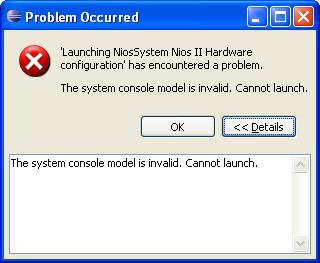
I have been trying for some time now to get a very basic Nios design to run. I have built the .sof and downloaded it to the Stratix-III. I have built the BSP and .elf file to simply control the LEDs on the dev kit board. But no matter what I try, I always get the dialog box that pops up with the following message:

"The system console model is invalid. Cannot launch."

I see one other thread that discussed this but I do not see any real conclusions. Does anyone have any idea what the problem can be?

Many Thanks....

13 Replies

  • Altera_Forum's avatar
    Altera_Forum
    Icon for Honored Contributor rankHonored Contributor

    If nios2-download is failing to verify then that means there is a problem with your hardware - nios2-download used the OCI core to write the memory locations specified but when it read them back they had different values.

    Is the timing OK on the device? What type of memory are you using at address 0? Are there any bridges which could make things go wrong at that address?
  • Altera_Forum's avatar
    Altera_Forum
    Icon for Honored Contributor rankHonored Contributor

    I am working with a BeMicro With Cyclone IV and Quartus 12.0 Build 263 SP2. I have some questions and observations.

    Question:

    I am running the tutorial. When you compile the Quartus 12.0 project, which verilog files contain the ID and Timestamp so we can always check what the SOF image contains?

    Can someone explain more about how the time stamp works with a limited time SOF? I assume the timestamp is a static value determined at the time Qsys generates its files, and the timeout of the SOF is independent from the time stamp. I would like to know for sure.

    When you program the Cyclone IV and the dialog pops up with the timer, does it matter if the dialog is cleared? I assume it is just a time counter that has nothing to do with the activity of the Cyclone IV. But I want to be sure.

    Observation:

    When the console error occurs, the fix is to close Eclipse and reopen it. The console error occurs even when the ID and Timestamp are ok. Somehow restarting Eclipse clears the problem. I have verified on two different days when I got stuck that this ultimately fixes the problems. This problem is absolutely crippling and leaves every user with a very bad impression. You feel helpless and everyone keeps saying if the ID and time stamp are correct it should work. No, there is some state-full behavior in Eclipse that clears it. This is a clearly a bug or very bad interface design problem.

    It would be nice to know the order dependencies of this problem or a way to reset things in Eclipse so you don't have to restart it. Even regenerating the BSP does not clear it. At least if there was a simple work around documented in the forum people could get unstuck.
  • Altera_Forum's avatar
    Altera_Forum
    Icon for Honored Contributor rankHonored Contributor

    --- Quote Start ---

    When you compile the Quartus 12.0 project, which verilog files contain the ID and Timestamp so we can always check what the SOF image contains?

    --- Quote End ---

    It should be in a file called sysid.v, in the folder with the other generated files. Alternatively you can look for the .sopcinfo file, the sysid component description starts with
     <module name="sysid" kind="altera_avalon_sysid" version="****" path="sysid">
    and you should find the id and timsteamp values a few lines below.

    --- Quote Start ---

    Can someone explain more about how the time stamp works with a limited time SOF? I assume the timestamp is a static value determined at the time Qsys generates its files, and the timeout of the SOF is independent from the time stamp. I would like to know for sure.

    --- Quote End ---

    Yes you are right. The timestamp value represents when the system was generated and is completely independent from the opencore evaluation system.

    --- Quote Start ---

    When you program the Cyclone IV and the dialog pops up with the timer, does it matter if the dialog is cleared? I assume it is just a time counter that has nothing to do with the activity of the Cyclone IV. But I want to be sure.

    --- Quote End ---

    Not exactly. The timer function only starts when the USB communication is interrupted, i.e. when you disconnect the cable. When you close the dialog, the evaluation stops immediately, not after the timer period. If you don't like this dialog hanging around (or need to access the Quartus GUI) you can disconnect the USB cable after the FPGA was configured, close the dialog, and then reconnect the USB cable. It would be a lot easier if closing the dialog started the timer instead of disabling the IP right away...

    --- Quote Start ---

    Observation:

    When the console error occurs, the fix is to close Eclipse and reopen it. The console error occurs even when the ID and Timestamp are ok. Somehow restarting Eclipse clears the problem. I have verified on two different days when I got stuck that this ultimately fixes the problems. This problem is absolutely crippling and leaves every user with a very bad impression. You feel helpless and everyone keeps saying if the ID and time stamp are correct it should work. No, there is some state-full behavior in Eclipse that clears it. This is a clearly a bug or very bad interface design problem.

    --- Quote End ---

    Yes it looks like a bug. I haven't used Eclipse in a while but I know it used to work well. From what I'm seeing on the forum it looks like it is a bug introduced in Quartus 12.0.

    --- Quote Start ---

    It would be nice to know the order dependencies of this problem or a way to reset things in Eclipse so you don't have to restart it. Even regenerating the BSP does not clear it. At least if there was a simple work around documented in the forum people could get unstuck.

    --- Quote End ---

    Those kind of bugs are hard to find or solve, but if it is related to the JTAG communication, maybe reconfiguring the JTAG target from Eclipse could shake things up?