Forum Discussion

GLees Contributor
3 years agoContributorSchematic Editor Problem Quartus 21.4
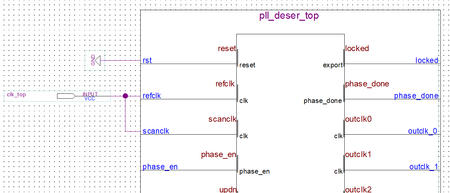
In the schematic editor the "pins" on the block symbols (generated by Quartus) don't line up with the grid points in the schematic editor. This makes it look like the interconnections are "skewed". ...

sstrell Super Contributor
3 years agoSuper ContributorIs it only this symbol? Maybe there's an "always align to grid" option you have turned off accidentally.
 GLees3 years ago
This is not the only symbol that acts this way. I'm not aware of any "always align to grid" option but would be thrilled to hear about one if it exists. I've looked through the Options menu and found nothing.


