Forum Discussion

 New Contributor
New Computer can NOT generate free license
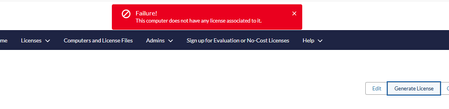
- 1 month ago
I received your private message. The Questa FPGA Starter Edition license is a no-cost license, so there is no need to rehost your existing license.
You can generate a new license by following these steps:
1. Go to Sign Up for Evaluation or No-Cost Licenses on the Altera SSLC portal.
2. Select Questa FPGA Starter Edition from the list of available no-cost licenses.
3. Enter the Host ID (NIC ID) of the machine where you intend to use the license.
If you encounter any issues during license generation, please let me know and share screenshots of the steps where the process fails.
Regards,
Richard Tan

 Super Contributor
I received your private message. The Questa FPGA Starter Edition license is a no-cost license, so there is no need to rehost your existing license.
You can generate a new license by following these steps:
1. Go to Sign Up for Evaluation or No-Cost Licenses on the Altera SSLC portal.
2. Select Questa FPGA Starter Edition from the list of available no-cost licenses.
3. Enter the Host ID (NIC ID) of the machine where you intend to use the license.
If you encounter any issues during license generation, please let me know and share screenshots of the steps where the process fails.
Regards,
Richard Tan


