Forum Discussion

 New Contributor
Does the Agliex F support Display port IP ?

 Frequent Contributor
Hi Liang Hong,
Apologize for the delayed response.
For Agilex device, currently we only have 2 design example available in Quartus software as below:
Table 3. DisplayPort Intel FPGA IP Design Example Parameters for Intel Agilex F-tile Device
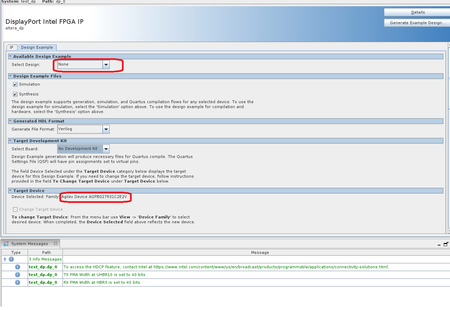
For DisplayPort SST Parallel Loopback without PCR design, you are required to turn on the Enable Video Input Image Port parameter to be able to view the design in the "select design" dropdown list under the design example tab.
As for DisplayPort SST Parallel Loopback with AXIS Video Interface, you are required to set Enable Active Video Data Protocols to AXIS-VVP Full for both DisplayPort Sink and Source option in the IP tab to be able to view the design.
You may refer to below link for your reference:
Q1.Did you enable/turn on the parameter settings as above?
Q2.May I know which OPN and Quartus version that you are using?
Q3.May I know which design example you are trying to generate?
Thank you.
Best Regards,
ZulsyafiqH_Intel
New ContributorHi
Q1.Did you enable/turn on the parameter settings as above?
NO cuz I turn-on the AXIS WP
Q2.May I know which OPN and Quartus version that you are using?
set_global_assignment -name DEVICE AGFB027R31C2E1V
Q3.May I know which design example you are trying to generate?
As for DisplayPort SST Parallel Loopback with AXIS Video Interface


