Forum Discussion

germano New Contributor
3 years agoNew ContributorQuesta not launching
Hello,
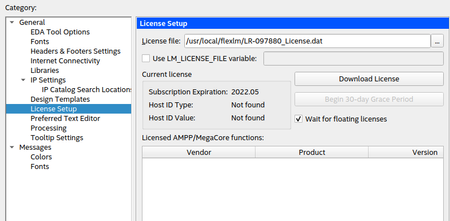
After installing Quartus and Questa together and setting up the licence it seems there is a problem with the Questa launch script. I looked at the license file and it seems to be normal.
...

RichardT_altera Super Contributor
3 years agoSuper Contributor1) The error showed that you have not set the Questa executable path in the Quartus, go to Tools > Options > EDA Tool Options to setup the path. The path should similar to <path directory>/intelFPGA_lite/21.1/questa_fse/linux_x86_64
2) It seems license file environment variable is not set up yet.
You may checkout this forum post.
Best Regards,
Richard Tan
p/s: If any answer from the community or Intel Support are helpful, please feel free to give best answer or rate 9/10 survey.


