Forum Discussion

 New Contributor
Questa for simulation
Hello,
I'm trying to run a test-bench from Quartus Prime Pro (23.1) using QuestaSim.
Documentation says that I should be able to run a simulation by running "Tools" > "Run RTL Simulation" but this option does not appear in my tools tab (tools_tab.png).
I select "Launch Simulation Library Compiler" and configure the parameters on the prompted windows to use the QuestaSim tool, but when I click on "Start Compilation" it reports an error with the executable location (quartus_questa.png).
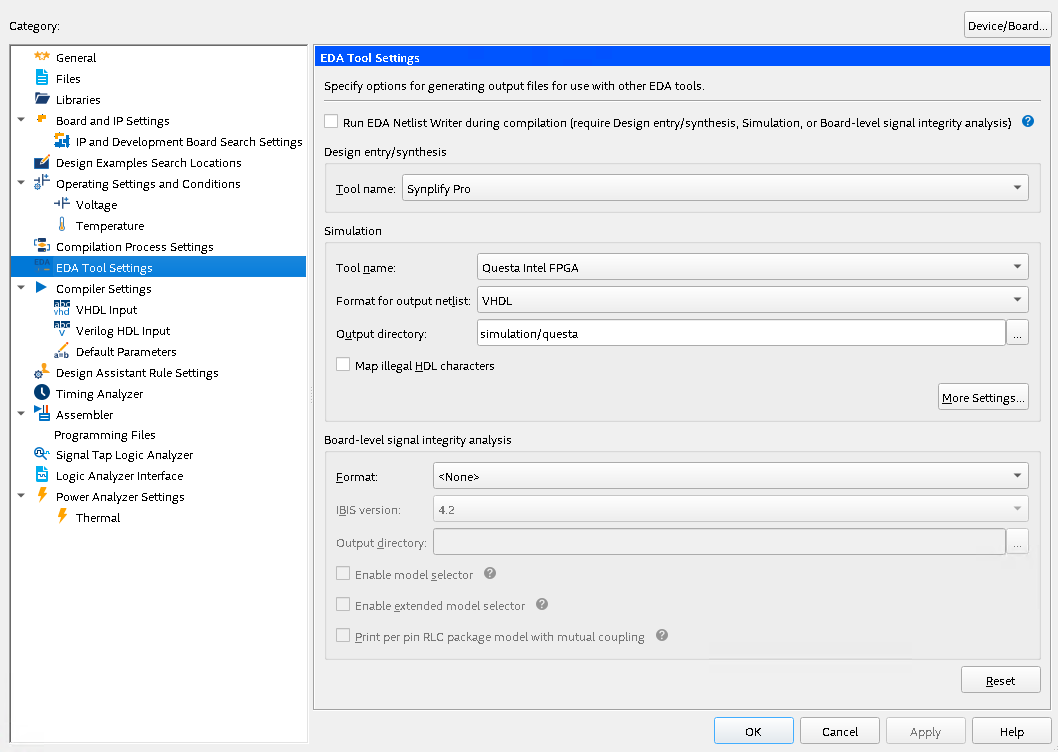
I have also configured Questa in the EDA tools configuration as shown in the image (tool_settings.png). Also seen in the docs that previous version of the tools had a "simulation" option where you can assign a test-bench file, but as can be seen in the screenshot, Quartus no longer have this option.
My questions are:
1. Do I need to configure something in the project so I can see all the missing options described in documentation?
2. Why the executable is not valid? I've tried launching Questa running the .exe and runs and locks to the license with no problem.
3. If my approach is wrong, what is the easy way to launch a simulation? It's my first time using Quartus Prime but I have good experience using EDA tools from other vendors, which have a button for "run simulation".
Thanks in advance.
7 Replies
 sstrell
Super Contributor
You should point to the win64 directory, not the executable itself.
 fpga_user1
Thanks a lot, this solved the issue (2.) with library compilation.
Very unfortunate that the example they give you below is kinda wrong and pointing to the binary...
 SyafieqS
May I know if all of your issue have been addressed?
Questasim and Modelsim in pretty similar only different in features I would say.
So if you refer to Modelsim tutorial or starter doc would be applicable (might not be all)
- fpga_user1
Hi, I was just looking for a way to generate the simulation scripts (like in previous versions of Quartus, with "run RTL simulation"). I guess I'll generate the simulation scripts manually.
- SyafieqS
Let me know if there is any update at your end.
- SyafieqS
You can easily get a script after compilations by using generate simulator setup script for IP. Modified the the generated according your suit and save it as .do file. In simulation tool (launch independently), you can easily invoke the macro .do file which is will run all the automation.
Let me know if there is any other concern at your end.
- SyafieqS
As we do not receive any response from you on the previous question/reply/answer that we have provided. Please login to ‘https://supporttickets.intel.com’, view details of the desire request, and post a feed/response within the next 15 days to allow me to continue to support you. After 15 days, this thread will be transitioned to community support. The community users will be able to help you on your follow-up questions.
p/s: If any answer from community or Intel support are helpful, please feel free to mark as solution, give Kudos and rate 5/5 survey